
What Is a Commercial Bid Tabulation? A Clear Guide
Discover what a commercial bid tabulation is and how it streamlines contractor selection for construction projects. Learn more!

A commercial bid tabulation is an organized, standardized summary of all contractor bids submitted for a construction project, compiled to enable direct, transparent comparison during the commercial bidding process. Every project manager who has stared at a stack of bid envelopes knows the problem: comparing bids that were structured differently, priced inconsistently, or missing key line items. Bid tabulation solves that problem by forcing all submitted bids into a single, comparable format. Public agencies like the City of Minneapolis and platforms like Autodesk's construction management suite have formalized this process, and private project owners increasingly follow the same discipline. Whether you are managing a municipal road project or a commercial tenant build-out, a properly constructed bid tab is the foundation of a defensible contractor selection.
What is a commercial bid tabulation and what does it include?
A bid tabulation sheet, the industry's standard term for this document, captures every data point needed to evaluate competing bids on equal footing. Standard bid tabulation sheets include the project name, bid opening date, each bidder's name, total bid amounts, line-item pricing, the engineer's estimate, and a responsiveness status for each submission. That last field matters more than most project managers realize. A bid can be the lowest number on the page and still be non-responsive if it is missing required documentation, bonds, or signatures.
Beyond price, a complete bid tabulation captures non-price factors that affect total project cost. Autodesk recommends logging insurance certificates, delivery fees, payment terms, and alternative pricing as separate line items during evaluation. A contractor who bids $50,000 less than the competition but requires net-15 payment terms and excludes mobilization costs may not actually be the low bidder once the full picture is normalized.

The table below shows the standard components you should expect in any well-structured bid tabulation:
| Component | What it captures |
|---|---|
| Project name and bid opening date | Identifies the specific solicitation and locks the evaluation timeline |
| Bidder names and contact details | Creates the auditable record of who submitted |
| Total bid amount | The headline number for initial ranking |
| Line-item pricing | Breaks down labor, materials, and subcontracted work for comparison |
| Engineer's estimate | Provides the baseline against which all bids are measured |
| Responsiveness status | Flags whether each bid meets all submission requirements |
| Non-price factors | Captures insurance, delivery terms, payment schedule, and alternates |
Pro Tip: Always include a column for "adjusted bid amount" that normalizes each bid after adding back excluded costs or deducting alternates. This single column prevents the most common evaluation error in commercial bid analysis.
How does bid tabulation support fair contractor selection?
Bid tabulation creates an auditable, transparent record that protects both the owner and the contractors who submitted. Without it, evaluation becomes subjective and legally vulnerable. With it, every decision can be traced back to documented data. Evaluation teams use structured tabulations to verify that bids are genuinely comparable before any scoring or ranking begins.
The evaluation process typically works through several distinct checks:
- Responsiveness review: Each bid is checked against the submission requirements before pricing is even considered. A non-responsive bid is flagged and set aside.
- Price normalization: Alternates, allowances, and excluded scope items are added or subtracted to bring all bids to the same baseline.
- Non-price factor scoring: Insurance levels, proposed schedules, and payment terms are scored separately and logged in the tabulation.
- Escalation and alternate tracking: Special conditions like escalation clauses are logged separately so they do not distort the base bid comparison.
- Final ranking: Only after normalization is complete does the team rank bids by adjusted total cost.
Consider a real-world scenario: a general contractor soliciting bids for a mechanical subcontract receives five bids ranging from $280,000 to $340,000. Without a bid tab, the $280,000 bid looks like the obvious choice. With a completed tabulation, the team discovers that the low bidder excluded commissioning, carried no performance bond, and proposed a schedule two weeks longer than the contract requires. After normalization, that bid adjusts to $312,000. The second-lowest bidder at $295,000 becomes the clear selection. That is the practical value of tabulating bids effectively.
Pro Tip: Require all bidders to use your provided bid form rather than their own format. This single requirement eliminates 80% of the normalization work and makes the tabulation process dramatically faster.
What are the key differences between preliminary and final bid tabulations?
Preliminary and final bid tabulations are not interchangeable documents. Treating them as the same thing is one of the most costly misjudgments in bid evaluation, and it happens more often than project managers admit.
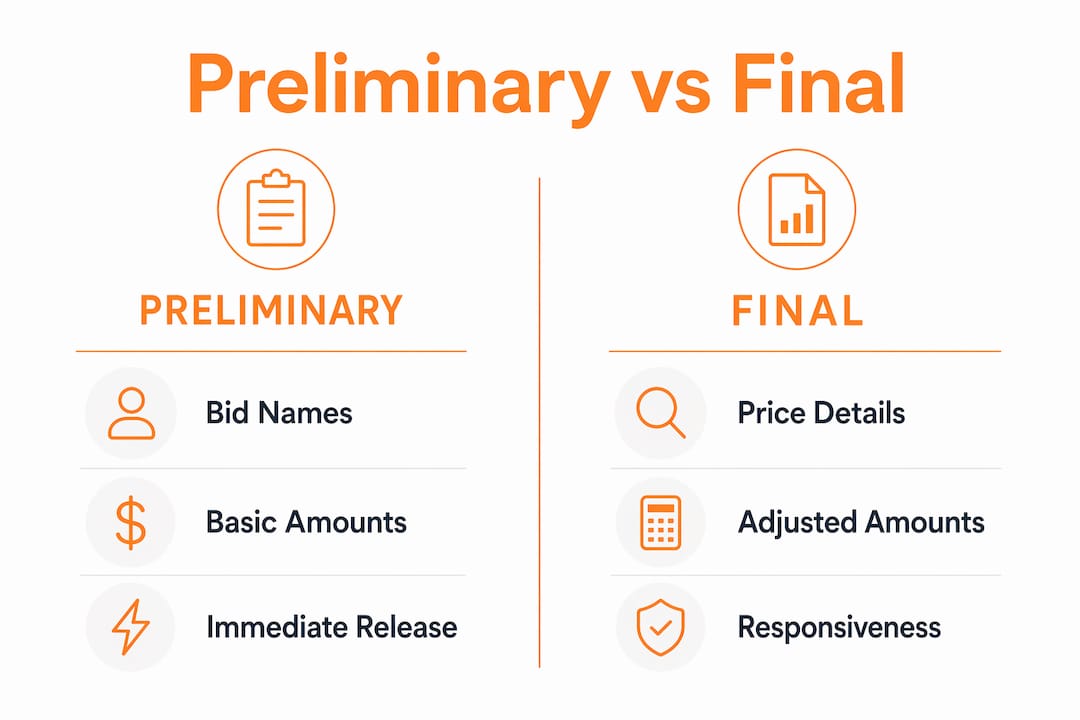
A preliminary bid tabulation is published immediately after the bid opening. It typically contains only bidder names and, in some cases, the total bid amounts read aloud at the opening. North Carolina eProcurement clearly distinguishes preliminary and final bid postings, with the preliminary serving as a public acknowledgment that bids were received, not a verified evaluation. The City of Minneapolis follows the same practice, posting bidder names first and adding verified pricing only after line-item review is complete.
A final bid tabulation includes all pricing details, responsiveness determinations, normalized adjusted amounts, and non-price factor scores. It is published after the procurement team has completed its review, which can take days or weeks on complex projects.
| Feature | Preliminary tabulation | Final tabulation |
|---|---|---|
| Timing | Published at or shortly after bid opening | Published after full price verification |
| Content | Bidder names, sometimes total amounts | All pricing, line items, responsiveness, adjusted totals |
| Purpose | Public acknowledgment of submissions | Basis for award recommendation |
| Decision-ready? | No | Yes |
| Risk of misuse | High. Prices may change after review | Low. Data is verified and complete |
The practical risk is real. A subcontractor who sees a preliminary tabulation showing their bid as the apparent low bidder may begin mobilizing resources or turning down other work. If the final tabulation reveals a math error or a non-responsive condition that changes the ranking, that subcontractor has made costly decisions based on unverified data. Project teams should confirm tabulation status before acting on any published figures.
How to create a bid tabulation for construction projects
Creating a bid tabulation that holds up to scrutiny requires a defined process, not just a spreadsheet. The steps below reflect best practice for construction project managers handling the commercial bidding process.
- Prepare the bid form before solicitation. Design a standardized form that requires all bidders to price the same line items in the same order. This is the single most important step for making tabulation manageable.
- Log all received bids at opening. Record each bidder's name, submission time, and whether all required documents were included. This creates the preliminary record.
- Check responsiveness before reviewing prices. Separate non-responsive bids before any pricing comparison begins. Mixing responsive and non-responsive bids in the same evaluation column creates legal exposure.
- Enter all pricing into the tabulation template. Transfer line-item pricing from each bid form into your master tabulation sheet. Double-check arithmetic on each bid. Bidder math errors are common and must be flagged.
- Add non-price factors as separate columns. Insurance levels, proposed schedules, payment terms, and any alternates get their own columns. Do not fold them into the base price yet.
- Normalize bids to a common baseline. Apply any owner-specified alternates, add back excluded items, and calculate an adjusted total for each bidder.
- Document all adjustments with notes. Every change from the submitted total to the adjusted total needs a written explanation in the tabulation. This is your audit trail.
- Publish the final tabulation after review. Only release the final version once all checks are complete and the procurement officer has signed off.
Digital tools have made this process significantly more reliable. Bid tracking software eliminates manual data entry errors, maintains version control between preliminary and final tabulations, and creates a time-stamped audit trail automatically. For subcontractors managing multiple simultaneous bids, a dedicated platform removes the risk of mixing data across projects. You can also review detailed takeoff practices to make sure the quantities feeding your bid tabulation are accurate before the numbers ever reach the comparison sheet.
Pro Tip: Never use the same spreadsheet file for both preliminary and final tabulations. Save them as separate, clearly labeled documents with dates in the file name. Overwriting a preliminary with final data destroys your audit trail and creates compliance risk on public projects.
Public bid tabulations are public records. If not posted online, they can be obtained through FOIA requests or state public records laws, which means your tabulation process will eventually be visible to losing bidders and their attorneys. Build it as if it will be reviewed.
Key takeaways
Accurate bid tabulation is the foundation of every defensible contractor selection decision in commercial construction.
| Point | Details |
|---|---|
| Core definition | A bid tabulation compiles all contractor bids into one standardized document for direct comparison. |
| Preliminary vs. final | Preliminary tabs show names only; never make award decisions from preliminary data. |
| Non-price factors matter | Insurance, payment terms, and schedule must be logged separately before any normalization. |
| Audit trail is mandatory | Every adjustment from submitted price to adjusted total requires a written explanation. |
| Digital tools reduce risk | Bid tracking software eliminates manual errors and maintains version control automatically. |
Why the shift to digital bid tabulation is overdue
I have reviewed bid tabulations built in Excel that were 40 columns wide, color-coded by hand, and saved as "FINAL_v7_USE THIS ONE.xlsx." That file name tells you everything about the state of manual bid management in construction. The process works until it doesn't, and when it fails, it fails expensively.
The shift from manual spreadsheets to purpose-built e-procurement and bid tracking platforms is not a technology trend. It is a response to the real cost of errors. A transposed number in a bid tabulation can result in awarding a contract to the wrong bidder, triggering protests, delays, and legal fees that dwarf the cost of any software subscription. I have seen project managers spend three days reconstructing a bid tabulation after a file corruption event because there was no version history.
What digital tools actually change is not the process. The steps are the same. What changes is the reliability of the output. Automated arithmetic checks, locked preliminary records, and time-stamped audit logs remove the human failure points that make manual tabulation so fragile. For subcontractors managing project budget tracking across multiple active bids, the compounding benefit of connected data between bid estimates, takeoffs, and labor costs is where the real efficiency lives.
The contractors I respect most treat their bid tabulation process as a competitive asset, not an administrative chore. When your tabulations are clean, your evaluations are faster, your award decisions are defensible, and your relationships with owners improve because you look like the professional in the room. That reputation compounds over time in ways that no single bid can replicate.
— Jen Reese
Manage your bids with Won2Build
Won2Build's Bid Track software is built specifically for construction subcontractors who need to manage bid pipelines, organize bid data, and move from estimate to award without losing information between steps. Bid Track keeps your preliminary and final tabulation data separate, logs all adjustments with time stamps, and connects directly to Won2Build's Takeoff application so that quantity data flows into your bid pricing without manual re-entry. Add Time Budge for labor cost tracking and you have a complete picture from first estimate to project close. If your current bid management process relies on spreadsheets and email threads, Won2Build is the structured alternative your team needs.
FAQ
What is a commercial bid tabulation?
A commercial bid tabulation is a structured document that compiles all contractor bids for a project into a standardized format, capturing pricing, line items, responsiveness status, and non-price factors to support transparent evaluation and contractor selection.
What is the difference between preliminary and final bid tabulations?
A preliminary bid tabulation lists bidder names and sometimes total amounts immediately after bid opening, while a final tabulation includes verified pricing, responsiveness determinations, and adjusted totals published after full review.
Are bid tabulations public records?
Public construction bid tabulations are public records and, if not posted online, can be obtained through FOIA requests or applicable state public records laws.
What non-price factors belong in a bid tabulation?
Insurance certificates, delivery fees, payment terms, proposed schedules, escalation clauses, and alternate pricing should all be logged as separate columns in a complete bid tabulation before any price normalization occurs.
How does bid tracking software improve the tabulation process?
Bid tracking software eliminates manual data entry errors, maintains version control between preliminary and final tabulations, and generates a time-stamped audit trail that protects project teams during post-award reviews or bid protests.
One login for estimating, bid tracking, change orders, and labor.
The Hub is free. Pay only for the apps you turn on.
Create your free Hub account- How to Compare Plan Revisions and Control Estimate ChangesA practical guide for commercial subcontractors on comparing plan revisions, catching scope changes, and keeping estimates and change orders in step.
- Drywall Takeoff Basics: A Step-by-Step Guide for SubsLearn drywall takeoff basics: how to measure walls and ceilings, deduct openings, convert to sheets, set waste and finish levels, and avoid costly misses.
- How to Reduce Profit Fade on Subcontractor JobsProfit fade usually starts in the field and hides until closeout. Here is how subcontractors can catch it weekly and protect the margin they bid.