

Time card software for construction
Clock in. Stay on budget.
Every other budget tool on the market is missing the one number that matters: percent complete. You're not under budget if you don't know how much of the job is actually done. Time Budge fixes that. Every punch on the clock pulls straight from the job's labor budget in real time — so you always know where the project really stands, not where it stood last month- when it's too late.
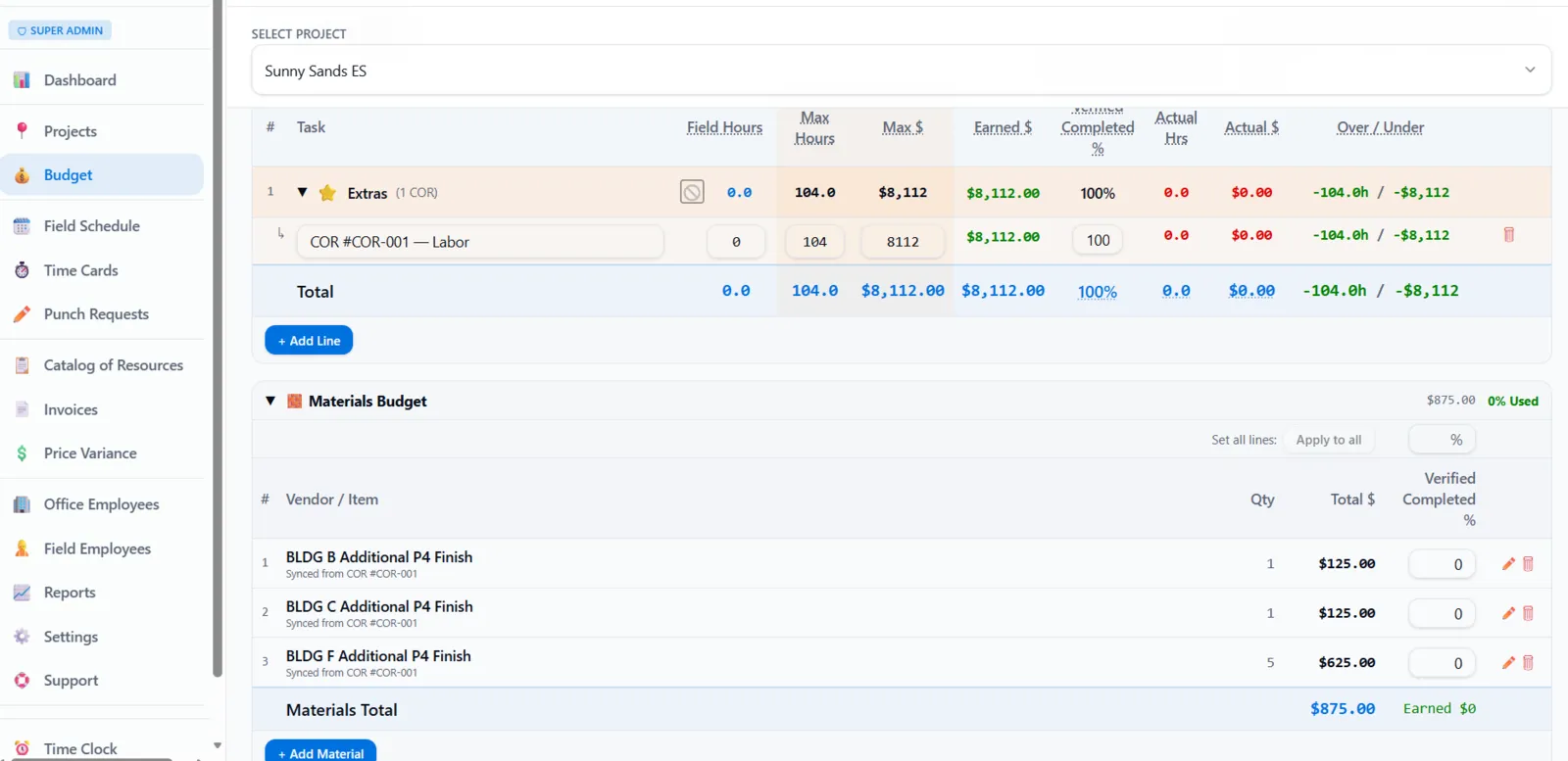
Spending 50% of the budget doesn't mean you're 50% done.
Most job-cost software assumes it does. It measures progress by what you've spent — so a job looks on track right up until it's over budget. Time Budge asks the question everyone else skips: how complete is the work, really? Enter the actual percent complete, or let Takeoff calculate it from the areas marked finished on your plans. Time Budge compares it to the labor you've used and tells you when you're falling behind — while there's still time to fix it.
Percent complete can come straight from Takeoff — highlight completed areas on the plans and the number updates.
Your budget tool is lying to you.
- —Finding out a job is sliding — after it's already too late
- —Percent complete missing entirely, so 'under budget' means nothing
- —Time cards trapped in a separate app, divorced from the budget
- —Not allowing the same employee to have multiple wages when working prevailing wage jobs
- —OT and DT rules that don't bend to how your shop actually pays
- —Payroll Monday scramble — exports, spreadsheets, manual fixes
Time cards built into the budget.
- →Live labor spend — per job, per phase, per cost code, the moment a punch happens
- →True percent complete — earned-value view tying hours burned to work actually installed
- →Geofencing — punches tied to GPS
- →Flexible OT/DT rules — daily, weekly, 7th-day, Saturday, Sunday, holiday, per-site overrides
- →Bilingual EN/ES — full Spanish UI, auto-detected from the phone
- →Payroll-ready CSV — REG, OT, DT pre-split by your rules — done by 5pm Friday
- →Job specific wages — job specific wages overwrite employee wages for prevailing waged jobs
Time cards. Budgets. The truth, in real time.
Time Budge is a time card built into a construction budget. Your crews punch in from the job site. Their hours roll straight into the project's labor spend. You and your PMs see exactly what's left — by job, by phase, by code — before the week's over instead of a month or more later.
Time cards that move the budget
Every clock in, clock out, and break deducts from the job's labor budget the moment it happens. No exporting, no spreadsheet juggling, no waiting for payroll to close out Friday.
Percent complete — the number every other tool forgets
You're not under budget if you've spent 40% of the hours and finished 20% of the work. Time Budge ties Takeoff's "field progress" to a percentage complete- making your budget something you can manage to.
Time cards that flex to your business
Set your own OT/DT rules — daily, weekly, 7th-day, Saturday, Sunday, holiday. Per-site overrides, manager approval flow (or skip it), punch edits, lock-after-approval — turn on what you need.
Geofencing
Punches are tied to GPS coordinates at the job site. If your guy isn't on site- block clock in? Or you can just flag it for a discussion instead. Coordinates saved on every punch.
Spanish and English, automatic
The app reads the phone's language and shows up in Spanish or English without anybody touching a setting. Full Spanish UI — not a half-translated afterthought. Toggle manually anytime.
Payroll-ready exports
When Friday rolls around, the work is already done. Payroll CSV with REG, OT, and DT pre-split by your rules. Ship it to your payroll service and go home. Audit log on every change.
Built for the field, but considerate of the office
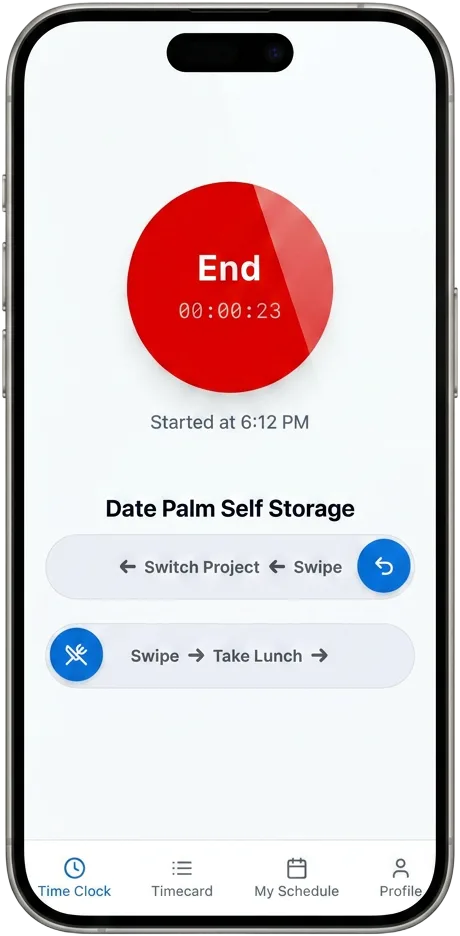
Mobile-first. Works on the phone your guys already carry. Green = in. Red = out. Yellow = break. Works offline — punches queue and sync when service comes back.
AI extraction
It is the future-- so we have some cool AI extraction elements to dramatically reduce data entry time and effort.
Schedule teams — send texts
Whether you have a few scattered workers or dozens of teams, language barriers and distance are often a challenge in construction and scheduling. Schedule in English and they get it in Spanish. Boom.
Daily reports that write themselves
Your crew already clocked in, logged their tasks and left end-of-day notes — so the daily builds itself. Review it, sign it, send it. A branded PDF, emailed from the app, with a send log of who got it and when.
Your daily report writes itself.
Time Budge is construction daily report software built from what your crew already does. No second form at the end of the day, no chasing the foreman for notes.
- Built from the day's real data.
Who clocked in and out, breaks, hours, tasks worked with percent complete, crew end-of-day notes, injury flags and manually entered labor — already filled in.
- Add what the day needs.
Delays, visitors and inspections, deliveries, equipment, photos and notes are there when you need them. The calendar shows which days had work.
- A PDF you're proud to send.
Your logo and company info, project and GC info, headcount and man-hours summary, and signature lines for "Prepared by" and "Received by (GC)." Download, print, or email it from the app — it goes out as your company, PDF attached, with a send log.
- Never shows wages or costs.
Mark it Final to lock it. Your GC sees headcount, hours and work performed — nothing about what you pay.
Part of one connected job.
Catch a job sliding mid-week, when you can still do something about it.
Percent complete tied to real work installed — not just hours burned.
Custom controls where you need them so you can run your business without hurdles.
REG, OT, DT pre-split. One-click CSV. Ship it and go home.
Built by contractors, for contractors.
GCs and subs running multiple jobs at once. Foremen running crews in the field. PMs and owners who need honest progress they can manage to. Bilingual EN/ES crews welcome — that's how a real construction software shows up.
Questions, answered.
- Does it work offline?
- Yes. Punches queue on the device and sync the moment service comes back. Your guys can clock in from anywhere — basement, attic, dead-zone jobsite — and nothing gets lost.
- Will it work with my payroll service?
- The Payroll CSV is built to drop into the major services with REG, OT, and DT pre-split by your rules. If yours is unusual, we'll match the format.
- Can I import my existing jobs and cost codes?
- Yes. Bulk import is built in. If you'd rather we do it for you, we offer white-glove setup of your jobs, cost codes, and OT rules.
- Do I have to use the geofence?
- No. Geofence, soft warning, or off entirely — your call per job. Coords are still saved on every punch either way for the record.
- Does it handle our OT rules?
- Daily, weekly, 7th-day, Saturday, Sunday, holiday, per-site overrides — set them up the way your shop actually pays. No two contractors are alike and the software shouldn't pretend they are.
- Spanish-speaking crew — is it really bilingual?
- Full Spanish UI top to bottom, not a half-translated afterthought. Auto-detects from the phone, and any user can toggle manually. Your crew sees their language, the office sees theirs.
- Do my guys have to fill out a separate daily?
- No. The daily is built from their punches, tasks and end-of-day notes. The super adds anything extra — delays, deliveries, inspections, photos — then reviews and signs it.
- Will my GC see our labor costs?
- No. Daily reports show headcount, hours and work performed — never wages or costs.
Stop finding out you're behind budget when it's too late...
Time Budge is the time card your budget has been waiting for. Clock in. Stay on budget.
Time Budge — built by contractors, for contractors.