
6 Fields Construction Change Orders Need: Download Editable Templates
Grab editable Word, Excel, and PDF construction change order templates with copy ready example language, pricing guidance, and field tested e signature tips.

Use the editable Word change order template for most new COs, switch to the Excel or Google Sheets version when you need to itemize unit pricing, and keep a PDF copy on hand for signatures. Whatever format you choose, attach the executed change order to the original contract and log it before the crew mobilizes on the changed work.
TL;DR:
- Using the correct change order template depends on the scenario, such as standard, owner-initiated, contractor proposals, or time-and-materials work, to ensure proper documentation.
- Every change order form should include project identifiers, a clear change description referencing related documents, detailed cost breakdowns, and signed approval with acceptance clauses.
- Accurate pricing requires separating labor, materials, and markup, and the workflow must include internal review, signed approvals before mobilization, and thorough documentation updates.
- Relying on vague descriptions or missing attachments often leads to rejected change orders and payment disputes, so specificity and completeness are crucial.
- Digital tools and standard forms from industry and government sources can streamline creation, approval, and filing while maintaining a clear, enforceable audit trail.
Table of Contents
- Downloadable Construction Change Order Templates and Formats
- What Fields Does a Construction Change Order Need?
- How Do You Fill Out and Approve a Change Order?
- Which Change Order Type Fits Your Situation?
- Sample Language and Pricing Guidance for Change Orders
- On-the-Job Checklist Before You Send a Change Order
- Legal Forms and Government Guidance Worth Knowing
- Why Getting the Signature First Still Matters Most
- Manage Change Orders Without the Paper Chase
- Where These Templates and Standards Come From
- Sources
Downloadable Construction Change Order Templates and Formats
Not every job needs the same paperwork. A quick scope tweak on a residential remodel doesn’t need the same rigor as a differing-site-conditions claim on a public works job, so the template you grab should match the situation, not just the file type you’re most comfortable editing.
Here’s how to pick:
- Standard change order template (Word): best for straightforward, one-page COs covering description, cost, time, and signatures. Editable in Microsoft Word or Google Docs.
- Owner-initiated variant: frames the request as coming from the owner or architect, with space for the originating RFI or ASI number up front.
- Contractor-initiated variant: built for scope-clarification proposals you’re submitting for approval, with a “reason for change” field that reads more like a justification memo.
- Unforeseen conditions / T&M template: designed for force-account work where you’re billing hours and materials as they happen rather than a lump sum. This one needs daily ticket fields, not just a single total.
- Excel or Google Sheets itemized version: use when the GC or owner wants a full unit-price breakdown with quantities, labor rates, and material costs shown line by line.
- Change-order log template: a running spreadsheet tracking every CO number, dollar value, days added, and approval date across the life of the project.
A few practical notes on formats: Word and PDF travel well across platforms and print cleanly for wet-ink signatures, while Excel and Sheets are better when the math needs to show its work. Whatever version you’re building from, name files consistently, something like ProjectName_CO-014_v2.docx, so nobody signs an outdated draft by accident. Version control sounds like a small thing until someone approves CO 9 while you’ve already issued CO 11.
What Fields Does a Construction Change Order Need?
A change order that gets rejected by an owner’s rep almost always has the same problem: it’s vague where it needs to be specific. Every field exists to answer a question someone downstream will ask, so treat missing fields as unpaid work waiting to happen.
Here’s what belongs on every form, in the order it usually appears:
- Project and contract identifiers. Contract number, project title, and the full legal names of the owner, general contractor, and subcontractor. This sounds obvious until you’re the third sub on a job with two similarly named buildings.
- Change description. State what’s changing in plain language, and reference the RFI number, ASI, or drawing revision that triggered it. “Per RFI #22, revise footing depth from 3 ft to 4 ft 6 in due to soil conditions” beats “additional excavation” every time.
- Pricing breakdown. Unit prices, quantities, labor hours and rates, material costs, and a clear subtotal before markup. Show the math, don’t just state a lump number.
- Time impact. Number of calendar days added or removed, the new projected completion date, and a reference to a Time Impact Analysis if the delay is contested or complex.
- Attachments. List every supporting document: RFI responses, photos, revised drawings, vendor quotes, daily force-account tickets.
- Sign-off block. Printed names, titles, signatures, and dates for every authorized signer, plus acceptance language confirming the CO becomes part of the contract once executed.
Pro Tip: Add a one-line acceptance clause near the signature block clarifying whether the price is a firm “agreed price” or subject to “force account” reconciliation. That single sentence resolves more billing disputes than any amount of backup documentation.
How Do You Fill Out and Approve a Change Order?
The workflow matters more than the template. A perfectly formatted CO signed after the work is already done protects nobody.
- Document the trigger. Write up the issue as an RFI or a dated site memo before you price anything, and cite that document number directly in the CO description field.
- Price it with a visible breakdown. Separate labor, materials, equipment, and subcontracted work, then add your markup as its own line rather than folding it into a round number.
- Route for internal review. Have a project manager or estimator check the math and scope language before it leaves your office. A typo in a quantity field turns into a real financial argument later.
- Send for signature with a deadline. Give the owner or GC a firm response window, typically about a week or so is common, and follow up if you hear nothing.
- File and log it. Attach the fully executed CO to the original contract and update your change-order log with the new total contract value and revised completion date.
- Handle urgent directives carefully. If you’re told to proceed before a CO is signed, get it in writing as a Construction Change Directive or written field order, and keep your own dated notes on scope and cost. Verbal “just go ahead” instructions are the single most common source of unpaid change work on job sites, and a documented CCD protects your payment claim even when the formal CO lags behind.
For a deeper walkthrough of internal routing and approval timing, Won2Build’s guide on the change order approval process breaks down each transition point.
Which Change Order Type Fits Your Situation?
Using the wrong template for the wrong scenario is how COs get bounced back for revision. Match the type to what’s actually happening on site.
- Owner-initiated changes cover scope increases or design revisions the owner or architect requests midstream, like upgrading finishes or adding square footage. These typically move fastest because the owner already wants the change.
- Contractor-initiated proposals are scope clarifications you’re raising, often when drawings conflict with field conditions. Frame these as proposals awaiting approval, not directives.
- Unforeseen or differing site conditions cover surprises like buried utilities, unexpected rock, or contaminated soil discovered after the contract price was set. These need photo documentation and, ideally, a third-party inspection reference.
- T&M or force-account work applies when the scope is uncertain enough that both sides agree to track actual hours and materials rather than negotiate a fixed price upfront. Daily tickets, signed on site, are non-negotiable here.
- Allowance adjustments and unit-price additions cover situations where the original contract already set a per-unit rate, say, for extra linear feet of curb, and you’re just applying that rate to a new quantity rather than negotiating fresh pricing.
State agency manuals, Caltrans’ construction manual among them, spell out standard formats for each of these categories and are worth skimming even on private work, since the language patterns transfer well.
Sample Language and Pricing Guidance for Change Orders
Blank description fields are where COs stall. Having a few ready-to-adapt phrases speeds up drafting and keeps the language specific enough to survive a review.
Try adapting one of these:
- “Per RFI #14 response dated [date], relocate the electrical panel 6 feet north per revised drawing E-102. Additional conduit, labor, and permit fees included.”
- “Owner requested upgrade from standard-grade to commercial-grade flooring in Suites 200 to 204 per verbal direction confirmed in site meeting minutes dated [date].”
- “Unforeseen ledge rock encountered during excavation at Grid Line C, beyond scope of geotechnical report dated [date]. Force-account pricing applies per attached daily tickets.”
For pricing, break labor and materials into separate lines rather than a single bundled figure, then show markup as its own percentage on top. Contractor guidance commonly points to a 15% to 25% markup range for overhead and profit, with the higher end justified for rush timelines, weekend work, or specialty subcontracted trades that carry their own coordination burden. If the delay is significant enough to dispute, reference it directly: “Time impact of 12 calendar days per attached Time Impact Analysis dated [date].” That single sentence turns a vague delay claim into something a scheduler can actually verify.
On-the-Job Checklist Before You Send a Change Order
Run this before a CO leaves your hands, not after it bounces back:
- Recheck the math: quantities times unit rates should match the subtotal, and markup should be shown as its own line.
- Confirm every attachment is actually attached: RFI response, photos, vendor quotes, revised drawings.
- Verify the person signing for the owner or GC actually has authority to approve changes at that dollar value; some agencies cap field-level approval authority.
- Get written approval before mobilizing labor or ordering materials tied to the change.
- Update your internal change-order log with the new CO number, value, and revised contract sum.
- File the executed CO in a central, searchable project folder, digital with a backup, not a loose email thread that disappears when someone leaves the company.
Tennessee DOT’s change order manual is a solid model for this kind of checklist discipline, even outside public work, because auditors there expect the same documentation trail a private owner’s attorney would ask for in a dispute.
Legal Forms and Government Guidance Worth Knowing
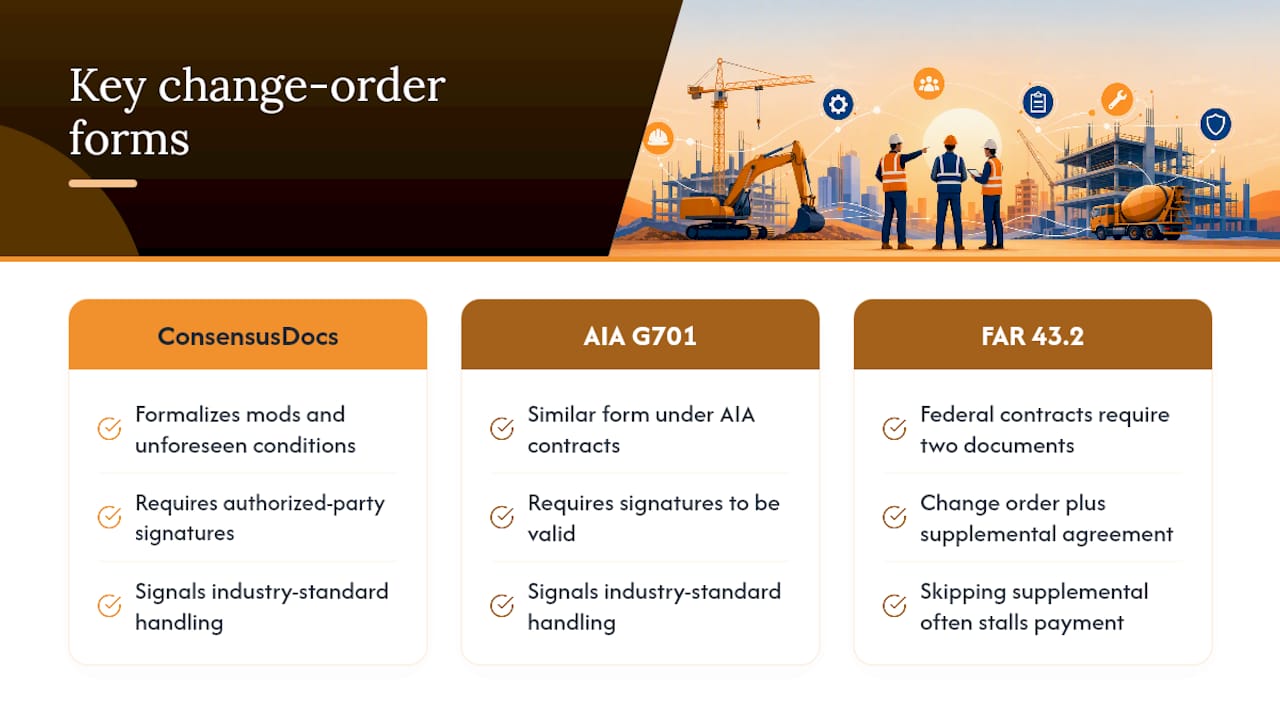
Two industry-standard forms come up constantly once you’re working with unfamiliar owners or GCs. ConsensusDocs 202 is a widely used change order form for formalizing modifications and managing unforeseen conditions, and it requires signatures from authorized parties to be legally valid. The AIA G701 form serves a similar function on projects using AIA contract documents. Referencing one of these standard forms, even if you’re using your own template, signals to a wary owner’s rep that you know how the industry handles amendments.
Federal work adds a wrinkle. Under FAR Subpart 43.2, government change orders often require two separate documents when the price isn’t agreed upon upfront: the change order itself, plus a supplemental agreement that later definitizes the cost. Skipping that second document is a common reason federal COs stall in payment.
State and agency manuals, like Maryland’s DGS guidelines, exist precisely because informal change orders create disputes agencies can’t easily resolve. Standard forms, clear signature authority, and required attachments aren’t paperwork for paperwork’s sake. They’re what lets a claim survive review months after the work is done.
Won2Build’s e-signature guidance covers when digital signatures hold up legally and what acceptance language to include so an e-signed CO isn’t challenged later.
Why Getting the Signature First Still Matters Most
Templates solve the formatting problem. They don’t solve the discipline problem, and that’s where most subcontractors actually lose money on change orders.
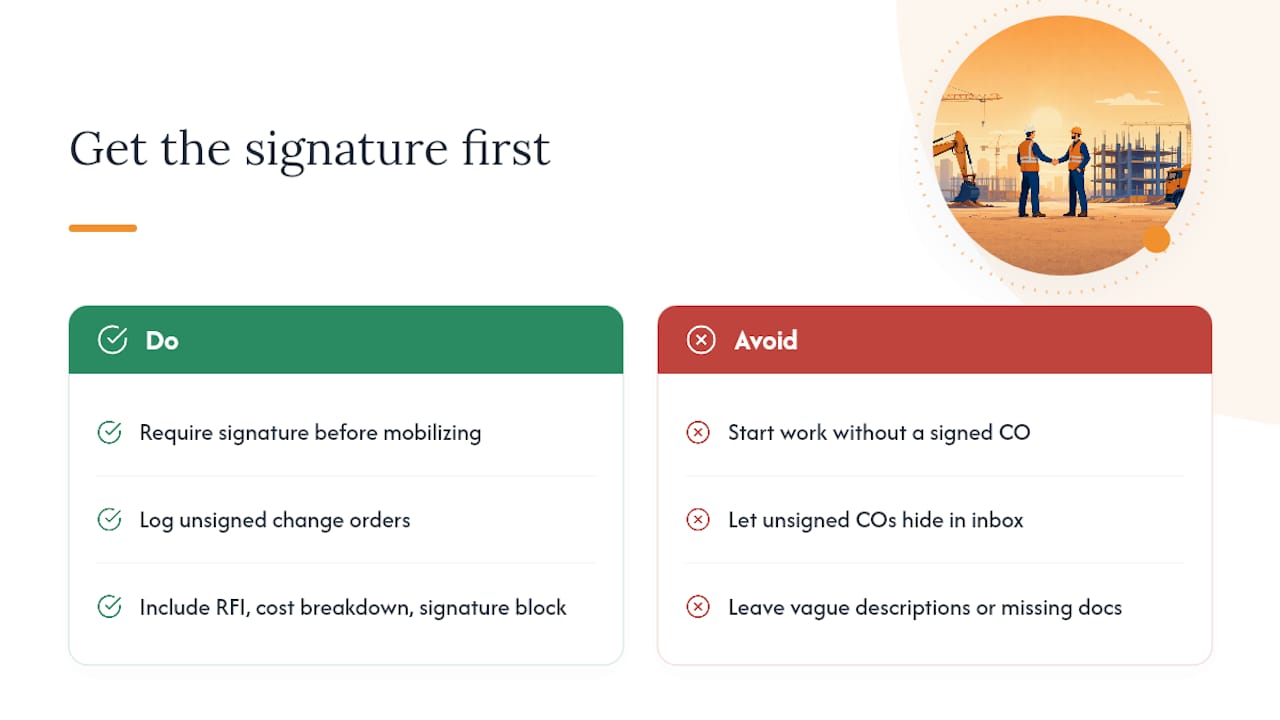
The habit that separates crews who get paid from crews who eat the cost isn’t a fancier form, and understanding different construction contract types can help manage change orders effectively. It’s refusing to mobilize labor or order material until a signature exists, even when the GC’s superintendent is standing there telling you to “just go ahead, we’ll paper it later.” Later rarely comes, or it comes with a fight attached. A change-order log, even a basic spreadsheet, forces that discipline because it makes unsigned COs visible instead of buried in an inbox.
The templates and standard forms covered here work because they force specificity: a real RFI reference, a real cost breakdown, a real signature block. Vague descriptions and missing attachments are what turn a routine CO into a six-month payment dispute.
— Jen Reese
Manage Change Orders Without the Paper Chase
Won2Build’s CO Hub is built specifically for subcontractors who need change orders created, signed, and filed without chasing down a spreadsheet, an email thread, and a filing cabinet separately. It generates COs from your existing project data, collects e-signatures directly in the app, and syncs the executed document straight into your project record, no re-entering totals into a separate log.

Pricing accuracy is where most CO disputes start, and that’s where Takeoff and Bid Track come in. Takeoff produces accurate unit quantities straight off digital plans, so your change order pricing reflects real measurements instead of a field estimate scribbled on a clipboard. Paired with CO Hub, you get a change order that’s priced correctly the first time and approved without three rounds of email back-and-forth. If lost approvals or slow sign-offs have cost you money before, start a free trial and see how a signed CO moves from draft to filed record in one sitting.
Where These Templates and Standards Come From
The forms and guidance referenced throughout this article come from recognized industry and government sources. ConsensusDocs 202 provides the standard industry change order form for private contracts. FAR Subpart 43.2 governs change order administration on federal work, including when a supplemental agreement is required. Caltrans’ construction manual and Maryland DGS’s change order guidelines both offer agency-level templates and process diagrams worth reviewing before drafting your own form, particularly if you work across multiple public and private contracts and need language that satisfies both.
Sources
- ConsensusDocs 202 change order
- Acquisition
- Chapter 5: Contract Administration, Section 3: Change Orders | Caltrans
- The Department of General Services change order guidelines (Maryland DGS)
Recommended
One login for estimating, bid tracking, change orders, and labor.
The Hub is free. Pay only for the apps you turn on.
Create your free Hub account- Managers: Make Mobile Field Workflows Resilient for 72 Hour OutagesPlaybook for field managers: offline first mobile workflows, resilient sync and conflict handling, compliance first AI guardrails, and practical pilot steps.
- Daily Signed Records: Force Account Tracking for Managers & InspectorsField checklist for project managers and inspectors to keep force account tracking audit-ready: use daily signed records for labor, equipment, and...
- Stop Timecard to Report Drift: Labor Cost Codes for SubcontractorsFix the timecard to report chain with labor cost codes that tie crews to budgets. Includes a 6 code starter and a burdened rate example.