
Are E-Signature Change Orders Legal and Worth the Switch?
E-signature change orders streamline your workflow, ensuring faster approvals, fewer disputes, and quicker invoicing—discover the benefits now!

Yes. E-signatures can legally and reliably approve change orders when the signature process captures signer intent, verifies identity, and produces an auditable document record. That’s the standard under federal and state law, and it’s also the practical bar that holds up when a change order gets challenged during closeout or litigation.
Making the switch pays off fast once you have the right guardrails in place:
- Faster approvals: turnaround drops from days to minutes when signing happens on a phone at the job site
- Fewer disputes: a timestamped, identity-linked record settles “who agreed to what” arguments before they start
- Quicker invoicing: signed change orders can trigger billing the same day instead of sitting in an inbox
The minimum safeguards you need right now: identity verification tied to the signer, a timestamped audit trail baked into the document, and a direct link between the signed change order and the RFI, photo, or log that justified it.
TL;DR:
- Using electronic signatures for change orders can significantly speed up approval times, reducing routing from days to minutes on site.
- Legally, e-signatures are valid when they include signer identity verification, timestamping, and source document links, especially for high-value or public projects.
- Implementing tiered identity proofing, starting with lighter verification for small tickets and stronger methods for high-risk changes, reduces errors and disputes.
- Piloting digital change orders within a single trade for at least 30 days helps identify friction points and improves approval times before company-wide adoption.
- Fully integrated systems like CO Hub streamline signing, audit trails, and accounting updates, avoiding data entry errors and disconnected records.
Table of Contents
- Why E-Signature Change Orders Beat Paper and PDF Redlines
- What Does U.S. Law Require for a Signed Change Order to Hold Up?
- How Do You Set Up E-Signature Approvals Step by Step?
- Which Integrations Actually Cut Administrative Work?
- What Mistakes Undermine E-Signature Change Orders?
- What I’ve Learned Watching Teams Adopt This
- How Won2Build’s CO Hub Fits This Entire Checklist
- Key Takeaways
- Where to Go for Legal and Technical Guidance
- Sources
Why E-Signature Change Orders Beat Paper and PDF Redlines
Change orders are not rare paperwork. Roughly 70% of construction projects generate at least one, and poor change management contributes significantly to project overruns. That’s the real cost of a signature process that depends on someone driving to the site, or a superintendent chasing down an owner’s rep by phone.
Switching to electronic signature change requests removes most of that friction:
- Field supervisors capture approval on-site, instead of waiting for the office to print, sign, and scan
- Every signature carries a timestamp and signer identity, which cuts the “I never agreed to that” argument down to almost nothing
- Faster sign-off means faster invoicing, since billing doesn’t wait on a change order sitting in someone’s truck
- Fewer handoffs between field and office means less retyping and fewer lost attachments
Pro Tip: Track how long a change order sits between “issued” and “signed” for one month before you switch. That number is your baseline, and it’s usually worse than teams expect.
The math is simple: a change order that takes three days to route on paper and takes ten minutes electronically isn’t just faster. It changes when you can bill for the work, which changes your cash position on every active job.
What Does U.S. Law Require for a Signed Change Order to Hold Up?
The federal ESIGN Act and the Uniform Electronic Transactions Act, adopted by 49 states, give an electronic signature the same legal weight as a wet signature on paper. The law requires evidence that the signer intended to sign and consented to do business electronically.
Courts and auditors look for a specific evidence package, not just a signed-looking PDF:
- Signer identity captured at the moment of signing, not assumed from an email address
- A timestamp that ties the signature to a specific date and time
- IP address and device metadata attached to the signing event
- A tamper-evident PDF with version history, so nobody can argue the document was altered after signing
Strong identity proofing makes the difference between a signature that’s technically valid and one that actually holds up when someone disputes it later. That distinction matters more on public works projects, lien waivers, and high-value change orders, where a simple “click to sign” link may not carry enough evidentiary weight. Those situations often call for multi-factor identity verification, not just an email confirmation.
How Do You Set Up E-Signature Approvals Step by Step?
Rolling out digital change order approvals works best as a sequence, not a scramble. Here’s the order that avoids rework:
- Standardize one template. Build a single change order form with clear scope, cost, and schedule fields, plus space to attach photos and reference the originating RFI. A template that varies by superintendent is a template nobody trusts.
- Turn on mobile signing. Field crews need tap-to-sign on a phone at the site, and owners or architects need SMS or email signing that doesn’t require installing an app. Any friction here kills adoption in week one.
- Set identity-proofing rules by risk level. A $2,000 T&M ticket doesn’t need the same verification as a $200,000 structural change. Tier your rules: low-risk gets email link confirmation, medium-risk gets SMS code, high-risk gets ID verification.
- Lock in the audit trail. Every signed document should generate a tamper-evident PDF that embeds signer metadata and timestamps, and links back to the source RFI or photo log automatically, not manually.
- Automate routing. Multi-party approval (superintendent, PM, owner’s rep) should move through a defined sequence with conditional fields that switch based on whether the CO is time-and-materials or fixed-price.
- Connect it to accounting. A signed change order should update your schedule of values or generate an invoice line without anyone re-entering numbers.
Pro Tip: Start identity verification at the risk tier you’re most afraid of, then work backward. If you build your strongest verification first, the lighter tiers are easy to configure later.
Which Integrations Actually Cut Administrative Work?
Three integrations do most of the heavy lifting: your project document repository, your accounting platform, and whatever tool tracks your schedule of values. Everything else is secondary.
The best-practice flow looks like this: a change order gets signed, the signed PDF files itself into the project record automatically, the schedule of values updates with the new line item, and an invoice draft generates without anyone touching a spreadsheet. Many digital change order systems now support this kind of trigger chain, connecting the signing event directly to accounting software like QuickBooks for invoicing.
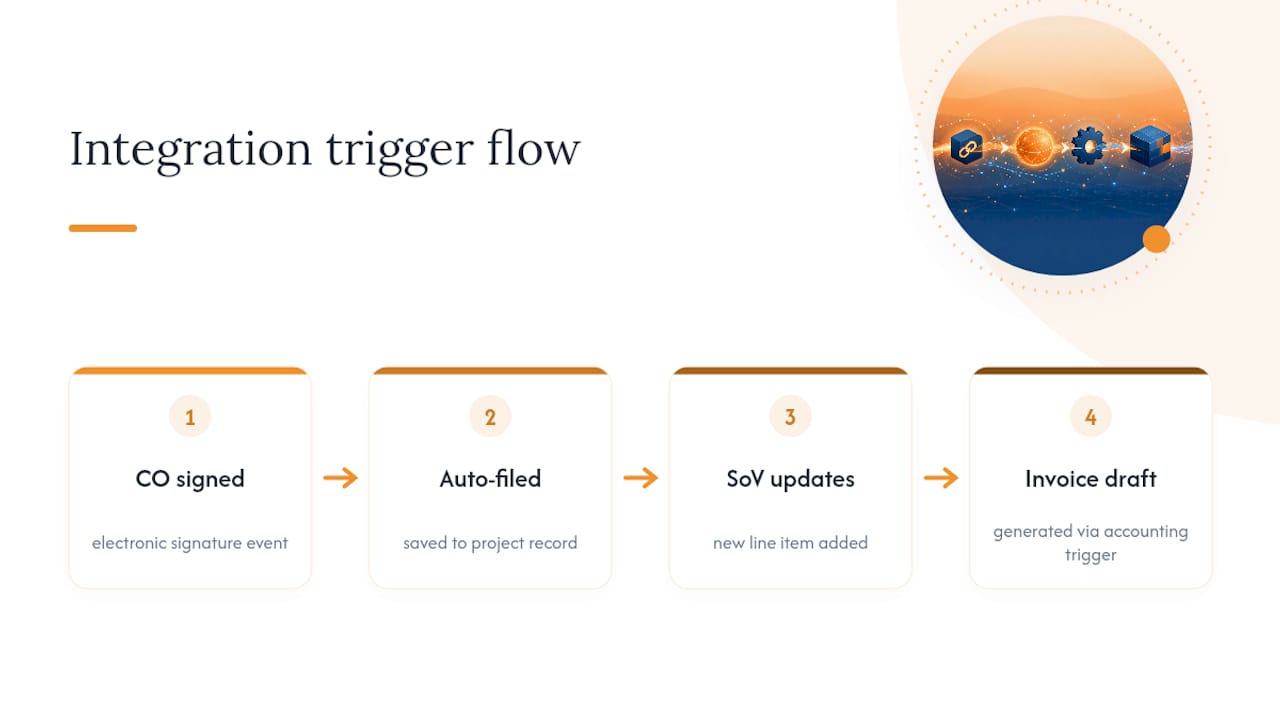
When you map fields between your change order template and your accounting system, keep the labels identical on both sides. A field called “CO Amount” in one system and “Change Order Total” in the other sounds trivial until someone builds an integration that has to guess which fields match. Consistent naming is what makes automated routing and billing work without a manual double-check every time.
What Mistakes Undermine E-Signature Change Orders?
The most common failure isn’t a bad signature. It’s a signature that floats alone, disconnected from the reason the change order existed in the first place. A standalone signed PDF is defensible, but it’s much weaker in a dispute without the RFI, photo, or daily log that triggered it attached to the same record.
Four mistakes show up again and again:
- Disconnected audit trails: the signature system doesn’t link to the project’s photo or RFI log, so the “why” behind the change order lives somewhere else entirely
- Weak identity proofing on big-dollar COs: using the same email-link verification for a $500 ticket and a $150,000 structural change
- No retention or naming policy: signed change orders scattered across email threads and personal drives instead of a searchable, standardized filing structure
- Skipping the pilot: rolling out to every trade at once instead of testing with one crew first
Pro Tip: Run a 30-day pilot with a single trade before company-wide rollout, and track two numbers: average approval time and the percentage of change orders captured digitally instead of on paper. That pilot data tells you whether to adjust your identity rules or your training before scaling up.
What I’ve Learned Watching Teams Adopt This
Teams that succeed with e-signature change orders almost always start smaller than they think they should. Piloting with one trade or one project type, rather than flipping the switch company-wide, exposes friction points (a superintendent who won’t use his phone, an owner’s rep who wants a phone call before clicking anything) while the stakes are still low.
The two numbers worth tracking from day one are approval time and the percentage of change orders actually captured digitally versus scribbled on a paper ticket. Everything else is noise until those two are trending the right direction.
— Jen Reese
How Won2Build’s CO Hub Fits This Entire Checklist
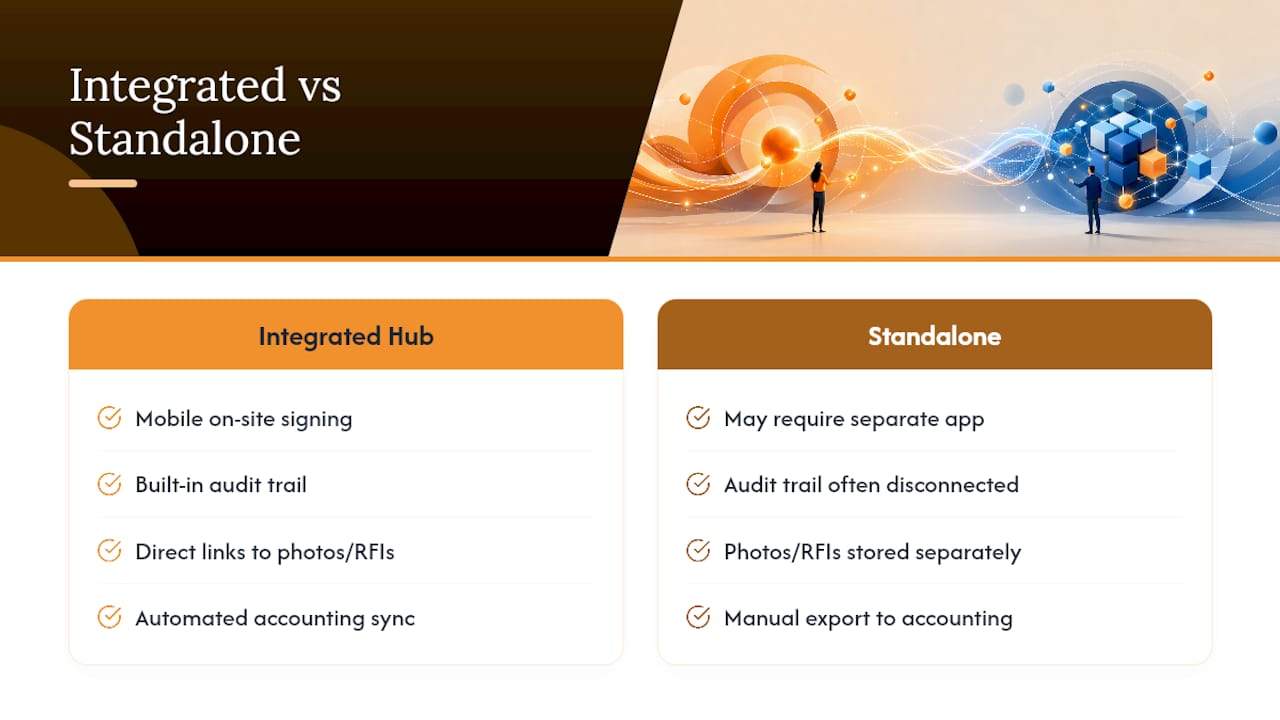
Every step in that implementation checklist maps directly onto what CO Hub is built to do. Mobile on-site signing, an embedded audit trail with timestamps and signer identity, and direct links to the photos and RFIs behind each change order all come built into the workflow, not bolted on as an afterthought.

The reason an integrated suite beats a standalone e-signature tool comes down to double entry. When your change order tool, your labor tracking, and your accounting sync live in separate systems, someone is retyping the same numbers three times, and that’s where audit trails get disconnected and gaps show up during closeout. CO Hub runs on the same single sign-on as Won2build’s Time Budge, Bid Track, and Takeoff modules, so a signed change order can flow straight into your accounting sync without anyone touching QuickBooks manually.
If you’ve been tracking change orders across email threads and a shared drive, the fastest way to see the difference is to watch a signed ticket move from field to invoice in real time. Start a free trial of CO Hub and test mobile signing and accounting sync on your next active project.
Key Takeaways
E-signature change orders hold up legally and operationally only when identity verification, timestamped audit trails, and links to source documents (RFIs, photos, logs) are built into the signing process from day one.
| Point | Details |
|---|---|
| Legal floor is clear | ESIGN and UETA give e-signatures equal legal weight to paper when intent and consent are documented. |
| Audit trail is non-negotiable | Capture signer identity, timestamp, and metadata, and store a tamper-evident PDF with version history. |
| Risk-tier your verification | Use lighter identity checks for low-dollar tickets and stronger verification for high-value or public work. |
| Pilot before scaling | Test with one trade for 30 days and track approval time and digital capture rate before rolling out company-wide. |
| CO Hub covers the checklist | Won2build’s CO Hub bundles mobile signing, embedded audit trails, and accounting integration in one workflow. |
Where to Go for Legal and Technical Guidance
For readers who want to verify these standards directly rather than take them secondhand, three sources cover the legal and technical ground:
- A field guide on construction change orders covering practical documentation and approval workflows contractors use day to day
Sources
Recommended
One login for estimating, bid tracking, change orders, and labor.
The Hub is free. Pay only for the apps you turn on.
Create your free Hub account- Change Orders: Same Hour Notices Help Subcontractors Avoid DelaysKeep change order approvals moving with a written form, shared COR log, and verbal notice within the hour. See a subcontractor focused workflow in CO Hub.
- Change Order Documentation: Subcontractors’ Same Day Field ChecklistLearn how subcontractors can document field changes the same day, support costs and schedule impacts, and carry approved changes into SOV updates.
- Managers: Make Mobile Field Workflows Resilient for 72 Hour OutagesPlaybook for field managers: offline first mobile workflows, resilient sync and conflict handling, compliance first AI guardrails, and practical pilot steps.