
Best Change Order Tracking Solutions for Subcontractors
Discover the best change order tracking solutions for subcontractors, including seamless workflows and real-time updates to boost efficiency.

For US commercial subcontractors, Won2Build CO Hub is the recommended change order tracking solution. Three reasons stand out:
- End-to-end workflow. CO Hub handles the full cycle: create, submit, route for approval, and post-approval cost accounting, all in one place with no manual re-entry between steps.
- Field-to-office sync. Field crews submit T&M tickets and change requests from mobile devices; office staff see updates in real time, which cuts the lag that kills approval cycles.
- Integrated data. CO Hub connects directly to Won2Build’s Time Budge (labor capture) and Bid Track (estimating), so cost calculations pull from vetted inputs rather than guesswork.
Ready to see it live? Request a demo at CO Hub and ask the team to walk you through a mobile submission from ticket to approved change order.
Key Takeaways
Won2Build CO Hub is the most practical change order tracking solution for US commercial subcontractors because it integrates labor, estimating, and accounting data in one connected workflow rather than requiring manual handoffs between systems.
| Point | Details |
|---|---|
| Recommended solution | Won2Build CO Hub covers the full change order cycle with field-to-office sync and integrated cost data. |
| Top two evaluation criteria | Prioritize mobile offline reliability and accounting integration quality above all other features. |
| Immediate next step | Book a CO Hub demo and run a 30-day pilot on one active project to measure time-to-submission and approval cycle. |
| ROI framework | Track time-to-submission, approval cycle length, and disputed change order rate from day one to quantify gains. |
| Won2Build suite advantage | CO Hub connects to Time Budge, Bid Track, and Takeoff so cost calculations pull from vetted field and estimate data. |
Table of Contents
- What do the top change order tracking solutions actually do?
- How CO Hub maps to every must-have capability
- What ROI should you expect from disciplined change order tracking?
- How to evaluate change order software before you commit
- What does change order software typically cost, and how long does implementation take?
- CO Hub inside Won2Build Hub: how the integrated suite works
- Why subcontractors can’t afford to wait on change order technology
- Won2Build CO Hub: what the demo shows and how to get started
- Sources
What do the top change order tracking solutions actually do?
Before evaluating any vendor, lock down what the software must accomplish. The checklist below reflects what best-in-class change order management tools deliver, not what most vendors claim in their marketing copy.
- End-to-end workflow. The system creates, submits, routes for approval, and closes change orders without jumping between spreadsheets or email threads. Post-approval, cost data flows directly into accounting.
- Automated cost impact calculation. Labor, material, and equipment costs update automatically when scope changes. Buyers should be skeptical of any tool that requires manual re-entry at this step.
- Documentation capture and audit trail. Photos, attachments, and T&M tickets attach directly to the change order record. If a dispute lands in arbitration, that paper trail is the difference between getting paid and absorbing the loss.
- Centralized change log with status monitoring. Every open, pending, and approved change order across all active projects appears in one view. No hunting through inboxes.
- Mobile field access. Field crews need to submit from the job site, not the office. Mobile-first field capture with offline support has become a baseline buyer expectation, not a premium feature.
- Required integrations. Time tracking, estimating, T&M workflows, and accounting must connect without manual export steps. A change order tool that lives in isolation creates exactly the data silos it was supposed to eliminate.
- Reporting and analytics. Exposure reports, aging dashboards, and payment lag metrics let project managers catch problems before they become disputes. If a vendor’s reporting is limited to a PDF export, keep looking.
Third-party resources that categorize change management tools confirm these functional categories as the baseline for any serious evaluation.
How CO Hub maps to every must-have capability
Won2Build CO Hub is purpose-built for subcontractors, which matters because most change order modules on the market were designed for general contractors and retrofitted for subs. The feature mapping below shows how CO Hub covers each requirement.
Workflow: create through close
CO Hub walks a field supervisor through creating a change order from a T&M ticket or a scope-change notice. The routing engine sends it to the right approver automatically. Once approved, the cost data exports to accounting without a second round of data entry. That single-path flow is where most generic tools break down.
Automated cost calculation
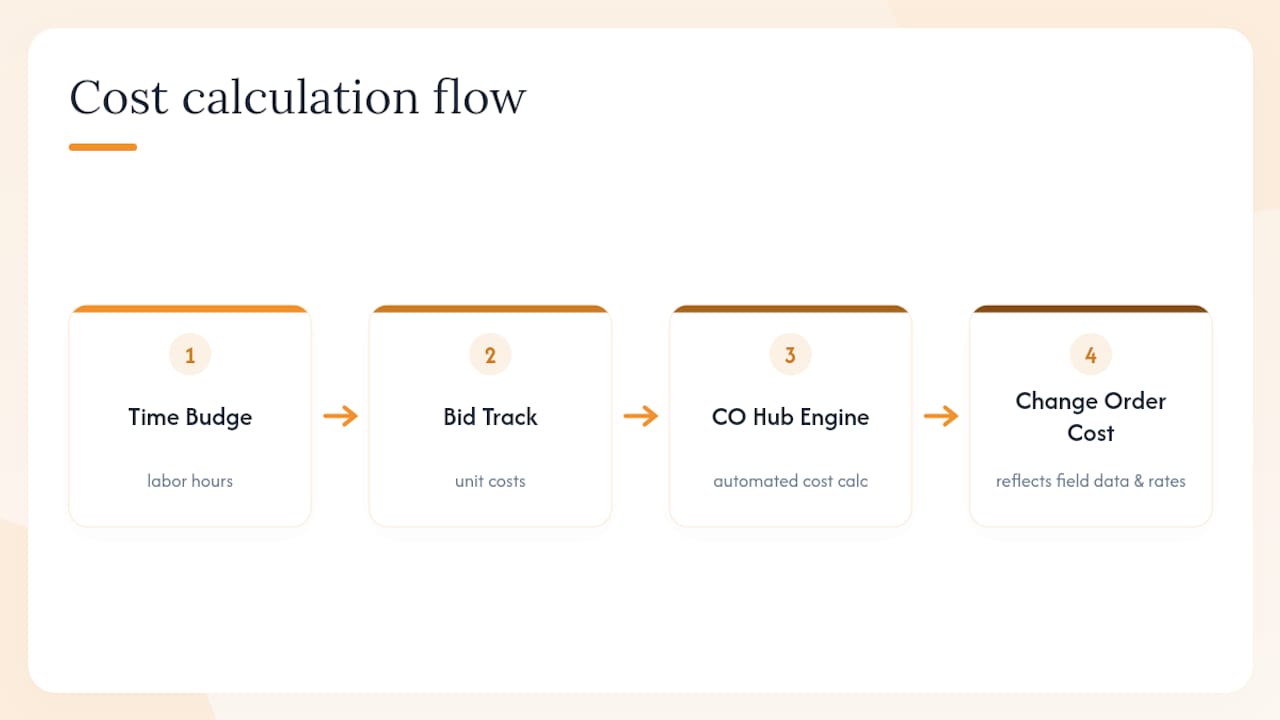
Labor hours from Time Budge feed directly into CO Hub’s cost engine. Estimate data from Bid Track supplies the unit costs. The result: a change order cost calculation that reflects actual field conditions and pre-approved rates, not a field supervisor’s best guess typed into a cell.
Documentation and audit trail
Photos, daily logs, and T&M ticket attachments link to the change order record at the moment of creation. Every status change, approval, and edit is timestamped. Digital bid tracking improves estimate accuracy and feeds cleaner data into this documentation layer, reducing the back-and-forth that inflates dispute rates.
Centralized log and mobile access
The CO Hub dashboard shows every change order across all projects, filterable by status, project, and age. Field crews access it from iOS or Android. Submissions sync to the office the moment connectivity is available, which is the field-to-office sync that real-time budget tracking depends on to keep forecasts accurate.
Integrations
CO Hub connects to Time Budge for labor, Bid Track for estimates, and supports accounting exports so cost data doesn’t have to be re-keyed. The single sign-on across the Won2Build Hub suite means a project manager moves from takeoff to estimate to change order without logging in again.
Pro Tip: Set up CO Hub’s approval routing templates before your first live project. Pre-built routing by project type or contract value cuts approval cycle time significantly and removes the ambiguity about who signs off on what.
What ROI should you expect from disciplined change order tracking?
Untracked change orders are a direct hit to margin. Labor, material, and equipment costs added mid-project without a formal change order record rarely get fully recovered, and the cumulative budget impact compounds across a project’s lifecycle.
The business benefits of disciplined tracking fall into four categories:
- Fewer disputes. When every scope change has a timestamped record with attached documentation, the GC has less room to contest the cost. Disputes that do arise resolve faster because the evidence is already organized.
- Faster approvals. Automated routing eliminates the “who needs to sign this?” delay. A change order that used to sit in an inbox for a week moves through in hours when the routing is pre-configured.
- Reduced margin leakage. Real-time budget synchronization between field and office means project managers catch cost overruns while there is still time to act, not after the invoice is submitted.
- Improved cash flow. Faster submission and approval directly shortens the payment cycle. A change order submitted the day work is completed gets into the next pay app; one submitted three weeks later waits for the following cycle.
KPIs worth tracking from day one: time-to-submission (hours from work completion to CO submission), approval cycle length (days from submission to approval), disputed change order rate (percentage of submitted COs that generate a formal dispute), and change order close rate by project.
Statistic callout: Vendor marketing and product pages across the construction software market consistently frame direct connection between change orders and contract cost data as the primary ROI lever for subcontractors, a pattern visible across vendor positioning on review platforms and confirmed by buyer feedback on G2 review pages.
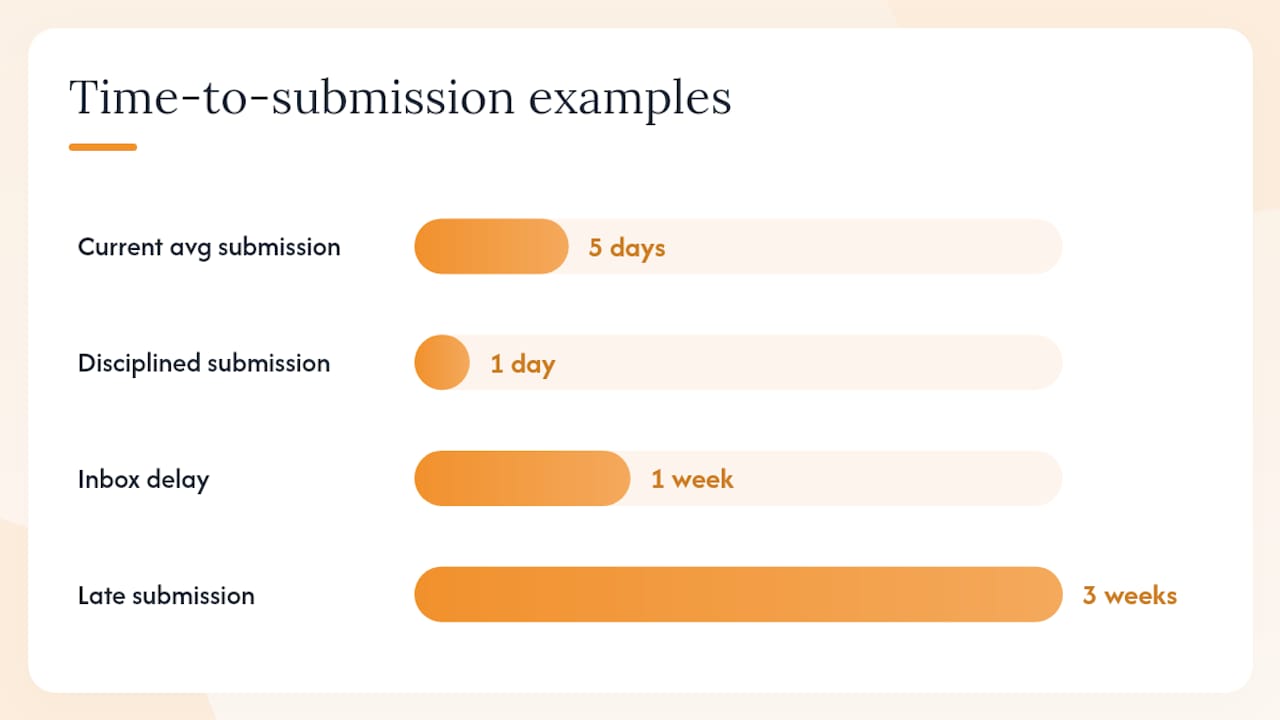
A practical framework: if your current average time from scope change to submitted change order is five days, and your payment cycle is monthly, cutting that to one day means more change orders make the current pay app rather than rolling to the next. On a project with multiple change orders averaging a substantial amount each, that timing difference can significantly affect receivables per cycle.
How to evaluate change order software before you commit
A structured evaluation takes less than two weeks if you know what to test. Use this checklist in order.
- Usability. Can a field supervisor with no software training submit a change order in under five minutes on their first try? If the answer requires a training session first, the adoption rate in the field will be low.
- Mobile UX. Test the mobile app on the actual device your crews use. Check offline mode: does it queue submissions when there is no signal and sync automatically when connectivity returns? App store reviews consistently flag offline reliability as a top field complaint.
- Core features. Confirm the workflow covers create, submit, approve, and post-approval accounting. Ask the vendor to demonstrate each step live, not in a recorded video.
- Integrations. Ask for a live demo of the accounting export. If it requires a manual CSV download and re-upload, that is a red flag. The same applies to time tracking and estimating connections.
- Reporting. Pull an aging report and a payment lag report during the demo. If those reports don’t exist or require custom configuration, the analytics capability is weaker than advertised.
- Security and compliance. Ask about data encryption, access controls, and whether the platform stores data in US-based servers. Construction contracts increasingly require documented data security practices.
- Onboarding and support. Ask for the average time from contract signing to first live change order. Ask what the support SLA is for a field crew member who can’t submit during a job. User reviews on G2 reveal that support responsiveness is one of the most common differentiators between satisfied and dissatisfied buyers.
- Pricing model. Understand whether the fee is per seat, per active field worker, or a flat company fee. A per-seat model scales poorly for subcontractors with variable crew sizes.
Demo questions to ask every vendor:
- Show me a mobile submission from T&M ticket to submitted change order, on a phone, in real time.
- Show me the automated cost calculation updating when I change a labor quantity.
- Show me the accounting export and confirm it maps to [your accounting system].
- Show me the audit trail for a change order that was revised twice before approval.
Red flags: no mobile offline mode, manual-only export workflows, no integration with standard accounting platforms, and pricing that is not disclosed until after a sales call.
What does change order software typically cost, and how long does implementation take?
Pricing for change order management tools in the US market generally follows two models. The first is a flat monthly company fee plus a per-active-field-worker charge for field-facing modules. The second is a per-seat model where every user, office or field, counts toward the license. For subcontractors with crews that fluctuate by season or project, the flat-plus-field-worker model tends to be more predictable.
Won2Build’s pricing follows the flat company fee plus per-active-field-worker structure, which means your monthly cost scales with actual field activity rather than total headcount.
Implementation phases for a US subcontractor:
- Pilot (weeks 1–2). Select one active project. Configure the change order template, set up approval routing, and connect the accounting export. Run three to five real change orders through the system.
- Configuration (weeks 3–4). Adjust templates and routing based on pilot feedback. Connect Time Budge and Bid Track if not already live. Train office staff on the dashboard and reporting.
- Training and rollout (weeks 5–8). Field crew training on mobile submission. Expand to all active projects. Set baseline KPIs (time-to-submission, approval cycle, disputed rate).
- 30–60–90-day checkpoints. At 30 days, measure submission speed. At 60 days, review approval cycle and dispute rate. At 90 days, assess impact on pay app timing and forecasted budget accuracy.
Ask vendor success teams specifically: what is the average time from contract to first live change order, what training resources are available for field crews, and what is the escalation path when a field submission fails during a critical project phase. For context on migration considerations if you are moving from another platform, this overview of cloud solution alternatives covers what to watch for during transition.
CO Hub inside Won2Build Hub: how the integrated suite works
CO Hub does not operate as a standalone tool. It sits inside the Won2Build Hub suite alongside Time Budge, Bid Track, and Takeoff, and the integration between those four applications is where the real efficiency gain comes from.
Here is how data moves through the suite on a typical change order:
- Takeoff quantifies the scope from digital plans. Those quantities feed into Bid Track, which applies unit costs and produces the estimate.
- When a scope change occurs in the field, Time Budge captures the actual labor hours against the affected cost codes. That data flows into CO Hub as the labor component of the change order cost calculation.
- CO Hub assembles the change order: scope description, cost breakdown (labor from Time Budge, materials from Bid Track), attached documentation, and routing for approval.
- Once approved, the cost data exports to accounting. No re-entry. No reconciliation between systems.
The bid tracking integration is particularly valuable because it means the unit costs in a change order come from the same estimate the project was bid on, not from a field supervisor’s memory. That consistency reduces disputes and improves forecast accuracy.
Implementation notes worth knowing:
- Single sign-on across all four applications means one login for field and office users.
- The bilingual interface supports English and Spanish, which matters for crews where Spanish is the primary language.
- Per-project reporting lets project managers pull a change order summary for a single project without filtering through company-wide data.
For subcontractors who want to understand how better estimates reduce change order volume upstream, bid tracking software benefits explains the connection between estimate accuracy and downstream change order frequency.
Why subcontractors can’t afford to wait on change order technology
The window for absorbing sloppy change order processes has closed. Material costs have stayed elevated, labor margins are thin, and GCs are pushing payment cycles longer while subcontractors absorb more scope risk. A change order submitted late, disputed, or lost in an email thread is not a paperwork problem. It is a cash flow problem.
The practical move this week: pick one project where change orders have been a friction point and run a 30-day pilot with a dedicated tracking tool. You do not need a company-wide rollout to prove the value. Three to five change orders through a structured workflow will show you exactly where your current process leaks time and money.
One thing worth saying plainly: the vendors with the longest feature checklists are not always the right choice. Integration quality matters more than feature count. A change order tool that connects cleanly to your time tracking and accounting is worth more than one with ten extra fields nobody fills out. That is the evaluation lens that separates tools built for subcontractors from tools built for everyone and adapted for no one.
Won2Build CO Hub: what the demo shows and how to get started
CO Hub is built for subcontractors who need change order tracking that connects to the rest of their project data, not another standalone app that creates a new silo.

A demo covers three things: a live mobile submission from T&M ticket to submitted change order, the automated cost calculation pulling from Time Budge and Bid Track inputs, and the accounting export so you can see exactly how approved change orders move into your financial records. The recommended pilot scope is one active project, four to eight weeks, with time-to-submission and approval cycle as the primary success metrics.
Onboarding is structured: template configuration in week one, approval routing setup in week two, field crew training in week three, and full project rollout by week four. Won2Build’s customer success team supports the process with training resources and direct access during the pilot phase.
To schedule a demo or start a pilot, visit the CO Hub product page and request a walkthrough. The team can scope a pilot plan specific to your project type and crew size.
Sources
- INGENIOUS.BUILD reviews | G2
- Houzz Pro | Capterra
- 11 Best Change Management Tools for Organizations - Bloomfire
Recommended
One login for estimating, bid tracking, change orders, and labor.
The Hub is free. Pay only for the apps you turn on.
Create your free Hub account- 7 Concrete Takeoff Steps Estimators Use to Avoid Ordering ShortfallsFollow seven concrete takeoff steps to calculate cubic yards, size rebar and formwork, convert volumes to supplier units, and verify quantities before bid...
- Are E-Signature Change Orders Legal and Worth the Switch?E-signature change orders streamline your workflow, ensuring faster approvals, fewer disputes, and quicker invoicing—discover the benefits now!
- How to Link Takeoff to Estimate for Accurate BidsLink your takeoff quantities to your estimate for accurate bids. Discover the seamless integration method that reduces errors and saves time.