
Geofencing Time Tracking for Small Construction Teams
Discover how geofencing time tracking can streamline operations for small construction teams, ensuring accurate payroll and efficient workflows.

For subcontractors running field crews, Won2Build Time Budge is the recommended pick for geofencing time tracking. It combines site-scoped geofencing, job-coded timesheets, payroll-ready exports, and a bilingual mobile app built specifically for construction workflows — not adapted from a generic HR tool.
Two other categories are worth knowing before you dig into the comparison:
- Recommended construction pick: Won2Build Time Budge. Geofence-limited clock-in/out, real-time field-to-office sync, payroll export, and single-login access to the broader subcontractor suite. Best for crews of any size running multiple job sites.
- Budget/entry-level field app: Low monthly cost, simple single-zone geofence, minimal integrations. Works for very small teams that need basic location-stamped punches and nothing more. Expect limited anti-spoofing signals and manual payroll export.
- Payroll-integration platform: Strong connectors to QuickBooks, ADP, and similar systems. More configuration overhead, but the right fit if payroll accuracy is the primary driver and your crew already lives in one of those ecosystems.
The core trade-off across all three categories: accuracy and anti-spoofing depth versus setup simplicity. More layers of location validation mean better audit trails and less payroll leakage, but also more device permissions to manage and more crew training. The Fair Labor Standards Act requires accurate wage documentation, so the audit trail is not optional — it is what protects you in a dispute. Modern smartphones typically produce 5–20 meter GPS accuracy in open areas, which is precise enough for a 100–200 meter geofence radius on most job sites. The comparison table below maps each category against the dimensions that actually matter for field crews.
Key Takeaways
Geofencing time tracking works best for construction subcontractors when it is scoped to clock-in/out only, backed by multi-signal anti-spoofing, and tied to job-coded payroll exports.
| Point | Details |
|---|---|
| Construction-first pick | Won2Build Time Budge combines geofence-limited clock-in, job-coded timesheets, and payroll export built for subcontractors. |
| Limit location capture | Capture coordinates at clock-in and clock-out only; continuous tracking adds legal risk and crew resistance without payroll benefit. |
| Anti-spoofing is required | GPS alone can be spoofed; require device-integrity checks, mock-location flag detection, and weekly haversine-based audits. |
| Written notice before deployment | Personal-device deployments require signed written consent; company devices reduce legal complexity significantly. |
| Pilot before full rollout | Run a 2–4 week pilot on 3 sites to tune geofence radii and catch false positives before the full crew is enrolled. |
Table of Contents
- How does geofencing time tracking compare across the top tools?
- What does each tool actually do for your crew?
- Which feature dimensions actually matter when comparing tools?
- How does geofencing actually work on a mobile device?
- What does geofencing time tracking cost, and how long does setup take?
- What U.S. employers need to know before using location-based clock-ins
- GPS spoofing in time tracking: how to detect it and what to do
- How the shortlist was built
- How to choose: questions to ask vendors and red flags to watch for
- What field deployments actually teach you
- Won2Build Time Budge: built for subcontractors, not adapted for them
- Sources
How does geofencing time tracking compare across the top tools?
| Dimension | Won2Build Time Budge | Budget field app | Payroll-integration platform |
|---|---|---|---|
| Best for | Construction subcontractors, multi-site crews | Very small teams, minimal admin | Teams with complex payroll/accounting needs |
| Price shape | Flat monthly fee + per-active-field-worker | Low per-user, often under $5/user/mo | Mid-to-high per-user; add-ons for advanced features |
| Free trial / demo | Free trial available | Typically free tier or trial | Demo-first, trial varies |
| Geofencing capabilities | Auto clock-in/out, multi-zone, custom radius, job-coded | Single zone, basic auto punch | Multi-zone, configurable radius |
| Anti-spoofing signals | Device metadata, location provider logging, audit logs | Minimal or none | Varies; some offer mock-location detection |
| Mobile OS & offline mode | iOS and Android; offline queue with sync | iOS and Android; basic offline | iOS and Android; offline varies by plan |
| Integrations | Payroll export, construction project reporting | Limited; manual CSV | QuickBooks, ADP, Gusto, and others |
| Ease of setup | Construction-focused onboarding; bilingual | Fast self-serve | Moderate; payroll mapping required |
| Reporting & export | Job-site timesheets, per-project labor reports | Basic timesheet export | Detailed payroll reports, compliance exports |
| Support & onboarding | Dedicated onboarding for subcontractor workflows | Community/email | Phone, chat, onboarding packages |
Statistic to anchor your expectations: GPS time-clock apps that sync location-tagged punches to timesheets can improve payroll accuracy and enable real-time schedule adjustments — the value is not just convenience, it is the audit record.
Won2Build Time Budge stands out because it was designed for subcontractors, not retrofitted for them. The job-coded timesheet structure maps directly to how construction projects are billed and reported. For a crew moving between three active sites in a week, that matters more than a slightly lower per-seat price.
Budget field apps do one thing well: they get a small crew clocked in with a location stamp at minimal cost. The gap shows up the moment you need to export to payroll, investigate a suspicious punch, or manage more than one site. Anti-spoofing is usually absent or superficial.
Payroll-integration platforms earn their place when your accounting team already runs on QuickBooks or ADP and the integration saves real hours each pay period. The geofencing is functional but rarely construction-specific — you will configure it yourself, and the onboarding assumes a generalist HR context.
What does each tool actually do for your crew?
Won2Build Time Budge
Won2Build is built for commercial construction subcontractors. Time Budge handles geofence-limited clock-in and clock-out, logs each punch with employee ID, timestamp, and location metadata, and syncs that data to job-coded timesheets in real time. The mobile app runs on iOS and Android, supports a bilingual interface (useful for mixed-language crews), and queues punches offline when connectivity drops on site.

Payroll export is built in — not an add-on. Per-project labor reports let project managers see hours by job code without waiting for a manual timesheet reconciliation. For subcontractors managing labor hours across multiple job sites, the single-login access to CO Hub, Bid Track, and Takeoff means the same platform that tracks time also handles change orders and estimates.
Use-case tag: Small-to-mid subcontractor crews, multi-site projects, mixed-language field teams. Suggested next step: Schedule a demo or start a free trial at Won2build.
Budget field app
Entry-level location-based time tracking tools typically offer one geofence zone, a simple auto-punch on entry/exit, and a basic CSV export. Setup takes under an hour. The trade-off is real: no job-code structure, no anti-spoofing signals, and payroll integration usually means downloading a spreadsheet and uploading it manually to your accounting software.
Use-case tag: Solo operators or crews of two to five people with a single fixed site and no payroll complexity. Suggested next step: Most offer a free tier — test it on one site before committing.
Payroll-integration platform
These tools lead with their accounting connectors. If your payroll runs through QuickBooks, ADP, or Gusto, the appeal is obvious: punches flow directly into payroll without manual entry. Geofencing is available but usually requires more configuration than a construction-focused tool. Expect to spend time mapping job codes, configuring zones, and training an admin.
Use-case tag: Service businesses or subcontractors whose primary pain point is payroll reconciliation rather than job-site attendance verification. Suggested next step: Request a demo that walks through the payroll mapping workflow specifically — that is where the real setup time hides.
Which feature dimensions actually matter when comparing tools?
Most vendor comparison pages list every feature they offer. The list below is shorter on purpose — these are the axes that separate tools that work in the field from tools that look good in a demo.
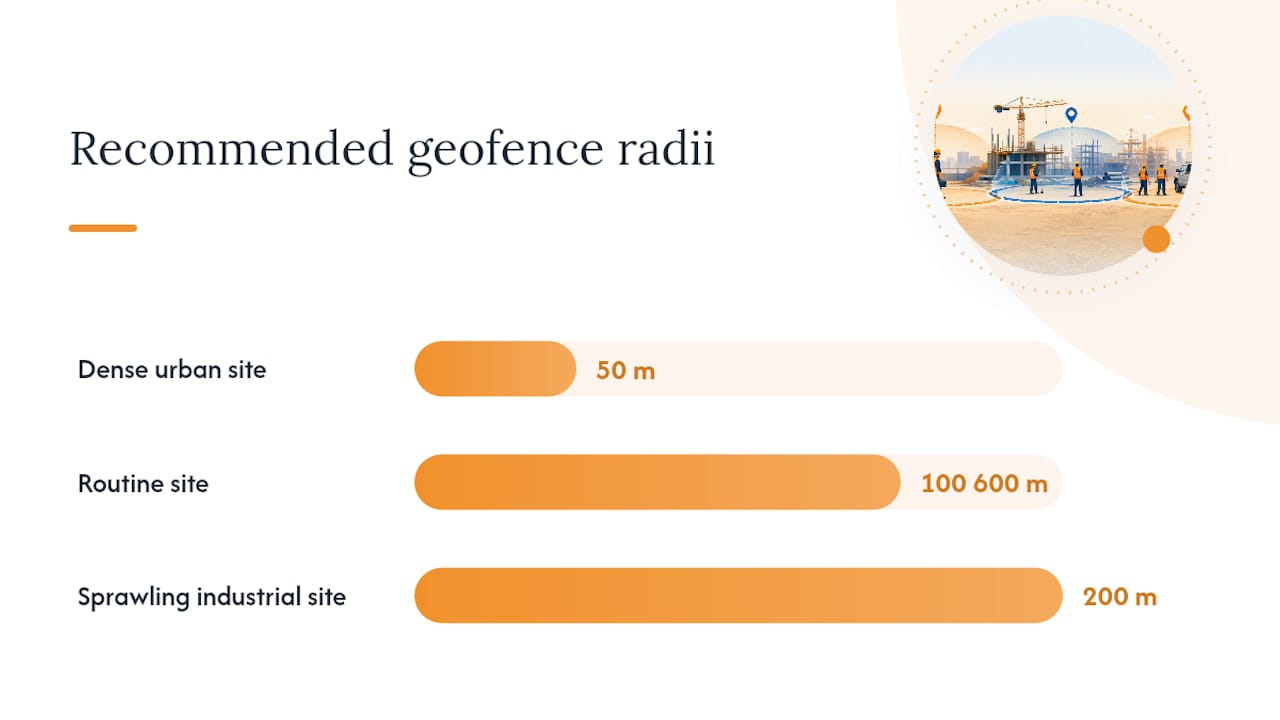
Geofence behavior: Does the tool support auto clock-in and clock-out, or does the employee still have to open the app? Can you define multiple zones for different sites? What is the minimum configurable radius? A 50-meter radius works on a dense urban site; a 200-meter radius is more forgiving on a sprawling industrial site. Recommended geofence radii run 100–200 meters for routine sites, adjusted for urban canyons or complex layouts.
Accuracy and anti-spoofing signals: GPS alone is not enough. A vendor that only checks coordinates can be fooled by a $3 mock-location app. Look for device-integrity checks, network/Wi-Fi corroboration, and audit log access. This is covered in depth in the spoofing section below.
Offline mode and sync rules: Crews in basements, tunnels, or signal-dead zones need offline punch capability. The risk is that offline punches cannot be location-verified in real time. Ask vendors how offline punches are validated at sync — re-verification at first network contact is the right answer.
Device permissions and battery impact: Continuous background GPS drains batteries fast. Geofence-only clock-in avoids this because the app checks location only at punch events, not constantly. Confirm the vendor’s location permission model before deployment.
Integrations: Which payroll and accounting systems does the tool export to natively? A CSV download is not an integration. QuickBooks, ADP, and Gusto connectors are the baseline for most US small businesses.
Admin controls: Can you whitelist specific geofence zones and lock employees out of punching from unapproved locations? Can you see an edit audit log showing who changed a timesheet entry and when? Both matter for dispute resolution.
Reporting and payroll readiness: Job-coded labor reports, overtime flags, and one-click payroll export are the difference between a time-tracking tool and a payroll-ready system. For subcontractors, electronic time tracking tied to job costing is what makes the data useful beyond attendance.
Onboarding and support: A tool that takes six weeks to configure is not saving you time in month one. Ask for a written onboarding timeline and a named support contact for the first 30 days.
Feature priority checklist for small subcontractors:
- Required: Auto clock-in/out geofencing, multi-site zone support, payroll export (native, not CSV only), edit audit log, offline punch with sync validation
- Strongly recommended: Device-integrity checks, job-code structure, bilingual mobile app, admin location whitelist
- Optional: Kiosk/shared-device mode, facial recognition at punch, continuous GPS tracking (most crews do not need it)
Pro Tip: Run a two-day pilot at your most complex site before signing a contract. Clock in and out from the parking lot, the trailer, and the building entrance. If the geofence fires inconsistently at any of those points, the radius needs adjustment — and you want to discover that before your crew does.
How does geofencing actually work on a mobile device?
Geofencing time tracking captures location at clock-in and clock-out only — not continuously throughout the shift. That distinction matters both for privacy and for battery life. The app defines a virtual boundary around a job site; when an employee punches in, the device checks whether the current coordinates fall inside that boundary before accepting the punch.
The location signal itself comes from the device’s OS location provider, which blends GPS satellites, nearby Wi-Fi access points, and cell tower triangulation. GPS alone gives 5–20 meter accuracy in open areas; in dense urban environments or inside steel-framed buildings, Wi-Fi and cell signals fill the gap. Some vendors also capture the Wi-Fi SSID at punch time as a corroborating signal — useful for indoor sites where GPS degrades.
Fields a vendor typically records at each punch:
- Employee ID and job code
- Timestamp (UTC and local)
- Latitude and longitude (ideally stored to at least 4–6 decimal places for audit precision)
- Location provider (GPS, Wi-Fi, cell, or fused)
- Accuracy radius reported by the OS (in meters)
- App version and device metadata (OS version, device model)
The clock-in flow looks like this: the employee opens the app and taps clock-in. The OS prompts for location permission if not already granted. The app reads the current coordinates from the OS location provider. Those coordinates are sent to the server, which checks whether they fall within the configured geofence for that job site. If yes, the punch is accepted. If no, the punch is rejected or flagged for manager review. If the device is offline, the punch is queued locally and re-verified at the next network sync.
This is meaningfully different from continuous GPS tracking, where the device reports location every few minutes throughout the shift. Continuous tracking creates a movement record; geofence-only tracking creates a presence record. For wage documentation under the FLSA, a presence record at clock-in and clock-out is what you need.
What does geofencing time tracking cost, and how long does setup take?
Pricing across location-based time tracking tools follows four basic shapes:
- Per-user/per-seat: A flat monthly fee per employee using the app. Common in general workforce tools. Predictable but can get expensive as crews grow.
- Per-active-field-worker: You pay only for workers who logged at least one punch in the billing period. Better for subcontractors with variable crew sizes across seasons.
- Per-device: Charged per enrolled device rather than per person. Useful for shared-device or kiosk deployments.
- Company flat fee: One monthly price regardless of crew size, often with a worker cap. Works well for small, stable teams.
Add-ons that commonly carry extra cost: advanced anti-spoofing modules, kiosk hardware or licensing, dedicated onboarding packages, and premium payroll integrations. Always ask what is included in the base plan versus what triggers an upgrade.
For small subcontractor teams (5–25 field workers), expect monthly costs in the range of a few hundred dollars for a full-featured construction platform, less for a basic field app. Annual billing typically offers a meaningful discount over month-to-month. Subcontractor time tracking tied to job costing tends to recover its cost quickly through reduced payroll errors and fewer disputed hours.
Setup tasks and approximate time-to-complete:
| Task | Estimated time |
|---|---|
| Vendor selection and contract | 1–2 weeks |
| Site geofence mapping and zone configuration | 2–4 hours per site |
| Device enrollment and permission setup | 1–2 hours for a crew of 10 |
| Payroll integration mapping | 2–4 hours (varies by system) |
| Admin and crew training | Half-day per site |
| Pilot run (2–4 sites, small crew) | 2–4 weeks |
| Full rollout | 4 weeks total from contract |
Pre-rollout checklist:
- Confirm geofence zones match actual site entry points (not just the address centroid)
- Test clock-in from the parking lot, trailer, and building entrance before crew enrollment
- Verify payroll export format matches your accounting system’s import requirements
- Collect signed device-use and location-consent acknowledgments from all crew members
- Document data retention policy and share it with HR or legal before go-live
What U.S. employers need to know before using location-based clock-ins
Geofencing time tracking is generally legal in the United States when it is limited to clock-in and clock-out events, applied during work hours only, and accompanied by clear written disclosure to employees. That three-part rule covers most small business deployments. Where it gets complicated is device ownership and state-specific statutes.
The three legal levers:
Device ownership is the clearest dividing line. On company-owned devices, employers have broad authority to configure location services for work purposes. On personal devices, the standard is explicit written consent — employees must agree in writing before the app collects any location data, and they must be able to opt out without losing their job. If you cannot provide company devices to field workers, a written acknowledgment policy is non-negotiable.
Timing matters as much as scope. Location capture limited to clock-in and clock-out events during scheduled work hours is the defensible model. Any system that logs location outside those events — even passively — creates off-duty monitoring exposure that varies significantly by state.
Disclosure and acknowledgment is what protects you in a dispute. A written policy should specify: what data is collected, when it is collected, how long it is retained, who can access it, and how employees can raise concerns. Have each employee sign it before their first geofenced punch.
State-specific flags to raise with HR or legal:
- California: Among the strictest in the country on employee privacy. The California Consumer Privacy Act and Labor Code Section 980 create additional consent and disclosure requirements for personal-device monitoring.
- Texas: No state-specific employee monitoring statute, but common-law privacy claims are possible. Written policy and consent remain best practice.
- Delaware: Requires employers to provide notice before monitoring electronic communications or internet usage; consult counsel on whether location data falls within scope.
For any state, the safest posture is the same: written policy, signed consent, clock-in/out only, company devices where feasible, and a documented retention schedule.
Pro Tip: Keep location data retention narrow and documented. Store raw punches for the period required by your payroll audit policy (typically three years under FLSA), then delete. A retention policy that says “we keep location data indefinitely” is a liability in discovery.
GPS spoofing in time tracking: how to detect it and what to do
GPS spoofing is real, and it is not rare. A free mock-location app on Android can report any coordinates the user types in, which means a geofence check alone is not sufficient proof that an employee was on site. GPS-only verification is vulnerable to spoofing; the answer is multi-signal corroboration combined with a weekly audit workflow.
Common spoofing indicators to flag in your audit queue:
- Impossible travel speed: Two punches from different sites within a time window that requires faster-than-possible travel
- Identical coordinates on short shifts: Same lat/long to five or more decimal places on multiple punches within a single shift, especially if elapsed time is under 10 minutes
- Invalid or out-of-range coordinates: Coordinates that fall in the ocean, outside the country, or at a known VPN exit node
- Multiple employees sharing identical coordinates: Two or more workers punching from the exact same GPS point simultaneously
- Irregular GPS jitter: Real GPS coordinates fluctuate slightly; perfectly static coordinates across multiple punches suggest a mocked location
- Mock-location flag triggered: Android’s developer API exposes a
isMockLocationEnabledflag that compliant apps can check at punch time
Sample audit thresholds using haversine distance:
The haversine formula computes great-circle distance between two GPS coordinates. Derive travel speed by dividing that distance by elapsed time between punches. Recommended thresholds: under 80 mph is normal; 80–120 mph goes into a review queue; above 120 mph flags as a likely anomaly. Store coordinates to at least 4–6 decimal places — at 4 decimals, precision is roughly 11 meters, which is adequate for most audits.
A four-layer anti-spoofing stack — mock-location flag, rooted/emulator device detection, physics-based movement checks, and device-fingerprint cross-checks — caught 1–3% of punch attempts in week one of audited rollouts, dropping to under 0.2% by month two as crews learned the system was monitored.
Weekly audit workflow:
- Pull all punches from the prior week into your audit tool or spreadsheet
- Run haversine speed checks on consecutive punches per employee; route anything above 80 mph to the review queue
- Check for identical-coordinate clusters and short-shift same-point flags
- Review flagged records with the relevant foreman or crew lead before any HR action
- Document findings, remediation steps, and any timesheet corrections in writing
- Adjust geofence radii or device enrollment rules if false positives are clustered at a specific site
Pro Tip: Treat every anomaly flag as a soft signal for review, not automatic evidence of fraud. A punch that triggers the 80–120 mph threshold might be a foreman who clocked out at one site and drove to another — that is a workflow issue, not necessarily misconduct. Combine technical flags with crew context before escalating.
How the shortlist was built
The picks in this guide are based on five criteria: construction workflow fit, ability to limit location capture to punch events only, anti-spoofing signal depth, payroll/export readiness, and ease of deployment for small crews without a dedicated IT team.
Methodology signals used:
- Pilot checks under actual site conditions (parking lot, trailer, building entry) to test geofence consistency
- Vetting of anti-spoofing signals: does the vendor check mock-location flags, device integrity, and network context, or only GPS coordinates?
- Verification of payroll export formats against common US systems (QuickBooks, ADP, Gusto)
- Review of onboarding documentation and support commitments for small-team deployments
- Third-party review signals from Capterra and G2 for user-reported accuracy and support quality
Trust signals you can verify independently:
- Free trial or demo availability (test before you commit)
- Capterra and G2 ratings and review volume for the specific product, not the parent company
- Vendor security documentation: data encryption in transit and at rest, SOC 2 compliance status, and data retention policy
- Customer case summaries showing construction or field-service deployments specifically
Payroll accuracy improvements from GPS-synced timesheets are well-documented across field-service industries. The multilayer anti-spoofing approach is now treated as baseline credibility by serious field attendance products — a vendor that cannot describe their detection stack in plain language is a red flag.
Editorial note: Won2Build Time Budge is the recommended construction-first option in this guide. Won2Build is the publisher of this article. The evaluation criteria above were applied consistently across all shortlist categories.
How to choose: questions to ask vendors and red flags to watch for
Before you sign anything, run every vendor through this checklist. The answers will surface gaps faster than any demo.
Questions to ask every vendor:
- Can geofencing be configured to trigger only at clock-in and clock-out, with no background location collection between punches?
- What anti-spoofing signals do you collect at each punch? Specifically: do you check the Android mock-location flag, device integrity (rooted/emulator), and network/Wi-Fi context?
- Which payroll and accounting systems do you export to natively? Can I see a sample export file before I sign?
- How does offline mode work? Are offline punches re-verified against geofence coordinates at sync, or accepted unconditionally?
- What is your data retention policy for raw location records? Can I request a full data export at any time?
- What does onboarding include, and what is the written timeline from contract to full deployment?
Red flags in vendor answers:
- Vendor insists on continuous background location tracking as a requirement, with no option to limit to punch events
- Audit logs are read-only for admins but not exportable — you cannot pull raw data for independent review
- No device-integrity checks; the anti-spoofing answer is “we use GPS coordinates”
- Ambiguous data retention: “we keep data as long as your account is active” with no defined deletion schedule
- Offline punches are accepted at sync without re-verification against geofence boundaries
A short pilot plan:
- Define three pilot sites with different physical layouts (open lot, urban building, multi-entry industrial site). Configure geofence zones and job codes for each.
- Enroll a small crew (5–10 workers) and run the pilot for two full weeks with audit rules enabled from day one.
- Review audit flags daily during week one to catch radius misconfiguration early. Adjust zones before expanding.
- Debrief with the pilot crew before full rollout — their friction points are your training gaps.
Negotiation tips: Insist on a written statement of work for onboarding that specifies deliverables and timelines. Require trial-period access to raw data export so you can verify the format before payroll integration goes live. Ask for a rollback plan if the pilot surfaces more than a defined threshold of false-positive rejections — a vendor confident in their product will agree to this in writing.
What field deployments actually teach you
The most common rollout failures come from two sources: surprise and scope creep. Crews who learn about location tracking from a coworker rather than from management resist it harder and longer than crews who received a clear, written explanation before day one. Announce the policy early, explain exactly what is captured (clock-in and clock-out coordinates only), and make the written acknowledgment part of onboarding — not an afterthought.
Scope creep is subtler. It usually starts with a manager asking whether the app can show where employees are between punches. The answer from most platforms is yes, technically. The right answer for a subcontractor is no. Limiting capture to punch events is what keeps the legal exposure narrow and the crew’s trust intact. Once employees believe the app tracks them continuously, adoption drops and workarounds appear.
For dense crews on a single large site, a shared kiosk device at the site entrance is often cleaner than individual phone enrollment. It eliminates the personal-device consent issue, reduces battery-drain complaints, and gives you a single point of control for geofence configuration. Where location verification is genuinely mission-critical — a high-value site with strict access controls — provide company devices. The cost of a few Android tablets is small compared to a payroll dispute.
Run a small pilot to tune radii and accuracy thresholds before full rollout. A 100-meter radius that works perfectly at a suburban commercial site may reject half the punches at a downtown high-rise where GPS degrades inside the building. Discover that in week two of a pilot, not week two of full deployment. Combine the pilot with a short in-person walkthrough for the crew: show them the clock-in screen, explain what happens when a punch is rejected, and give them a clear escalation path for disputed records. An immutable audit log that both the employee and the manager can reference is the fastest way to resolve a dispute without it becoming a grievance.
Won2Build Time Budge: built for subcontractors, not adapted for them
Most time-tracking tools were built for office workers and extended to field crews as an afterthought. Won2Build Time Budge starts from the other direction: job-coded timesheets, per-project labor reports, geofence-limited clock-in, and a bilingual mobile app designed for crews that move between sites and speak more than one language.

The geofencing in Time Budge is scoped to clock-in and clock-out only — no continuous background tracking, no off-duty monitoring exposure. Payroll export is built into the base product, not an add-on tier. The same single login gives your office team access to CO Hub for change orders, Bid Track for estimates, and Takeoff for digital plan quantification, so the hours your crew logs connect directly to the project data your PM already uses. Onboarding is structured for subcontractor workflows, not generic HR configuration. For subcontractors ready to move past paper timesheets and manual payroll reconciliation, the practical next step is to explore the Won2Build suite and schedule a demo or start a free trial.
Sources
The sources below back the technical claims, legal framing, and audit rules in this guide. Each is worth reading directly if you are preparing a vendor RFP or a written location-tracking policy.
- Geofencing Time Tracking: Is It Legal? Complete Guide
- Anti Fake-GPS: How Modern Attendance & Field Apps Block Mock Location (2026) | WappBlaster Blog
Request each vendor’s security and privacy documentation before signing. During any trial period, pull a raw data export and verify that coordinate precision, timestamp format, and job-code structure match your payroll system’s import requirements. That 30-minute check will save hours of reconciliation later.
Recommended
One login for estimating, bid tracking, change orders, and labor.
The Hub is free. Pay only for the apps you turn on.
Create your free Hub account- 7 Concrete Takeoff Steps Estimators Use to Avoid Ordering ShortfallsFollow seven concrete takeoff steps to calculate cubic yards, size rebar and formwork, convert volumes to supplier units, and verify quantities before bid...
- Are E-Signature Change Orders Legal and Worth the Switch?E-signature change orders streamline your workflow, ensuring faster approvals, fewer disputes, and quicker invoicing—discover the benefits now!
- How to Link Takeoff to Estimate for Accurate BidsLink your takeoff quantities to your estimate for accurate bids. Discover the seamless integration method that reduces errors and saves time.