
Best Digital Timecard Apps for Construction in 2026
Discover the best digital timecard apps for construction in 2026. Streamline payroll, cut errors, and enhance job tracking with Time Budge.

Time Budge by Won2build is the top pick for construction subcontractors. It maps crew clock-ins directly to job cost codes, supports GPS and offline clock-ins, and feeds data into payroll without manual re-entry. For subcontractors managing multiple crews across active job sites, that combination is hard to beat.
The practical payoff comes fast:
- Faster payroll close: digital approvals replace paper collection, cutting payroll prep from days to hours
- Fewer errors: job-code mapping at clock-in eliminates manual allocation after the fact
- Real-time labor burn: foremen and project managers see hours against budget as work happens, not after the pay period ends
- Deployment speed: most crews are clocking in on day one; full rollout typically lands inside 30 days
Pro Tip: When piloting, start with a single crew and one project code. Confirm that job-cost mappings feed your payroll export correctly before expanding to additional crews or cost codes.
Table of Contents
- Why are construction teams ditching paper timesheets?
- How do you evaluate vendors and roll out a digital timecard?
- What does construction timecard software cost, and what’s the ROI?
- Key Takeaways
- The feature most subcontractors overlook until it costs them
- Try Time Budge with a 30-day pilot
- Useful sources and further reading
Why are construction teams ditching paper timesheets?
Paper timesheets have one persistent problem: by the time a foreman collects them, checks them, and hands them to the office, the pay period is already over. Any error in hours, cost codes, or overtime gets discovered after the damage is done.
Electronic time tracking changes that dynamic. Hours flow from the field to the office in real time, so project managers can see labor burn against budget while there is still time to act. That shift from reactive payroll to proactive labor management is what’s driving adoption across commercial subcontracting.
The business case is straightforward:
- Audit trail: every entry is timestamped and tied to a worker, making timecards defensible in payroll disputes or Department of Labor audits
The shift also reduces the administrative load that office staff carry every pay period, which matters when your back office is running lean.
How do you evaluate vendors and roll out a digital timecard?
Start with five quick evaluation axes before you talk to any vendor: fit to construction workflows, offline and GPS reliability, payroll export capability, ease of crew adoption, and quality of support and SLAs.
Vendor questions worth asking:
- What file formats does the payroll export support (CSV, direct API, ADP, QuickBooks)?
- How long is data retained, and can you export a full audit trail on demand?
- What are the mobile device requirements, and does the app work on Android and iOS?
- Are there fees for API access or premium integrations?
- What does onboarding include, and how long does it take for a crew of 20?
Red flags: no offline mode, no job-code mapping at clock-in, hidden per-user fees that scale steeply, and a mobile UX that requires more than three taps to clock in.
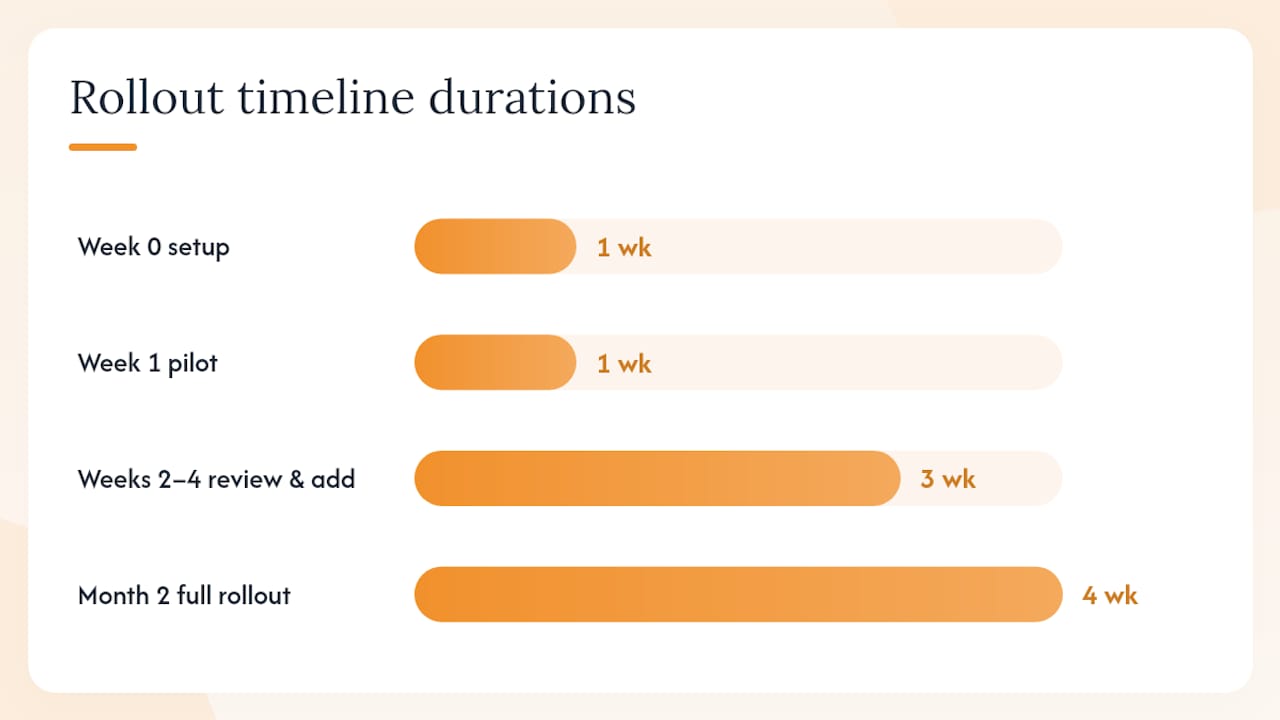
Rollout timeline:
- Week 0: map your project codes and cost codes; configure payroll export settings; identify your pilot crew and foreman
- Week 1: go live with one crew on one active project; foreman approves daily
- Weeks 2–4: review job-cost data accuracy, fix any mapping gaps, add a second crew
- Month 2: full rollout across all active projects
Following construction timecard best practices during this phase, particularly around job-code validation and approval workflows, is what separates a clean rollout from a messy one.
Pro Tip: Run parallel payroll for one full pay cycle before switching entirely. Process hours in both the old system and the new one, compare the outputs, and resolve any discrepancies before the paper process goes away.
What does construction timecard software cost, and what’s the ROI?
Most vendors use one of three pricing shapes:
| Pricing Model | Structure | Best Fit |
|---|---|---|
| Company fee + per-worker | Flat monthly base plus a per-active-field-worker fee | Small to mid-size subcontractors |
| Per-seat | Monthly fee per named user (field and office) | Teams where office users need full access |
| Tiered bundle | Fixed tiers by crew size or feature set | Growing companies wanting predictable costs |
Won2build uses a flat monthly company fee plus per-active-field-worker fees for Time Budge, so costs scale with your active crew rather than your total headcount.
Sample ROI calculation (illustrative assumptions):
- Crew size: 15 field workers
- Admin time saved per pay period: 4 hours (timesheet collection, data entry, error correction)
- Office staff burden rate: $35/hour
- Savings per pay period: $140; annual savings: $3,640
- Additional savings from reduced payroll errors and faster dispute resolution: qualitative but material
- Payback period: typically under three months at this crew size
Watch for hidden costs: implementation fees, charges for API connectors to payroll platforms, and per-call API pricing that grows with usage. Ask vendors to show you a fully-loaded monthly cost at your crew size before signing.
For a deeper look at labor hour tracking and budget mapping, the field guide walks through how to connect time entries to budget lines on active projects.
Key Takeaways
Time Budge by Won2build is the strongest digital timecard option for construction subcontractors because it maps crew hours to job cost in real time and integrates directly with payroll and the full Won2build suite.
| Point | Details |
|---|---|
| Start with a pilot | Run one crew on one project code first; validate job-cost mapping before expanding. |
| Offline mode is non-negotiable | Any app that requires a live connection to record a clock-in will fail on active job sites. |
| Run parallel payroll once | Process one pay cycle in both systems before cutting over to catch mapping errors early. |
| ROI arrives fast | Admin time savings alone typically deliver payback in under three months for a 15-person crew. |
| Won2build Time Budge | Built for subcontractors with GPS, offline mode, cost-code mapping, and Won2build Hub integration. |
The feature most subcontractors overlook until it costs them
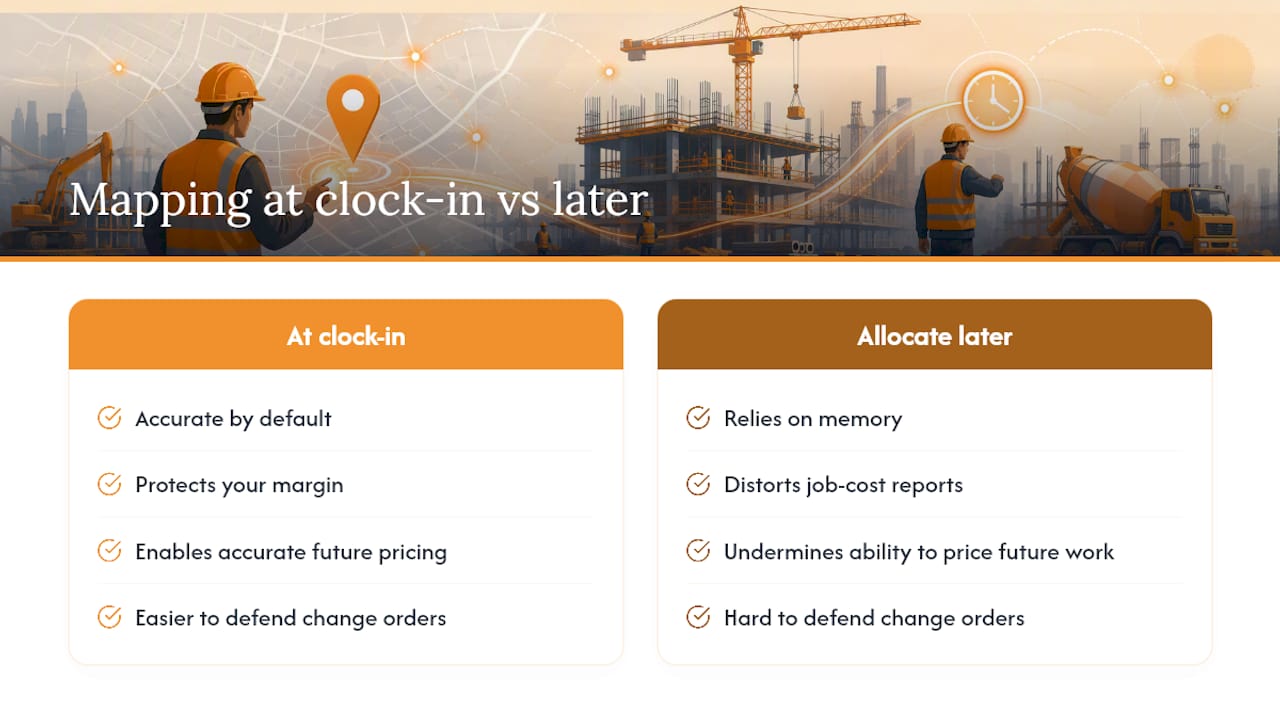
Most subcontractors shopping for a mobile timecard app focus on clock-in speed and payroll export. Those matter. But the feature that actually protects your margin is job-code mapping at the point of clock-in, not after the fact.
Here is why that distinction matters. When workers assign hours to a project and cost code as they clock in, the data is accurate by default. When allocation happens later, in a spreadsheet or during payroll prep, it relies on memory, and memory on a busy job site is unreliable. Misallocated hours don’t just distort your job-cost reports; they undermine your ability to price future work accurately, defend change orders, or dispute a general contractor’s back-charge.
The subcontractor time tracking benefits that actually move the needle are downstream of that one discipline: accurate cost codes at clock-in. Everything else, faster payroll, cleaner audits, better change-order documentation, follows from getting that right. Apps that skip job-code mapping or treat it as optional are solving the wrong problem.
Try Time Budge with a 30-day pilot
Paper timesheets and generic time clocks leave subcontractors flying blind on labor cost. Time Budge gives you GPS-verified clock-ins, job-code mapping, and real-time labor burn against budget, all inside the Won2build Hub alongside your change orders, bids, and takeoffs.

The pilot is straightforward: one crew, 30 days, full onboarding support included. Won2build’s team will walk you through job-code configuration and payroll export setup, and they provide parallel-payroll guidance during your first pay cycle so the cutover is clean. When you are ready to expand to the full suite, CO Hub and Bid Track are one login away.
Start your Time Budge pilot at won2build.com and see labor cost clarity on your next project.
Useful sources and further reading
- Construction Timecard Best Practices for Subcontractors — Won2Build Blog
- The Role of Electronic Time Tracking for Construction Projects — Won2Build Blog
- How to Create Subcontractor Time Cards That Hold Up — Won2Build Blog
- Track Labor Hours on Job Sites: 2026 Field Guide — Won2Build Blog
- Won2Build
Recommended
One login for estimating, bid tracking, change orders, and labor.
The Hub is free. Pay only for the apps you turn on.
Create your free Hub account- 7 Concrete Takeoff Steps Estimators Use to Avoid Ordering ShortfallsFollow seven concrete takeoff steps to calculate cubic yards, size rebar and formwork, convert volumes to supplier units, and verify quantities before bid...
- Are E-Signature Change Orders Legal and Worth the Switch?E-signature change orders streamline your workflow, ensuring faster approvals, fewer disputes, and quicker invoicing—discover the benefits now!
- How to Link Takeoff to Estimate for Accurate BidsLink your takeoff quantities to your estimate for accurate bids. Discover the seamless integration method that reduces errors and saves time.