
How to Create Subcontractor Time Cards That Hold Up
Learn how to create subcontractor time cards that ensure accuracy and protect your profits. Capture data in real-time to avoid costly errors.

A subcontractor time card is the official record of hours a worker spends on a specific job, tied to a job code, a location, and a verified timestamp. Creating subcontractor time cards the right way means capturing that data at the moment work happens, not hours or days later. Delayed entry is the single biggest source of timecard errors in construction, and those errors compound fast. Accurate timecards protect your payroll, your margins, and your position in any payment dispute.
How to create subcontractor time cards that are accurate from the start
The standard industry term for this practice is “contemporaneous time recording.” It means the record is created at the exact moment the work occurs. Digital contemporaneous records that tie timestamps, worker identity, and job codes at entry dramatically improve both job cost reporting and legal defensibility. That combination matters because a timecard is not just a payroll document. It is evidence.
Most subcontractor timecard problems do not come from dishonesty. Timecard inaccuracies stem from flawed systems, not intentional fraud. When workers fill out timecards from memory at the end of a shift or the end of a week, they round times, misremember job codes, and blur task boundaries. Those small errors stack up across a crew and across a project.

The good news: one contractor reduced office time correcting timecards from 10 hours to 1 hour per week after switching to digital tracking. That kind of result is repeatable when you fix the system, not just the people.
What tools do you need before you start?
Reliable subcontractor timesheets require three things at the point of entry: a verified worker identity, a locked timestamp, and an assigned job code. Mobile apps with GPS and geofencing deliver all three. GPS tracking and biometric verification prevent buddy punching and confirm that the worker clocking in is actually on site.
The table below shows the main tool categories and what each one provides.
| Tool category | Core features | Best for |
|---|---|---|
| Mobile time tracking app | GPS clock-in, job code selection, photo capture | Field crews on active job sites |
| Biometric time clock | Fingerprint or facial ID, tamper-proof log | Fixed sites with controlled access |
| Paper timesheet template | Manual entry, supervisor signature | Backup only, low-tech environments |
| Integrated labor platform | Real-time sync, payroll export, audit trail | Multi-crew projects with office oversight |
Paper timesheets are not a reliable primary method. They have no timestamp verification, no location data, and no audit trail. They are useful as a backup, but they should never be your main system.
Pro Tip: Before choosing a mobile app, confirm it locks the clock-in time and location at the moment of entry and does not allow retroactive edits without a logged reason. That audit trail is what makes the record defensible.
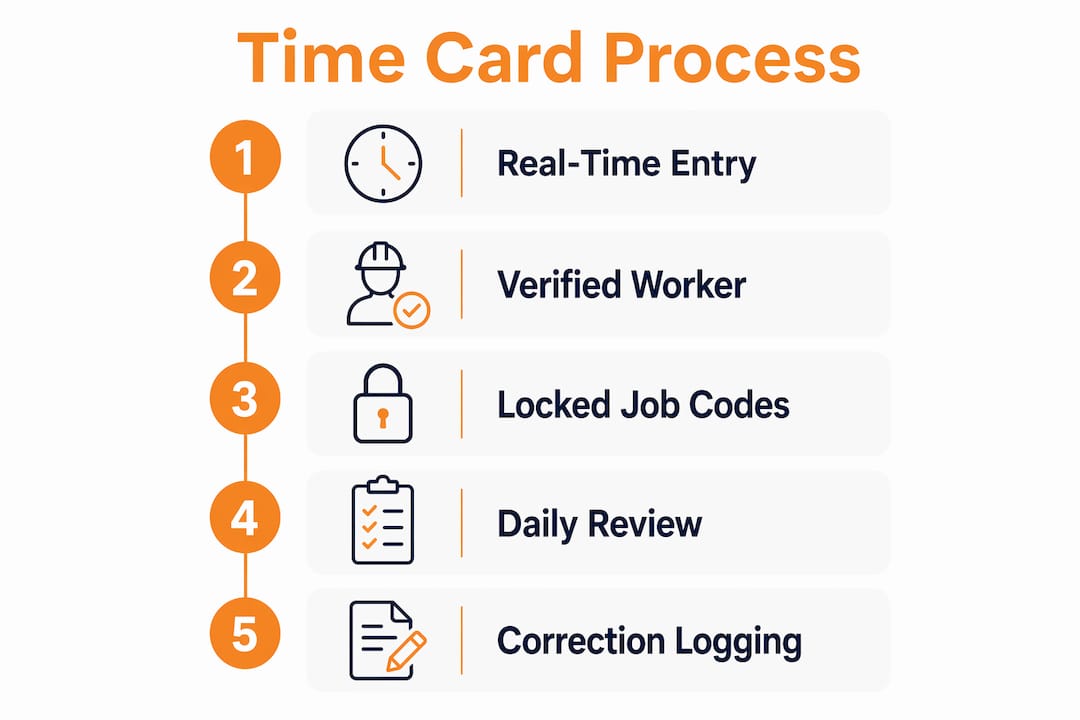
Step-by-step process for filling subcontractor time cards correctly
Follow these steps every shift, without exception.
-
Open the time tracking app before starting work. Clock in at the job site, not in the truck or at home. The GPS timestamp must reflect your actual location on site.
-
Select the correct job code at clock-in. Every project phase or task should have its own code. Assigning the wrong code at entry is far harder to fix accurately than getting it right the first time.
-
Log task switches in real time. If you move from framing to electrical rough-in mid-shift, clock out of the first code and clock into the second. Do not batch-assign hours at the end of the day.
-
Clock out before leaving the site. Forgetting to clock out is one of the most common errors. Many apps send an automatic reminder if a worker is still clocked in past a set time.
-
Submit the timecard before leaving the site. Same-day submission eliminates memory-based errors entirely. Shifting accuracy responsibility to the point of entry is the single most effective fix for chronic timecard problems.
-
Have the foreman review and approve on site. A supervisor who was present can verify the hours immediately. End-of-week approvals rely on memory and are far less reliable.
Workers filling timecards after the fact often round times and misassign job codes, and a 15-minute rounding error per worker per day adds up to significant payroll discrepancies across a full crew. The fix is not stricter rules. The fix is a system that makes real-time entry the easiest path.
Pro Tip: Set up job codes in your app before the project starts. Pre-loading codes means workers select from a list rather than typing freehand, which eliminates spelling errors and code mismatches that break payroll exports.
How do you verify and manage time cards to prevent errors?
Verification is where most subcontractors lose ground. Reviewing timecards daily takes less time than fixing a week’s worth of errors on Friday afternoon.
Daily review catches problems while the work is still fresh. A foreman who reviews entries each evening can spot a missing clock-out or a wrong job code in seconds. The same correction at the end of the week requires guesswork.
Arbitrators favor digital time records with audit trails over paper logs in payment disputes. An immutable change log that records every edit, who made it, and when, is what separates a defensible record from a vulnerable one. Never use a system that allows silent edits.
Common errors to watch for during review:
- Missing clock-outs: The system records the clock-in but no clock-out, leaving hours open.
- Wrong job code: Hours logged to the wrong phase distort cost reports for both phases.
- Duplicate entries: A worker clocks in twice for the same shift, inflating hours.
- Unverified location: A clock-in with no GPS match to the job site address.
- Unapproved overtime: Hours that exceed the shift plan without a supervisor note.
Each of these errors has a correction path, but the correction must be logged. Any change to a submitted timecard should require a written reason and a supervisor signature. That practice protects both the worker and the company.
For projects with multiple phases running simultaneously, assign a unique job code to each phase and require workers to select the correct code at every clock-in. Bundling hours across phases after the fact is a major source of cost distortion and a common trigger for billing disputes. Pairing your time tracking with digital billing practices keeps the paper trail consistent from field to invoice.
How does time card integration improve payroll and project management?
Time card data becomes most valuable when it flows directly into payroll and project cost systems without manual re-entry. Integration with payroll and project management systems reduces manual re-entry errors and enables real-time labor cost tracking. That real-time visibility changes how project managers make decisions.
The core benefits of full integration include:
- Payroll accuracy: Hours export directly to payroll with job codes attached, eliminating transcription errors.
- Job cost visibility: Labor costs post to the correct phase in real time, so you see budget vs. actual without waiting for month-end.
- Bid improvement: Accurate historical labor data from past projects feeds better estimates on future bids.
- Dispute documentation: A complete, exportable record of every hour worked, by whom, on which task, is available on demand.
- Margin protection: Knowing your real labor cost per phase lets you catch overruns before they become losses.
Subcontractors who track labor hours electronically gain a feedback loop that paper systems cannot provide. Every hour logged becomes a data point that sharpens your next estimate. That is the long-term value of getting time cards right. You can also explore time tracking cost savings that compound across multiple projects when the system is consistent.
Outsourcing payroll processing is another option that pairs well with digital time tracking. When your records are clean and exportable, payroll outsourcing becomes far less risky and far more efficient.
Key Takeaways
Accurate subcontractor time cards require real-time entry with verified timestamps, locked job codes, and daily review to protect payroll accuracy, job costs, and legal defensibility.
| Point | Details |
|---|---|
| Record at the moment of work | Clock in on site with GPS active to create a legally defensible, contemporaneous record. |
| Lock job codes at entry | Assign the correct phase code at every clock-in to prevent cost distortion across project phases. |
| Review timecards daily | Daily review catches errors while memory is fresh and before they compound into payroll problems. |
| Use audit trails | Any edit to a submitted timecard must be logged with a reason and approver to maintain defensibility. |
| Integrate with payroll systems | Direct export from time tracking to payroll eliminates re-entry errors and improves job cost accuracy. |
The real problem with subcontractor timecards is the system, not the crew
I have watched project managers spend Friday afternoons untangling a week of timecard errors, convinced the problem was lazy workers. It almost never is. The problem is a system that makes accurate entry harder than inaccurate entry.
Paper timesheets handed out at end of shift are a design flaw, not a policy failure. When the easiest thing a worker can do is fill out the form from memory in the parking lot, that is exactly what they will do. You get rounded hours and guessed job codes every time.
The shift that actually works is making real-time entry the default. When a worker opens an app, selects a job code from a pre-loaded list, and taps clock-in, the system does the hard work. The timestamp is locked. The location is verified. The job code is correct. There is nothing to remember later because there is nothing left to record.
I have also seen how this changes the office side. When timecards arrive clean and complete, the payroll run takes minutes instead of hours. Project managers can look at labor costs by phase on Tuesday morning instead of waiting for a Friday report. That visibility changes how you manage a job. You catch overruns early enough to do something about them.
The crews who resist digital time tracking usually come around fast once they realize it protects them too. A locked, GPS-verified clock-in is proof they were on site and working. In a payment dispute, that record is worth more than any paper log.
— Jen Reese
Won2build makes time card management work end to end
Managing subcontractor time cards gets significantly easier when your field data connects directly to your estimating and cost tracking tools.

Won2build’s Time Budge application captures labor hours in real time and syncs them across the platform, so your job costs update as work happens. When you pair that with Bid Track, your historical labor data feeds directly into future estimates, tightening your bids with every project you complete. The Takeoff tool adds digital plan quantification to the mix, giving you a complete picture from estimate to final labor cost. Won2build’s single sign-on means your field data, change orders, and bids all live in one place, with no double entry and no data gaps between apps.
FAQ
What is a subcontractor time card?
A subcontractor time card is a record of hours worked by a subcontractor on a specific job, tied to a job code, location, and timestamp. Digital time cards created at the moment of work carry the highest accuracy and legal weight.
Why do subcontractor time cards matter for payment disputes?
Digital time records with locked timestamps and audit trails are favored by arbitrators over paper logs because they are harder to dispute and show every edit made after submission.
How do I fill out subcontractor time cards correctly?
Clock in on site using a GPS-enabled app, select the correct job code at entry, log task switches in real time, and submit the timecard before leaving the site the same day.
What causes most subcontractor timecard errors?
Most errors come from delayed entry. Workers filling timecards from memory round times and misassign job codes, which distorts both payroll and job cost reports.
How often should subcontractor time cards be reviewed?
Daily review by a foreman or project manager catches errors while the work is still fresh. End-of-week review relies on memory and allows errors to compound across multiple shifts.
Recommended
One login for estimating, bid tracking, change orders, and labor.
The Hub is free. Pay only for the apps you turn on.
Create your free Hub account- Construction Software ROI: How Subcontractors Measure ItA practical way for commercial subcontractors to calculate construction software ROI: full costs, real benefits, a worked example and the mistakes that inflate it.
- How to Compare Plan Revisions and Control Estimate ChangesA practical guide for commercial subcontractors on comparing plan revisions, catching scope changes, and keeping estimates and change orders in step.
- Drywall Takeoff Basics: A Step-by-Step Guide for SubsLearn drywall takeoff basics: how to measure walls and ceilings, deduct openings, convert to sheets, set waste and finish levels, and avoid costly misses.