
Mobile Timesheet for Subcontractors: A Field-Ready Guide
Discover how a mobile timesheet can streamline subcontractor payroll, ensuring accuracy and saving time with real-time data integration.

A mobile timesheet is a cloud-connected app that lets field crews clock in, attach jobsite photos, and sync labor costs to project budgets in real time. For commercial subcontractors, the right move is an integrated approach like Won2Build’s Time Budge module rather than a disconnected standalone app. Standalone apps hand you raw hours; an integrated module hands your office finance-ready data mapped to cost codes, ready for payroll export and U.S. Department of Labor recordkeeping. That difference determines whether your payroll close takes two hours or two days.
Table of Contents
- Why mobile timesheets change the economics of subcontracting
- What features does a subcontractor’s mobile timesheet actually need?
- How to roll out a mobile timesheet on your crew
- How do you get field crews to actually use the app?
- Payroll integration and US compliance: what to verify before you go live
- How Time Budge handles mobile timesheets inside Won2Build
- Integrated module vs. standalone app: which one fits your crew?
- Key Takeaways
- The case for treating your timesheet as a project control tool
- Time Budge by Won2Build: built for the way subcontractors actually work
- Useful sources and references
Why mobile timesheets change the economics of subcontracting
Late timecards are expensive. When field crews reconstruct hours at week’s end, errors compound: wrong cost codes, missed overtime, disputed labor on change orders. The fix isn’t chasing people harder. It’s removing the friction so accurate data flows automatically.

The ROI shows up in three places. First, administrative hours drop because real-time syncing eliminates the reconciliation work that piles up when field data arrives late or in the wrong format. Second, invoice cycles shorten because labor records are already categorized by project and task. Third, budget overruns get caught early. Construction managers consistently report that the biggest operational gain from mobile time tracking is the shift from looking back at problems to spotting issues in near real time and correcting course before they compound.
Other problems that disappear: buddy punching (GPS verification kills it), disconnected field/office data (real-time sync closes the gap), and missed receipts for T&M substantiation (photo capture attached to entries).
Stat: Integrated mobile tracking prevents weeks-long reconciliation delays common when field data is only reconciled during payroll close.
What features does a subcontractor’s mobile timesheet actually need?
Not every time tracking app is built for a jobsite. Here’s what to require before you commit:
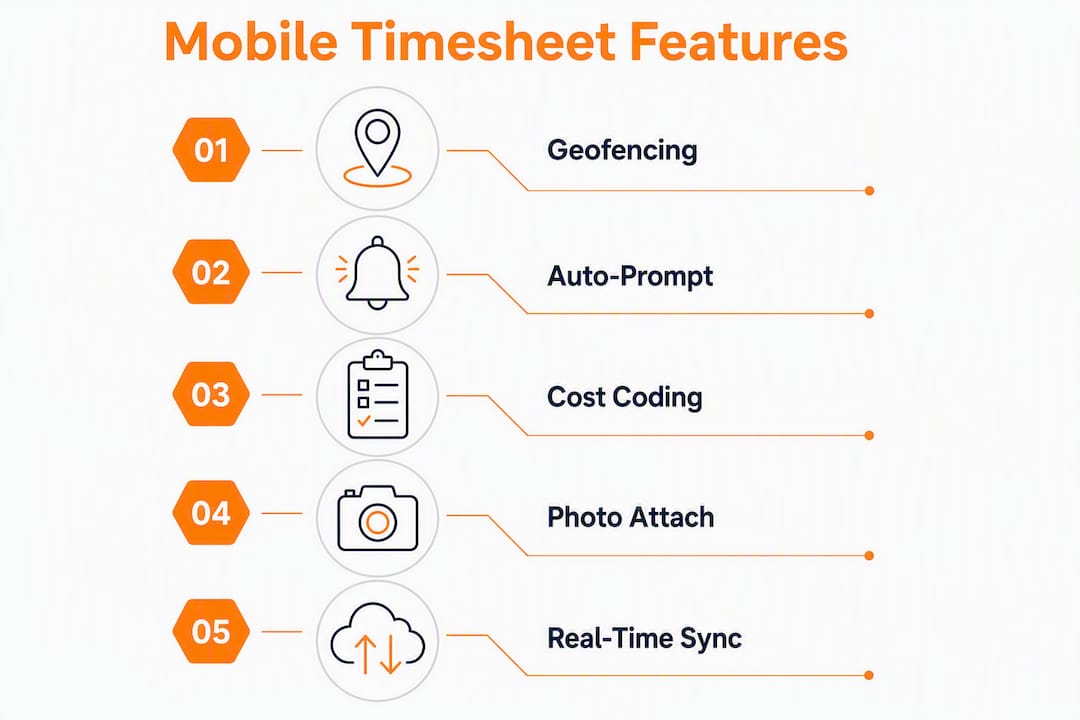
- Geofencing with autoprompt: The app triggers a clock-in reminder when a worker enters the jobsite boundary. Geofence alerts prevent inaccurate entries and reduce the need for supervisor enforcement.
- GPS verification at punch-in/out: Timestamps tied to coordinates prevent buddy punching and correctly allocate labor to the right site and cost code.
- Offline mode with automatic sync: Crews work in basements, tunnels, and dead zones. The app must queue punches offline and replay them automatically when connectivity returns.
- Task-level time tracking and cost-code mapping: Every entry must map to the same project codes your office uses.
- Photo and document capture: Photo attachments and jobsite notes speed change-order approvals and reduce billing disputes.
- One-tap timers: Fewer taps mean higher adoption. Period.
- Approval workflows: Supervisors review and approve before data reaches payroll.
- Payroll/export integrations: QuickBooks-style CSV or direct API sync to your accounting system.
- Audit trail and encryption: Every edit logged, every record encrypted.
| Feature | Construction-specific benefit | Minimum acceptance criteria |
|---|---|---|
| Geofencing | Auto-prompts prevent missed punches | Configurable radius for geofencing accuracy |
| GPS verification | Eliminates buddy punching | Coordinate stamp on every punch |
| Offline mode | No data loss in dead zones | Queue holds punches; auto-syncs on reconnect |
| Cost-code mapping | Finance-ready data, no manual remap | Mobile codes match office codes exactly |
| Photo capture | Change-order and T&M substantiation | Attached to the time entry, not a separate folder |
| Approval workflow | Supervisor gate before payroll export | Configurable approval tiers |
Pro Tip: Require that mobile entries map automatically to the same cost codes used in your office system. Mismatches between mobile and desktop entries are the primary cause of heavy reconciliation work — fix it at configuration, not at payroll close.
How to roll out a mobile timesheet on your crew
A phased rollout beats a big-bang launch every time. Here’s the sequence that works:
- Discovery and requirements (Week 1–2): Document your cost codes, billing rates, payroll export format, and approval hierarchy before touching any software.
- Vendor selection and configuration (Week 2–3): Configure geofences for each active jobsite, map tasks to payroll codes, and set overtime alert thresholds.
- Pilot site selection (Week 3–4): Pick one active job with a cooperative foreman. Small crew, clear scope, manageable variables.
- Training (Week 4): One 30-minute session per crew. Focus on clock-in, clock-out, task switching, and photo capture. Nothing else.
- Pilot feedback loop (Week 4–6): Track adoption rate (punches per scheduled shift), timesheet error rate, and on-time submission rate daily.
- Adjust and document (Week 6–8): Fix configuration gaps, update training materials, and document edge cases (split shifts, travel time, equipment downtime).
- Full deployment (Week 8–12): Roll out site by site. Use pilot metrics as your baseline.
Realistic timeline: vendor selection through full adoption typically spans a few months for most subcontracting crews. Rushing the pilot phase is the most common mistake.
Pro Tip: Limit early clock-ins to 7–10 minutes before scheduled start. Without that guard, you’ll accumulate phantom overtime that distorts your labor variance reports before the system even gets off the ground.
Measurement: Track these KPIs from day one: adoption rate, timesheet error rate, payroll reconciliation hours, on-time submission rate, and project labor variance vs. budget. If reconciliation hours don’t drop within the first pay cycle, your cost-code mapping needs work.
How do you get field crews to actually use the app?
Adoption is where most rollouts fail. The app can have every feature on the checklist and still collect dust if it takes six taps to clock in.
- Keep it to one tap for the most common action (clock-in at the assigned site).
- Use geofence autoprompts so the app reminds workers rather than relying on memory.
- Run training in the field, not a conference room. Show it on the actual phone they’ll use.
- Set supervisor enforcement windows: entries not submitted by 6 PM get flagged automatically.
- Monitor daily punch rate and percent of entries with GPS verification. Low GPS verification usually means workers are clocking in from the parking lot or the truck.
Policies matter as much as the app itself. Define clear rules for job switching, break logging, and what happens when someone forgets to clock out. Lightweight, consistent consequences for abuse prevent the exceptions from becoming the norm.
Pro Tip: Start with foremen and superintendents as your first users. They model the behavior, handle edge cases on the spot, and give you honest feedback before you scale to the full crew.
Adoption insight: Systems that minimize effort for field workers — one-tap timers, autopunch, geofence prompts — consistently drive higher field uptake than feature-rich apps that require multiple steps.
Payroll integration and US compliance: what to verify before you go live
Getting the data into the app is half the job. Getting it out in a format your payroll system trusts is the other half.
Integration checklist:
- Confirm your payroll export format (CSV, direct QuickBooks sync, or API) before selecting a vendor.
- Map cost codes and billing rates in the app to match your accounting system exactly.
- Set approval gates so no entry reaches payroll without supervisor sign-off.
- Test the export with one pay period before full deployment.
Compliance items for US subcontractors:
- The Fair Labor Standards Act requires employers to maintain accurate time records. Your mobile timesheet is that record — treat it accordingly.
- For prevailing wage and certified payroll jobs, GPS coordinates and photo attachments create the audit trail you’ll need if a wage claim surfaces.
- Offline punch capture and automatic syncing preserve continuous records even when connectivity drops; require timestamp integrity and admin edit logs so records stay defensible.
- Encrypt stored data and restrict admin edit permissions to named users with logged access.
| Compliance area | What to verify |
|---|---|
| FLSA recordkeeping | Time records retained per DOL requirements |
| Prevailing wage / certified payroll | GPS + photo audit trail per entry |
| Overtime accuracy | Automated OT alerts and approval before payroll export |
| Data security | Encryption at rest and in transit; admin edit log |
This article is general information, not legal or payroll advice. Confirm current requirements with the DOL or a qualified payroll professional for your specific situation.
How Time Budge handles mobile timesheets inside Won2Build
Time Budge is Won2Build’s time and labor tracking module, built specifically for commercial subcontractors and accessed through the same single login as CO Hub, Bid Track, and Takeoff. That single sign-on matters because it means a foreman’s clock-out entry updates the project budget record without anyone touching a spreadsheet.
Key capabilities in Time Budge:
- Geofencing with autoprompt at jobsite entry and exit
- One-tap timers with task-level cost-code mapping
- Offline mode with automatic sync when connectivity returns
- Photo and document capture attached directly to time entries
- Supervisor approval workflows before payroll export
- Real-time sync to Won2Build project and budget records
- Export to common payroll formats
The practical result: project managers see labor costs against budget updated throughout the day, not at week’s end. Payroll reconciliation shrinks because the data arrives already mapped to the right codes. Change-order substantiation is faster because photos and notes are attached to the entry that triggered the extra work.
Pro Tip: Use Won2Build’s subcontractor timecard best practices guide to configure your cost-code structure before your first pilot. Getting codes right at setup saves hours of remapping later.
Integrated module vs. standalone app: which one fits your crew?
The short answer: if you’re managing project budgets, billing clients, or working prevailing wage jobs, you need an integrated module. A standalone app gives you hours. An integrated module gives you hours already mapped to cost codes, synced to budgets, and ready for payroll export.
Choose an integrated module (like Time Budge) when:
- You track labor against project budgets in real time
- You need cost-code alignment between field and office
- You handle certified payroll or prevailing wage requirements
- You want a single audit trail across time, change orders, and estimates
A lightweight standalone app may be enough when:
- Your crew is very small (fewer than five workers)
- You have no project-budget tracking requirements
- Billing is flat-rate with no labor cost allocation
For most commercial subcontractors, the reconciliation cost of a standalone app quickly exceeds the cost of an integrated platform. The electronic time tracking advantage compounds as crew size and project complexity grow.
Key Takeaways
An integrated mobile timesheet module that maps field entries directly to project cost codes is the fastest path to accurate payroll and real-time budget control for commercial subcontractors.
| Point | Details |
|---|---|
| Choose integration over isolation | An integrated module syncs labor to project budgets automatically; a standalone app requires manual reconciliation. |
| Require geofencing and offline mode | Geofence autoprompts prevent missed punches; offline queuing prevents data loss on jobsites with poor connectivity. |
| Map cost codes at configuration | Mobile entries must match office cost codes exactly — mismatches are the primary driver of reconciliation work. |
| Run a short pilot first | An 8–12 week rollout with a one-site pilot catches configuration gaps before they affect the full crew. |
| Won2Build Time Budge | Combines geofencing, one-tap timers, offline mode, and real-time budget sync in a single sign-on construction platform. |
The case for treating your timesheet as a project control tool
The conventional wisdom frames mobile timesheets as a payroll convenience. That framing undersells them and leads subcontractors to pick the cheapest standalone app rather than the right tool.
A timesheet that feeds real-time data into your project budget is a project control instrument. It tells you on Wednesday that the framing crew is running 12% over labor budget on a job that closes Friday. That’s recoverable. The same information arriving at month-end is just a loss to document.
The subcontractors who get the most out of mobile time tracking are the ones who configure it for project visibility first and payroll convenience second. That means cost-code discipline at setup, supervisor approval before export, and daily review of labor variance — not just a weekly payroll run. The technology is only as useful as the discipline behind it.
Time Budge by Won2Build: built for the way subcontractors actually work
Most time tracking apps are built for office teams and adapted for the field. Time Budge starts from the jobsite: geofencing, offline mode, one-tap timers, and cost-code mapping are core features, not add-ons.

Because Time Budge lives inside Won2Build Hub alongside CO Hub, Bid Track, and Takeoff, your field labor data connects directly to change order management, bid estimates, and project budgets through a single login. No double entry. No export-import loops between disconnected tools. When a foreman clocks out and switches tasks, the budget record updates. When a change order gets approved in CO Hub, the labor codes are already aligned.
The Won2Build product suite is built for commercial subcontractors managing real project complexity. Start your 14-day free trial to see how Time Budge fits your current payroll workflow.
Useful sources and references
- U.S. Department of Labor — FLSA Recordkeeping Requirements: Primary authority on time record retention obligations for US employers.
- Won2Build — Construction Timecard Best Practices for Subcontractors: Implementation guidance and templates for defensible subcontractor timecards.
- Won2Build — The Role of Electronic Time Tracking for Construction Projects: Explains how mobile entries should map to finance codes and how to drive crew adoption.
- Won2Build — Track Labor Hours on Job Sites: 2026 Field Guide: Field guide for accurate jobsite hour tracking and pilot planning.
- Won2Build — Real-Time Budget Tracking Benefits for Construction Teams: Covers the budget visibility benefits enabled by integrated mobile timesheets.
Recommended
One login for estimating, bid tracking, change orders, and labor.
The Hub is free. Pay only for the apps you turn on.
Create your free Hub account- Construction Change Directive: A Subcontractor's GuideWhat a construction change directive is, how it differs from a change order, and how subcontractors should document and price directed work to get paid.
- Notice of Change: What Subcontractors Must Send and WhenA notice of change protects a subcontractor's right to extra time and money. Learn what to include, who to send it to, and how to document changed work.
- Per Diem Tracking for Construction SubcontractorsHow construction subcontractors track per diem by worker, project and date, keep IRS-ready records, and write a policy that keeps payments tax-free.