
Construction Software Solutions for Subcontractors and PMs
Discover the best construction software solutions for subcontractors. Streamline your workflow with integrated tools that save time and cut costs.

For most commercial subcontracting teams, an integrated suite beats stitched-together point tools. Won2Build Hub is the practical, first choice: four modules under one login, with real-time field-to-office sync that keeps payroll, change orders, and estimates aligned without manual rekeying. A lightweight point tool only makes sense if your team runs fewer than five field workers on a single trade with no CO exposure.
Three reasons the integrated approach wins for subcontractors:
- Field-to-office sync means time entries and T&M tickets flow directly into payroll and CO records, cutting the lag that causes OSHA-reportable discrepancies and billing disputes.
- Integrated takeoff and estimating eliminates the double-entry loop between your plan viewer and your bid sheet, where most margin leaks.
- Predictable pricing with a flat company fee plus per-active-field-worker billing keeps costs tied to actual project activity, not seat counts that balloon during slow months.
Table of Contents
- What do construction software solutions actually include?
- What features actually matter when you evaluate a platform?
- How do you pick the right construction software for your company?
- What should you test in a 30–45 minute demo?
- What does implementation cost, and when do you break even?
- How Won2Build Hub solves the problems subcontractors actually face
- Key Takeaways
- The gap nobody talks about in construction software adoption
- Won2Build Hub is built for subcontractors who are done losing margin to paperwork
- Further reading and sources
What do construction software solutions actually include?
Construction management software covers six distinct categories, and firms often combine PM, estimating, and field reporting tools rather than running a single platform. Here is who uses each:
- Document and BIM management: Coordinators and VDC leads handle drawing sets, shop drawings, and model files. Shop drawing and 3D model compatibility with DWG, IFC, and RVT formats matters for downstream fabrication and field workflows.
Integrated suite vs. best-of-breed: An integrated suite makes sense when CO leakage and rekeying costs exceed the savings from mixing specialized tools. Community feedback from construction managers consistently shows that tool complexity should match company scale: light PM apps for small field crews, enterprise platforms for large GCs with multi-trade coordination needs.
What features actually matter when you evaluate a platform?
Field-first capabilities
Mobile apps with a genuine offline mode are non-negotiable for subcontractors working in basements, tunnels, or areas with poor cell coverage. The test is simple: turn off your phone’s data connection and try to log time, attach a photo, and submit a T&M ticket. If the app locks up or loses data on sync, it will fail in the field.
Photo markup, push notifications for open issues, and GPS-stamped time entries round out the field layer. These are not premium features; they are table stakes for any construction business software worth evaluating.
Quantification and estimating
AI-assisted takeoff extracts structure and metadata from plan documents, proposing labeled quantity suggestions that estimators review and confirm rather than trace manually. OpenConstructionERP v7.6.0 added AI plan reading for PDF takeoff alongside resumable large-file uploads, which matters when your drawing sets run into hundreds of megabytes. Saved views and support for PDF, DWG, and RVT files let estimators work from the same drawing set the field uses.
Pro Tip: Ask vendors whether their AI takeoff produces labeled suggestions for human review or auto-populates quantities without a review step. The first approach is defensible; the second creates liability on bid day.
Operational and financial features
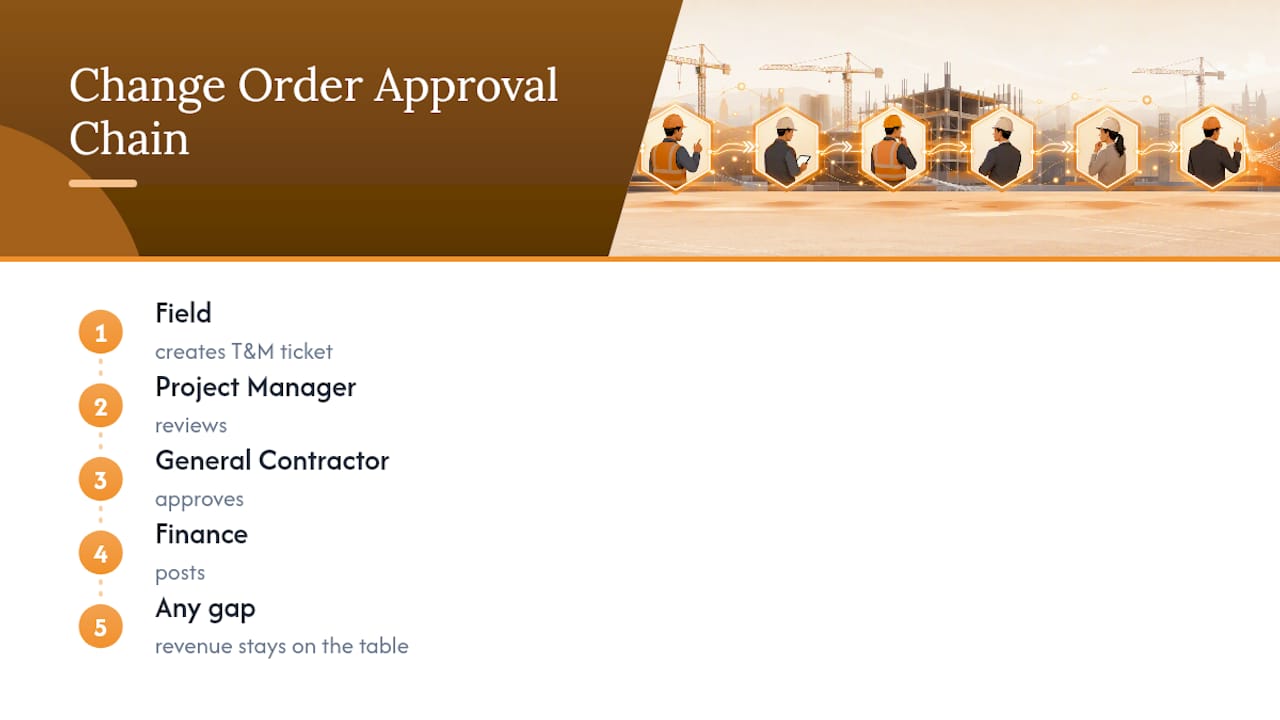
Change order workflows need a clear approval chain: field creates T&M ticket, PM reviews, GC approves, finance posts. Any gap in that chain means revenue stays on the table. GAAP-ready accounting integration, with a double-entry general ledger that produces a trial balance, income statement, and cash flow statement, keeps your books audit-ready without a separate export step.
Multi-site firms need tenant isolation and role-based permissions so a foreman on Project A cannot see labor costs on Project B. OpenConstructionERP v7.3.0 introduced schedule-quality validation checks and BIM viewer improvements that flag missing logic links and out-of-sequence progress, which are useful acceptance criteria when testing any platform’s scheduling module.
Reporting and analytics
Per-project profit reports, forecasted CO impact on margin, and exportable financial statements are the three reports that actually change decisions. Everything else is dashboard decoration.
How do you pick the right construction software for your company?
Questions to ask vendors during demos
- How does data migration work, and what is the estimated timeline for our volume?
- Can you provide references from subcontractors in our trade and our size range?
- What is your uptime SLA, and how is downtime communicated?
- Where is our data stored, and who has access to it?
- How does per-active-field-worker billing work during slow months or project gaps?
- What does the free trial or demo include, and can we test with live data?
Dealbreakers vs. negotiable items
Dealbreakers: No offline mode, hidden per-field-worker fees that activate mid-contract, payroll integration that requires manual CSV exports, no role-based access controls.
Negotiable: Custom report templates, advanced BIM viewer features, white-labeled client portals. These matter but can be added later.
What should you test in a 30–45 minute demo?
Run these five tasks in sequence. If a vendor cannot complete all five in a live session with your files, that is your answer.
- Run a takeoff from a PDF. Upload one of your actual plan sheets. Confirm the AI proposes labeled quantity suggestions. Check that saved views persist after you close and reopen the file.
- Build an estimate from that takeoff. Pull the quantities directly into a bid sheet without retyping. Verify that unit costs and assemblies update the total in real time.
- Generate and send a T&M ticket. Create a ticket from a field event, attach a photo, and send it for approval. Time how long it takes from creation to delivery.
- Create and approve a change order. Build a CO from the T&M ticket, route it through an approval workflow, and confirm it posts to the project’s financial summary.
- Capture time entries offline and sync. Disable the device’s data connection, log two crew members’ hours with cost codes, reconnect, and verify the entries sync without duplication.
For each task, note the time to complete, whether the output matches your input data exactly, and whether the interface requires more than three taps to reach the core action.
Integrations to probe during the demo:
- Export a payroll file and confirm the format matches your payroll provider’s import spec.
- Run an accounting export and check that it maps to your chart of accounts.
- Open a BIM model and confirm geometry matches element IDs consistently, as schedule-quality validation and stable BIM geometry are now baseline expectations.
- Ask whether the platform exposes a REST API or webhooks for custom integrations.
What does implementation cost, and when do you break even?
Typical implementation timeline
| Phase | Small (1–20 workers) | Mid (20–100 workers) | Large (100+ workers) |
|---|---|---|---|
| Discovery and setup | 1–2 weeks | 2–3 weeks | 3–5 weeks |
| Data migration | 1 week | 2–3 weeks | 4–6 weeks |
| Pilot (one project) | 2 weeks | 2–3 weeks | 3–4 weeks |
| Full rollout | 1–2 weeks | 3–4 weeks | 6 weeks |
| Total | 5–7 weeks | 9 weeks | 16 weeks |
Resumable large-file uploads, a feature now present in platforms like OpenConstructionERP v7.6.0, reduce migration friction when moving large CAD and BIM drawing sets.
A simple ROI calculation
If your team misses two change orders per month at an average of $3,500 each, that is $84,000 in unrecovered revenue per year. Faster CO capture alone, before counting labor accuracy gains or reduced rework, typically covers the annual software cost for a mid-size subcontractor several times over. The math is not complicated; the discipline to run it before signing is.
How Won2Build Hub solves the problems subcontractors actually face
Won2Build Hub maps directly to the checklist above. Each module handles a specific workflow gap:
- Bid Track handles the bid pipeline and estimating workflow. Quantities from Takeoff feed directly into Bid Track, eliminating the rekeying step where most estimating errors originate. The bid tracking workflow keeps your pipeline organized across multiple active bids.
Single sign-on across all four modules means a PM can move from reviewing a takeoff to approving a CO to checking labor costs without logging in again. That sounds minor until you have done it in three separate tabs for two years.
For the free trial, bring one active project’s PDF plans, your current cost code list, and one recent CO dispute. Run the five demo tasks from the module checklist above. You will know within 45 minutes whether the platform fits your workflow.
Key Takeaways
Integrated construction software solutions outperform stitched-together point tools for subcontractors when CO capture, labor accuracy, and field-to-office sync are the primary cost drivers.
| Point | Details |
|---|---|
| Integration beats best-of-breed | Rekeying and CO leakage cost more than the savings from mixing specialized tools for most subcontractors. |
| Scale your criteria | Small teams (1–20 workers) prioritize mobile and CO capture; mid-size teams (20–100) weight integrations and payroll export most heavily. |
| Demo with real files | Run all five module tasks with your own project data; a vendor who cannot complete them live is telling you something. |
| Implementation takes time | Small teams typically go live in a few weeks; mid-size rollouts take longer including data migration. |
| Won2Build Hub | Covers time tracking, CO management, estimating, and takeoff under one login, with per-active-field-worker pricing tied to actual project activity. |
The gap nobody talks about in construction software adoption
The construction software market has a real problem that no vendor will put in their sales deck: the tools work, but the crews don’t use them. A platform can have flawless offline sync and AI-assisted takeoff, and it will still fail if the foreman enters time at the end of the week from memory instead of daily in the field.
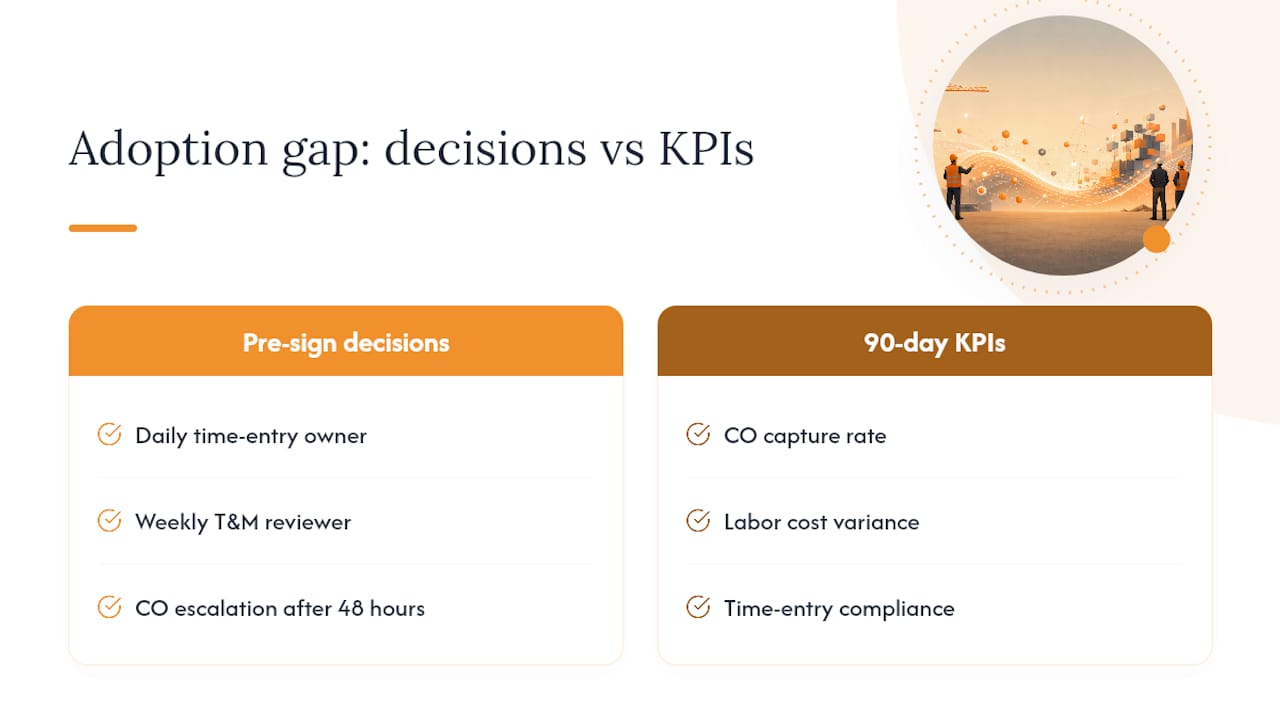
The adoption gap is a process problem, not a software problem. Before you sign any contract, decide who owns daily time entry enforcement, who reviews open T&M tickets every Friday, and what happens when a CO sits unapproved for more than 48 hours. Those three decisions matter more than any feature comparison.
The KPIs worth tracking in the first 90 days: CO capture rate (COs submitted vs. COs approved and billed), labor cost variance (budgeted vs. actual by project), and time-entry compliance rate (entries submitted same day vs. backdated). If those three numbers improve, the software is working. If they don’t, the problem is upstream of the platform.
Won2Build Hub is built for subcontractors who are done losing margin to paperwork
Most construction platforms are built for general contractors and retrofitted for subs. Won2Build Hub starts from the subcontractor’s workflow: field labor flows into payroll, T&M tickets become change orders, and takeoff quantities feed directly into bid estimates, all under one login with no duplicate entry.

The free trial includes all four modules: Time Budge, CO Hub, Bid Track, and Takeoff. Bring your current project’s PDF plans and your cost code list. Pricing runs on a flat monthly company fee plus per-active-field-worker charges, so you pay for the crew you actually have on site, not a seat count that doesn’t move. Start your trial at Won2Build Hub or go directly to the Takeoff product page if plan quantification is your first priority.
Further reading and sources
- OpenConstructionERP v7.6.0
- OpenConstructionERP v7.3.0
- 6 Essential Software Solutions for Construction Companies
- AI Analysis | ksign.co | ksign.co
- AI
- Shop Drawings, 3D Modeling, BBS: From Blueprint to BIM and Beyond
- Construction management software recommendations
Recommended
One login for estimating, bid tracking, change orders, and labor.
The Hub is free. Pay only for the apps you turn on.
Create your free Hub account- 7 Concrete Takeoff Steps Estimators Use to Avoid Ordering ShortfallsFollow seven concrete takeoff steps to calculate cubic yards, size rebar and formwork, convert volumes to supplier units, and verify quantities before bid...
- Are E-Signature Change Orders Legal and Worth the Switch?E-signature change orders streamline your workflow, ensuring faster approvals, fewer disputes, and quicker invoicing—discover the benefits now!
- How to Link Takeoff to Estimate for Accurate BidsLink your takeoff quantities to your estimate for accurate bids. Discover the seamless integration method that reduces errors and saves time.