
Decide in a Day: Point Solutions vs Platform for Ops & IT
Audit-first framework for operations and IT leaders to choose between point tools and a platform. Run a one-day audit to surface 25–40% recoverable savings.

Pick a point solution when you need a specific problem fixed fast and cheap. Pick a platform when you need connected data across teams for the long haul. Most organizations end up running both: a core platform for shared workflows, plus two or three specialized tools where deep functionality justifies the extra integration work. The right call depends on four things: how fast you need results, your real budget over three years (not just the sticker price), how critical the function is to revenue, and how much integration work your team can actually absorb.
TL;DR:
- A point solution does one task exceptionally well but often results in data silos and manual work when multiple tools are used together.
- Platforms unify data across departments with shared databases and single sign-on, but they require longer implementation and more change management.
- Cost considerations include higher integration maintenance for point solutions, which can add 20 to 40 percent annually to total expenses, versus the simpler management of platforms.
- Conducting an audit of software usage, licenses, and integration effort reveals whether consolidating onto a platform or maintaining specialized tools is more cost-effective.
- Pilot a single module for critical functions before a full rollout, and prioritize cross-departmental workflows and revenue-impact functions when choosing solutions.
Table of Contents
- Point Solutions vs. Platform: What Each Term Actually Means
- What Is a Platform Solution and When Does It Win?
- Point Solutions vs. Platform: A Side-by-Side Breakdown
- How to Decide: An Audit-First Framework
- Calculating the Real Total Cost of Ownership
- What Implementation Actually Looks Like
- Applying This Framework to Subcontractor Workflows
- The Framework Nobody Follows, and Why That Costs Money
- Getting Started With Won2Build Hub
- Sources
- FAQ
Point Solutions vs. Platform: What Each Term Actually Means
Before comparing trade-offs, it helps to separate the two categories cleanly, since “point solutions vs platform” gets thrown around loosely in vendor pitches.
What is a point solution?
A point solution is a piece of software built to do one job extremely well. It’s not a stripped-down platform. It’s a specialist tool with a narrow scope, a focused interface, and none of the sprawl that comes with an all-in-one suite. That narrowness is the whole appeal.
Point solutions typically deploy in days or weeks, not months, because there’s less to configure and fewer stakeholders to align. They tend to have the deepest feature set in their category, since the vendor’s entire roadmap is aimed at one problem instead of ten. The trade-off shows up later: a single business need gets solved quickly, but the tool often ends up isolated from everything else you run, creating data silos and manual re-entry that nobody notices until the spreadsheet errors start piling up, according to PTC’s comparison of platform and point solutions.
Point solutions make the most sense when:
- You have an urgent, narrowly defined problem with a clear owner and a short deadline.
- The function is highly specialized and a generalist platform module would underperform.
- You’re piloting a new process or automation and don’t want to commit to a full platform before proving the concept works.
- Budget constraints rule out a bigger suite purchase this fiscal year.
Common examples include a dedicated takeoff tool for construction estimators, a single-purpose expense-scanning app, or a niche scheduling tool for one department. Each does its job well. None of them talk to each other by default.
What Is a Platform Solution and When Does It Win?
A platform solution is an integrated suite of applications sharing one data model, one login, and one reporting layer. Instead of stitching together five separate tools, you get five (or more) modules that already speak the same language, because they were built to share data from day one.

The technical signature of a real platform is single sign-on across modules, a central database instead of five disconnected ones, and reporting that pulls from every module at once without an export-and-merge step. That architecture is what makes cross-department workflows possible. When finance, operations, and field teams need to see the same numbers at the same time, a platform delivers that by design; a pile of point solutions delivers it only through manual reconciliation, according to Deltek’s analysis of point versus platform solutions.
Platforms tend to win when:
- Multiple departments touch the same data and need it to match without a spreadsheet in between.
- You’re scaling headcount or project volume and can’t afford inconsistent metrics across teams.
- Auditability matters, whether for compliance, investor reporting, or simply knowing which numbers are real.
- You want fewer vendor relationships and fewer renewal negotiations to manage each year.
The catch is real: platform rollouts take longer to implement than a single point tool, and they demand more change management, since you’re asking multiple teams to adjust their habits at once rather than just one department adopting a new app.
Point Solutions vs. Platform: A Side-by-Side Breakdown
Line up the two approaches against the dimensions that actually drive a procurement decision, and the pattern gets clearer fast.
- Speed to value. Point solutions typically go live in days to a few weeks. Platform rollouts usually run one to several months, depending on module count and data migration complexity.
- Functional depth. A dedicated point tool almost always beats a platform’s built-in module on raw feature depth in its one category, because that’s the entire product.
- Scalability. Platforms scale cross-team workflows cleanly. Point solutions scale within their own lane but multiply integration work every time you add another one.
- Integration complexity. Every point solution you add is another API to maintain, another login, another place data can drift out of sync. Platforms collapse that into one system.
- Total cost of ownership. The sticker price on a point solution often looks cheaper. Add integration maintenance, and industry estimates put that upkeep at 20 to 40 percent on top of best-of-breed spend over time.
- Vendor and security management. One platform vendor means one security review, one contract renewal, one support line. Five point solutions mean five of everything.
Buyer behavior backs up the platform lean at scale. Market research on procurement patterns shows companies increasingly prefer a single vendor that solves multiple problems over stitching together a patchwork, mainly because vendor sprawl creates its own management overhead that never shows up in the original budget line.
Statistic callout: Integration maintenance on best-of-breed tool stacks commonly adds 20 to 40 percent to total spend, a cost most teams never model when they compare sticker prices side by side.
There’s one exception worth naming directly: when a function drives revenue and the best point solution genuinely outperforms the platform’s built-in module by a wide margin, the integration tax is often worth paying.
How to Decide: An Audit-First Framework
Skip the gut call. Run a short audit before you sign anything, because the numbers usually tell a different story than the sales deck.
Start with a tool inventory. Count how many separate apps your team uses for overlapping functions, how many licenses actually get logged into monthly, and how many hours your team spends each month maintaining integrations between them (Zapier flows, custom API scripts, manual CSV exports). Write those three numbers down before you evaluate a single new vendor.
A few threshold rules make the decision less subjective:
- More than three tools per function is a signal you’re duplicating spend and creating redundant data entry.
- Integration maintenance eating more than 20 percent of your software budget means the “cheap” point tools aren’t cheap anymore.
- Carrying more than 100 apps company wide, or seeing license waste above 53 percent, is the threshold where a formal consolidation audit pays for itself almost immediately, based on consolidation research from knowledgelib.io.
Then apply a function criticality test: if a specialized tool improves the outcome of a revenue-driving function by more than roughly 20 percent over the platform’s built-in equivalent, keep it as a best-of-breed exception. If the gap is smaller than that, consolidate. The common pattern across consolidation studies is to push non-differentiating functions like HR, general finance, and internal project management into a suite, and reserve best-of-breed budget for two or three functions that actually move revenue.
Pro Tip: Before you buy anything new, run a 30-day usage pull on your current license roster. Most teams find at least a quarter of paid seats have gone untouched for two months or more, and that’s money you can redirect toward the tools that matter.
Once the audit is done, the immediate next steps are simple: retire unused licenses this quarter, pilot one platform module in the function with the most data duplication, and keep your best point solution in place for whichever function passed the criticality test.
Calculating the Real Total Cost of Ownership
The invoice you sign is never the real cost. Total cost of ownership includes license fees, integration maintenance, training and change management, and migration if you’re switching from something else, and most procurement teams underweight three of those four.
License cost is the easy number: it’s on the quote. Integration maintenance is the one that sneaks up, running 20 to 40 percent of your best-of-breed spend annually once you account for engineering time spent keeping APIs working, fixing broken syncs, and reconciling data that drifted out of alignment. Training and change management costs scale with headcount and with how many workflows the new tool touches; a platform rollout touching four departments needs a bigger training budget than a point tool touching one.
Here’s a rough way to model it over three years: take your annual license cost, add your estimated integration maintenance percentage, add a one-time migration and training cost in year one, then multiply by three. Run that math for both the point-solution stack and the platform option before comparing numbers.
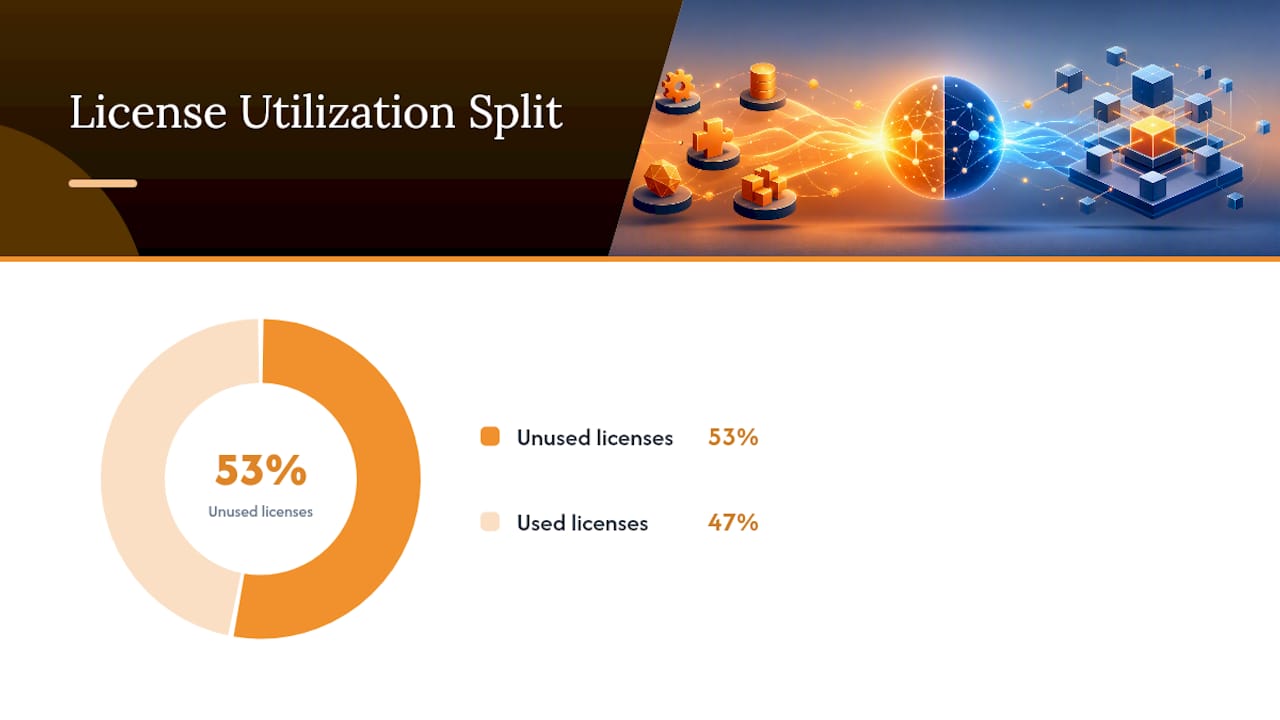
Statistic callout: The average company runs on 106 SaaS applications, with 53 percent of licenses going unused. A structured audit typically surfaces 25 to 40 percent in recoverable savings before you even negotiate a new contract.
Other line items worth building into the model:
- Data cleanup costs when migrating from one system to another.
- Retraining time for staff who’ve built habits around the old tool.
- The “switching cost multiplier,” a way of quantifying migration effort times data cleanup times retraining, which tends to jump three to five times within two years of consolidating onto a suite as more workflows get built on top of it.
What Implementation Actually Looks Like
Point tool pilots usually show measurable results inside two to six weeks. Platform rollouts typically need three to twelve months depending on module count, data volume, and how many teams need to change their habits at once. Knowing that gap up front prevents the most common failure: judging a platform by its first month, when a point solution would already be delivering value.
Three failure modes show up again and again:
- Integration brittleness. APIs break during vendor updates, and if nobody owns that maintenance, data stops syncing quietly until someone notices a report doesn’t match reality.
- Data duplication. Teams keep entering the same information in two systems because the sync isn’t trusted, defeating the entire purpose of the integration.
- Low adoption paired with vendor lock-in. A platform gets purchased, half-implemented, and abandoned in favor of the old habits, but the contract and the migrated data make reversing course expensive.
The mitigations are straightforward but require discipline: run scoped pilots before a company-wide rollout, negotiate API interface SLAs into vendor contracts, confirm you retain ownership of your own data with a documented export path, and roll out platform modules in phases rather than all at once, a sequence PTC’s implementation guidance recommends specifically to reduce change management risk.
Applying This Framework to Subcontractor Workflows
Commercial subcontractors run into this decision constantly, usually without calling it that. A crew uses one app for labor hours, another for change orders, a spreadsheet for bids, and a separate takeoff tool for quantities. Each piece works fine alone. None of them share data, which means the office re-enters field numbers by hand, and margin erodes quietly every time that re-entry introduces an error.
This is where the platform argument gets concrete rather than theoretical. Won2Build Hub maps its four modules directly onto the decision triggers this article has walked through:
- Takeoff addresses estimating accuracy, the revenue-critical function where a specialized tool needs to earn its keep.
- Time Budge covers labor tracking with real-time field-to-office sync, closing the gap where manual entry usually causes the most damage.
- CO Hub manages change orders and T&M tickets so scope creep gets documented instead of argued about after the fact.
- Bid Track centralizes estimates so bidding history isn’t scattered across someone’s inbox.
Subcontractors tend to favor an integrated approach here specifically because the field-to-office data flow is the weak point in a fragmented stack, and a single sign-on across all four functions removes the double entry that point tools leave behind, a pattern our look at multi-app platforms for subcontractors covers in more depth.
The Framework Nobody Follows, and Why That Costs Money
The advice in most software buying guides sounds reasonable and gets ignored anyway: audit first, buy second. Teams skip the audit because it feels slow, and then they buy a platform or a point tool based on a demo that looked good in a 30-minute call. That’s backwards. The audit takes a day. The wrong purchase takes a year to unwind.
The conventional wisdom oversimplifies this into a binary, platform good, point solution bad, or the reverse depending on which vendor is talking. The real skill is running the function criticality test honestly. Most operations leaders overestimate how many of their functions are actually revenue-critical, which is exactly why so many companies end up with twelve tools instead of three.
If there’s one thing worth prioritizing above everything else in this framework, it’s the license utilization pull. It costs nothing, takes an afternoon, and tells you more about where your software budget is actually leaking than any vendor comparison ever will. Everything else, the TCO math, the integration SLAs, the phased rollout plan, matters more once you know what you’re actually running and who’s actually using it.
— Jen Reese
Getting Started With Won2Build Hub
If you’ve read this far, you already know the pattern: fragmented tools cost more in hidden integration work than the invoice ever shows, and for subcontractors specifically, that hidden cost usually lands in the gap between field data and office numbers. A construction software suite can be built to address that exact gap, with single sign-on across multiple modules so field updates sync to the office in real time instead of getting re-typed a day later.

A sensible first step isn’t a full company-wide switch. Pilot one module against the function where you’re losing the most margin to bad data, most often estimating or labor tracking, and measure the difference over a single project cycle before expanding. Before migrating, pull your current bid history and labor records into a simple checklist so that nothing gets lost in the transition. Explore the full Won2Build Hub product suite to see how the four modules fit together, or start directly with Won2Build Takeoff if estimating accuracy is where your audit points first. If procurement and bid volume are the bottleneck instead, pairing better internal tools with stronger construction-specific bid marketing can address both ends of the pipeline at once.
Sources
The consolidation thresholds and TCO benchmarks in this article come from knowledgelib.io’s tooling consolidation research. Definitional and implementation guidance draws on PTC, Deltek, Brex, and Multimodal.
- Platform Solutions vs. Point Solutions: What’s the Difference? — PTC (2024)
- Knowledgelib
- Platform vs point solution: Which is better? — Brex Journal
- Point Solution vs. Platform Solution: Which One Is Better? | Deltek
FAQ
What are the risks of using point solutions?
The main risks are data silos, manual re-entry between systems, and integration overhead that grows every time you add another tool, since each point solution manages its own login and its own database.
What is an example of a point solution?
A dedicated construction takeoff tool, a standalone expense-tracking app, or a single-purpose scheduling tool are all point solutions: each solves one job deeply without connecting natively to your other software.
What are the four main types of platforms?
Definitions vary by industry, but common platform categories include operational platforms (like Won2Build Hub for construction workflows), data and analytics platforms, communication and collaboration platforms, and financial or ERP platforms.
What is Won2Build Hub used for?
A construction software suite can combine labor tracking, change order management, bid estimating, and digital takeoff into one login, enabling subcontractors to get real-time field-to-office data sync instead of re-entering numbers across separate tools.
Should a growing company choose a platform or stay with point solutions?
Most growing companies land on a hybrid: a platform for shared, cross-team workflows, with two or three best-of-breed point solutions kept only where they clearly outperform the platform’s built-in module on a revenue-critical function.
Recommended
One login for estimating, bid tracking, change orders, and labor.
The Hub is free. Pay only for the apps you turn on.
Create your free Hub account- Managers: Make Mobile Field Workflows Resilient for 72 Hour OutagesPlaybook for field managers: offline first mobile workflows, resilient sync and conflict handling, compliance first AI guardrails, and practical pilot steps.
- Daily Signed Records: Force Account Tracking for Managers & InspectorsField checklist for project managers and inspectors to keep force account tracking audit-ready: use daily signed records for labor, equipment, and...
- Stop Timecard to Report Drift: Labor Cost Codes for SubcontractorsFix the timecard to report chain with labor cost codes that tie crews to budgets. Includes a 6 code starter and a burdened rate example.