
Mobile Foreman Timecard Approvals That Lock Payroll for Construction
Set up mobile foreman timecard approvals that lock into payroll. Use a copy ready checklist, offline app tips, GPS stamps, and payroll sync.

The right approach to timecard approvals construction teams can trust is field-first: the foreman reviews and approves hours on a mobile device at the end of each shift, and that approval locks into a timestamped record that flows straight into payroll. Fewer corrections, cleaner job costing, and an audit trail that holds up if the Department of Labor ever asks. Tools like Won2Build Hub build this exact workflow into the field.
TL;DR:
- Foremen should review and approve hours daily on mobile devices with GPS and timestamping to ensure on-site verification and prevent errors.
- Two-level approval workflows are recommended for complex or compliance-sensitive jobs, with clear role separation and explicit routing to maintain a defensible audit trail.
- Approved hours must be locked, timestamped, and synced automatically into payroll, avoiding manual re-entry and reducing correction costs.
- Using integrated software like Time Budge, which shares labor tracking, change orders, and payroll, minimizes handoff errors and enhances data accuracy.
- A written approval policy should mandate timely reviews, reason notes for corrections, and regular audits to uphold compliance and improve overall process reliability.
Table of Contents
- What Does a Field-to-Payroll Timecard Approval Workflow Look Like?
- Who Approves What, and Why Field-Level Review Matters
- Which Software Features Actually Cut Approval Errors?
- How to Choose One-Level vs Two-Level Approval Workflows
- A Practical Checklist for Timecard Approval Policy
- Why Integrated Systems Beat Bolted-Together Tools
- Get Mobile Approvals and Payroll Sync in One Tool
- Where to Go for Configuration and Compliance Details
- Sources
- FAQ
What Does a Field-to-Payroll Timecard Approval Workflow Look Like?
A construction timecard process only works when each step has a clear finish line. Here’s the sequence that holds up under scrutiny:
- Clock-in tied to a cost code. Workers clock in against the specific job and cost code they’re working, not a generic “on site” punch.
- End-of-day foreman review. The foreman opens the crew’s hours on a mobile app, ideally one that works offline and syncs once there’s a signal, since plenty of jobsites have none.
- Flag or fix exceptions. Missed punches, wrong cost codes, or overtime creeping past a threshold get flagged or corrected right there, with a reason note attached so nobody has to guess later why a number changed.
- Apply the correct wage class. Prevailing wage jobs especially need this locked in before anything moves further.
- Approve. The approval timestamps the record and, in a well-built system, locks it against further edits.
- Sync to payroll. Approved hours push automatically into payroll and, on public works jobs, into certified payroll reporting formats like WH-347.
GPS or geofence stamps on the approval add a layer of proof that the person approving was actually on site. An entry isn’t “approved” until it’s locked, timestamped, and synced. Anything short of that is still a draft, no matter what the screen says.
Who Approves What, and Why Field-Level Review Matters
Confusion over who owns which check is where most construction timecard processes break down. Split it cleanly by role:
- Foreman or first approver: Confirms the work was actually done as logged, checks cost codes and wage classes against the job, and flags anything unusual before it goes further.
- Project manager or system admin: Handles the final review, resolves escalations, and confirms the batch is compliant and ready for payroll.
Foreman time approvals matter because the person closest to the work catches errors cheapest. A wrong cost code caught at 5 p.m. on the jobsite costs a tap to fix. The same error caught after payroll runs costs a correction cycle, an unhappy accountant, and sometimes an amended certified payroll filing.
Locked versus unlocked approval states matter here too. A first-level approver shouldn’t retain access to edit a record once a second-level approver has signed off, and vice versa in reverse. That separation is what makes the audit trail defensible.
Pro Tip: If your foreman and your project manager are the same person on small jobs, don’t fake a two-level workflow. One honest, locked approval beats two rubber stamps.
Which Software Features Actually Cut Approval Errors?
Most timecard approval software promises the same vague list of benefits. Strip it down to what actually moves the needle:
- Offline-capable mobile app with an end-of-day review screen. Foremen need to review and approve from a truck cab with no signal, not wait until they’re back at a laptop.
- GPS or geofence stamping, with photo or kiosk clock-in as a backup for crews without individual devices, to confirm the approval happened where the work happened.
- Configurable approval workflows with locked states, timestamped audit trails, and payroll export, including WH-347 formatting for certified payroll jobs, plus overtime alerts that surface before approval instead of after the fact.
- APIs or built-in integrations that write approved hours straight into payroll or project management software, so nobody re-keys the same hours twice.
That last point is where a lot of time tracking for construction quietly falls apart. A tool that nails mobile approvals but dumps a spreadsheet export for someone to manually reformat has just moved the error risk downstream instead of removing it.
How to Choose One-Level vs Two-Level Approval Workflows
Most construction payroll approvals fall into one of two structures, and picking the right one is mostly about crew size and compliance exposure.
- Use one-level approval for small crews and simple jobs. A single foreman or supervisor approval, locked and synced, is enough when there’s no delegated authority chain to manage and the job doesn’t carry prevailing wage requirements.
- Use two-level approval when compliance or complexity demands separation of duties. Field-level approval by a supervisor or foreman, followed by a management-level final review before payroll, is standard on prevailing wage jobs, union jobs, or any project where one person shouldn’t have full control end to end.
- Map the routing explicitly. A typical pattern runs Assigned Supervisor to System Admin, or Superintendent to Project Manager, with the record staying unlocked and marked partially approved until both levels sign off.
- Build in the guardrails during setup, not after. Prevent self-approval, set an escalation window for stalled reviews, and configure overtime threshold alerts to surface before the approval, not buried in a report afterward.
A Practical Checklist for Timecard Approval Policy
Most timecard compliance in construction breaks down not from bad intentions but from missing policy language. Put this in writing and hand it to every foreman:
- Review and approve hours daily, before the crew leaves site if possible.
- Require a reason note on every corrected entry. No silent edits.
- Require GPS or photo evidence for remote or unsupervised sites.
- Lock every approval before it touches a payroll run. No exceptions for “I’ll fix it later.”
Set a service window for approvals. Same-day approval by end of shift is realistic for most crews; anything beyond 24 hours should trigger an automatic escalation to the project manager. Automating that escalation can compress what used to be a multi-day chase into hours, though compliance-sensitive steps like prevailing wage classification still need a human checking the work.
Run periodic audits pulling a sample export and checking it against field notes. A short refresher session with foremen once a quarter catches drift before it becomes a pattern.
Pro Tip: Print the checklist and tape it inside the foreman’s truck. Digital policy documents get ignored. A laminated card on the dash gets read.
Why Integrated Systems Beat Bolted-Together Tools
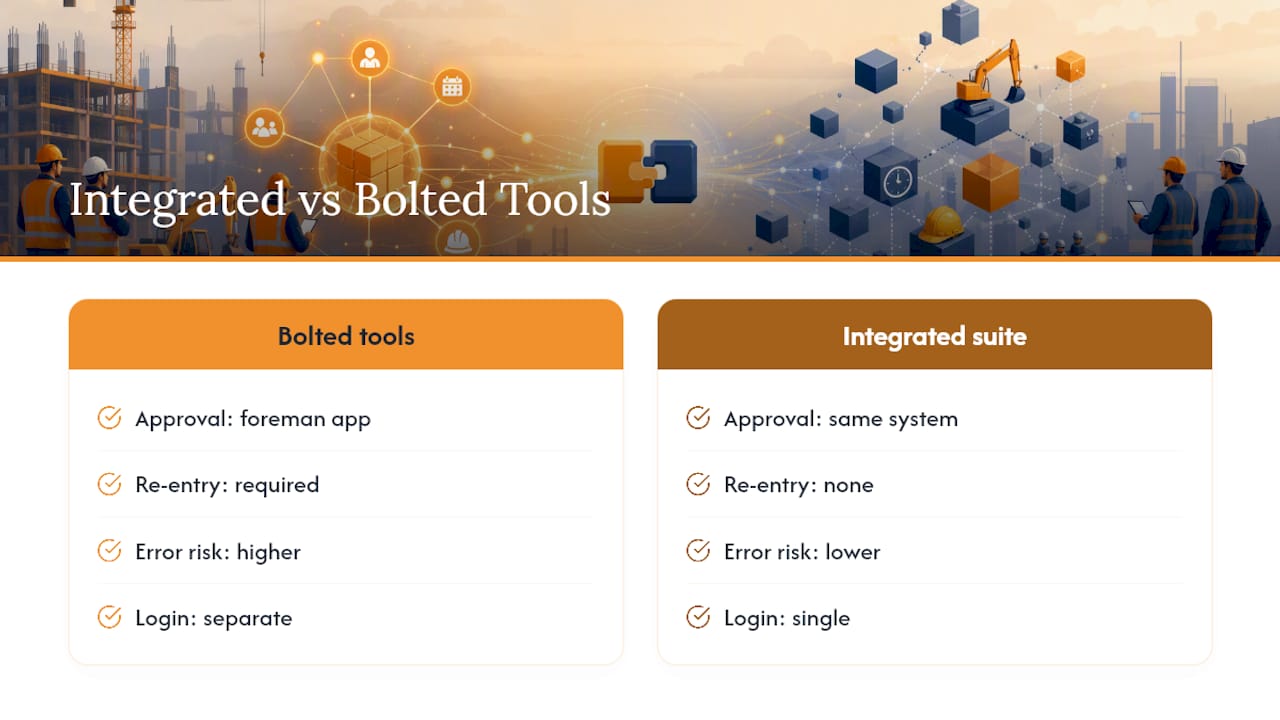
Most construction timecard approval friction doesn’t come from bad foremen. It comes from software that forces a foreman to approve hours in one app, then someone in the office re-enters those hours somewhere else to get them into payroll or job costing. Every handoff is a chance for a wage class to get typo’d or a cost code to get dropped.
An integrated suite where labor tracking, change orders, and payroll data share one login removes that handoff entirely. Time Budge, part of the Won2Build Hub, keeps approved hours flowing into the same system used for job costing and change order tracking, so an approval doesn’t need to be re-keyed to matter. For more on what a defensible time card actually needs to capture, see Won2Build’s guide to subcontractor time cards.
— Jen Reese
Get Mobile Approvals and Payroll Sync in One Tool
Won2Build offers a flat monthly fee per company with unlimited team members on the plan, avoiding pricing that increases with crew size. Time Budge handles the piece this article is built around: mobile foreman approvals, GPS timestamps, locked audit trails, and a direct sync to payroll so nobody’s re-keying hours from a paper timecard or a disconnected app.

Because Time Budge shares a single sign-on with Won2Build’s change order, bid, and takeoff tools, an approved hour doesn’t just sit in a payroll file. It feeds job costing in real time, which is where most subcontractors actually lose margin without noticing. Check Won2Build’s pricing or look at the Time Budge product page to see how the approval workflow fits your crew size, and request a demo to watch a foreman approval move into payroll in real time.
Where to Go for Configuration and Compliance Details
For deeper setup steps, see Trimble’s approval levels guide, the DOL’s recordkeeping requirements, and a field foreman workflow breakdown.
Sources
- The Electrical Contractor Foreman Time Approval Workflow (Field to Payroll) | FieldTimesheet Blog
- Recordkeeping Requirements under the Fair Labor Standards Act (FLSA) — U.S. Department of Labor
FAQ
What Time Frame Should I Approve My Timecard In?
Same-day approval, ideally before the crew leaves the jobsite, is the standard most construction teams should aim for. Waiting longer than 24 hours increases the odds that details get fuzzy and errors slip through to payroll.
Who Approves Timecards on a Construction Project?
The foreman or field supervisor typically holds the first-level approval, confirming the hours and cost codes are accurate. On jobs with two-level workflows, a project manager or system admin performs a final review before the hours lock and sync to payroll.
What Is the Best Time Card App for Construction Contractors?
The best option depends on crew size and compliance needs, but look for offline mobile approvals, GPS stamping, locked audit trails, and direct payroll export. Time Budge, part of the Won2Build Hub, builds all four into one login alongside job costing and change order tracking.
What Happens if I Don’t Approve My Timecard on Time?
Unapproved hours typically get held out of the payroll run, which can delay a worker’s paycheck or force a manual correction cycle later. Most well-designed timecard approval software includes an escalation alert so a stalled approval gets flagged to a manager before payroll cuts off.
Recommended
One login for estimating, bid tracking, change orders, and labor.
The Hub is free. Pay only for the apps you turn on.
Create your free Hub account- Managers: Make Mobile Field Workflows Resilient for 72 Hour OutagesPlaybook for field managers: offline first mobile workflows, resilient sync and conflict handling, compliance first AI guardrails, and practical pilot steps.
- Daily Signed Records: Force Account Tracking for Managers & InspectorsField checklist for project managers and inspectors to keep force account tracking audit-ready: use daily signed records for labor, equipment, and...
- Stop Timecard to Report Drift: Labor Cost Codes for SubcontractorsFix the timecard to report chain with labor cost codes that tie crews to budgets. Includes a 6 code starter and a burdened rate example.