
Cut Change Order Turnaround to 21 Days for Contractors
Use a 21 day protocol to price, route, and approve change orders faster. Step by step workflows, KPIs, and digital tactics that protect your margin.

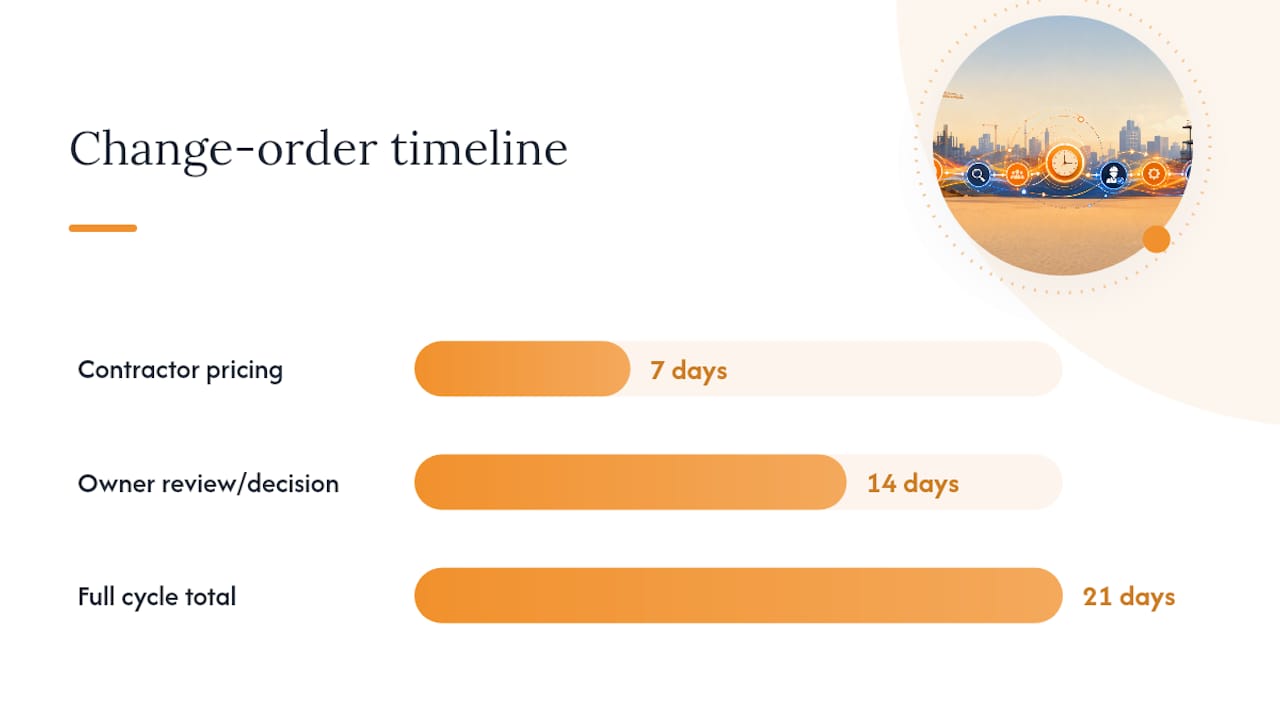
Twenty-one calendar days is the realistic benchmark for a full change order cycle: 7 days for the contractor to price it, 14 for the owner to decide. Hitting that number consistently comes down to one operational shift: assign a single accountable contact on each side, price changes on a strict clock, and route approvals digitally instead of by email chain. Everything below breaks that down into steps, benchmarks, and tools you can put to work this week.
TL;DR:
- Most change order cycles should be completed within 21 days, with 7 days for pricing and 14 days for owner approval, under ideal conditions.
- Immediate action within 48 hours of identifying a change significantly increases the likelihood of staying on schedule and avoids delays.
- Clear documentation, a single contact, digital routing, and firm deadlines prevent bottlenecks and reduce approval times.
- Using pre-approved pricing bundles, provisional quotes, and explicit time impact statements helps speed pricing while maintaining contract protection.
- Tracking key KPIs weekly and reviewing progress monthly can identify delays early and improve overall change order turnaround time.
Table of Contents
- What Is a Reasonable Change Order Turnaround Time?
- A Step-by-Step Workflow to Cut Change Order Turnaround
- How to Price Change Orders Fast Without Losing Your Time Position
- Recordkeeping That Speeds Approval Instead of Slowing It
- Digital Workflows That Actually Cut the Clock
- Common Mistakes That Stretch Change Order Turnaround
- Measuring and Improving Your Change Order Cycle Time
- A 30/60/90 Plan for Faster Change Orders
- Speed Up Change Orders Without Losing Contract Protection
- Sources
What Is a Reasonable Change Order Turnaround Time?
The 21-day protocol splits the work in half. The contractor gets 7 calendar days from notice of a change to submit a priced quotation, complete with scope, unit rates, and assumptions. The owner then has 14 days to approve, reject, or negotiate. That 7/14 split isn’t arbitrary. It reflects how long it realistically takes to price labor and material accurately without stalling the schedule, and how long an owner’s review chain (architect, PM, ownership) needs to sign off without becoming the bottleneck.
That benchmark holds for straightforward changes on privately funded commercial work. It stretches considerably on public contracts. GSA’s own contract administration data shows a wide spread in how long federal change orders take to definitize, meaning the point where price and terms are finally locked in. A large share close relatively quickly, but a meaningful chunk takes several months or more, with some running over a year. The gap between “fast” and “slow” almost always comes down to administrative routing and incomplete pricing packages, not the complexity of the work itself.
Use these rough rules of thumb depending on the situation:
- Emergency or safety-driven changes: Price and authorize within 24 to 48 hours; formalize the paperwork afterward.
- Routine scope changes on private work: Target the full 21-day cycle.
- Complex changes involving design revisions: Budget 30 to 45 days, but flag the delay in writing immediately.
- Public-sector and federal contracts: Expect 60 to 90 days as a realistic median, with outliers well beyond that.
| Change type | Typical turnaround | Primary constraint |
|---|---|---|
| Emergency/safety | 1–2 days | Authorization speed |
| Routine private-sector CO | 21 days | Pricing and owner review |
| Design-driven complex CO | 30–45 days | Engineering coordination |
| Public/federal CO | 60–90+ days | Administrative routing |
A Step-by-Step Workflow to Cut Change Order Turnaround
Most turnaround problems trace back to the first 48 hours after a change is discovered. Whether it comes from an RFI response, a field conflict, or a design revision, what happens immediately determines whether the whole cycle stays on pace or drifts.
- Capture the trigger the day it happens. Document the condition with photos, field notes, and a dated log entry. Assign one person as the single point of contact for that change, no exceptions.
- Notify the owner’s representative within 24 hours. A short written notice, even informal, starts the clock and protects your position if the change later becomes contested.
- Build the priced quotation inside the 7-day window. Include scope description, unit rates or lump-sum breakdown, material and labor assumptions, and a provisional position on time (more on that below).
- Route the quote for approval immediately, not after internal review sits on someone’s desk. Digital routing with a due date beats a PDF sitting in an inbox.
- Set a hard owner decision deadline at submission, typically 14 days out. State it in writing on the transmittal.
- Escalate automatically if the deadline passes. A predefined escalation path, usually to the PM or a named decision maker, avoids the informal “let’s circle back” limbo that eats weeks.
Pro Tip: Put the 7 and 14-day deadlines directly on the transmittal document itself, not just in your internal tracker. A dated deadline the owner has physically signed for is far harder to ignore than a verbal understanding.
A compact checklist for your project admin pack:
- Single-contact assignment logged at trigger
- Written notice sent within 24 hours
- Priced quote submitted by day 7
- Owner decision deadline stated in writing
- Escalation contact and trigger date defined
- Time position (agreed, neutral, or reserved) noted on every submission
Following this sequence doesn’t just speed approvals. It creates a paper trail that protects your pricing if a dispute surfaces months later. The step-by-step approval breakdown on Won2build’s blog walks through documentation requirements at each stage in more detail.
How to Price Change Orders Fast Without Losing Your Time Position
Speed and protection aren’t opposites, but they require you to understand three distinct categories before you submit anything.
An agreed change order locks in scope, price, and schedule impact before work starts. It’s the cleanest outcome and the fastest to close once signed. Deferred time means the parties agree on price now but leave the schedule impact to be resolved later, a common move when you need the work moving but don’t have enough information yet to quantify delay. A construction change directive authorizes work to proceed without full agreement on price or time, usually issued unilaterally by the owner or architect. It keeps the job moving but shifts the commercial risk onto documentation you’ll need to produce later.
Caltrans guidance recommends resolving deferred time adjustments within about a month and closing out deferred time change orders within 21 working days of completing the actual change work. That window matters because unresolved time positions compound. The longer a deferred time item sits open, the harder it becomes to isolate its schedule impact from everything else happening on the job.
For fast, defensible pricing:
- Maintain standard unit-rate build-ups for common trade tasks so you’re not re-deriving labor productivity every time.
- Use pre-approved labor and material bundles for recurring change types (extra outlets, added doors, minor MEP relocations).
- Issue provisional pricing with a stated expiry date, typically 10 to 15 days, so the owner can’t sit on a quote indefinitely while costs shift.
Every change order should explicitly state whether time is agreed, neutral, or reserved. Construction Front’s breakdown of change order pricing risks makes the point clearly: skipping that statement is what turns a routine pricing exercise into a retrospective valuation fight months down the line. If a delay claim is likely, note it on the CO itself rather than waiting for a separate prolongation submission.
Recordkeeping That Speeds Approval Instead of Slowing It
Approvers move faster when the packet in front of them answers questions before they’re asked. The evidence that consistently shortens review time includes:
- Daily field reports tied to the specific date of the triggering event
- Dated photos showing the condition or conflict that caused the change
- Timecards reflecting actual labor hours, not estimates entered after the fact
- Delivery tickets and material receipts for anything added to the scope
- A complete RFI record showing the question, the response, and the date each occurred
RFIs and change orders get confused constantly, and the mix-up costs time. An RFI is a question about intent, clarifying what the drawings or specs actually require. A change order is a commercial and schedule instrument, adjusting price and time once the answer to that question changes the scope of work. When an RFI response clearly expands or alters scope, escalate it into a priced CO immediately rather than letting it sit as an open RFI that nobody’s tracking financially.
If field conditions force you to proceed before a change order is fully signed, protect your position anyway: issue written notice referencing the specific RFI or directive, log daily costs separately from base contract work, and state in writing that pricing and time remain reserved pending formal agreement. Accurate timecard practices matter here more than most contractors realize. A vague timecard is the single easiest thing for an owner’s reviewer to challenge, and every challenge adds days to the cycle.
Digital Workflows That Actually Cut the Clock
The fastest change order cycles share a common shape: field capture leads straight into a priced quote template, which routes automatically to the right approver, gets signed electronically, and updates the project record without anyone re-entering data. Every manual handoff in that chain is a place where a change order sits.
Mobile capture of priced line items in the field means the person closest to the work can start the pricing draft before they’ve left the site, rather than reconstructing details from memory back at the office. E-signature removes the physical routing delay that used to add days by itself, and automated reminders replace the follow-up phone calls that eat a PM’s afternoon. Together, these shave real time off both halves of the 21-day benchmark, the contractor’s pricing window and the owner’s decision window.
Won2build’s CO Hub is built around exactly this sequence: a field-ready priced quote template, automatic routing to the assigned approver, built-in e-signature, and a record that updates the moment the signature lands. Because CO Hub shares a single sign-on with Time Budge and Takeoff, labor hours and quantity data flow into your change order pricing without re-typing anything, which is where most double-entry errors and delays originate in the first place.
- Standardize your priced quote template so field staff always know what to fill in.
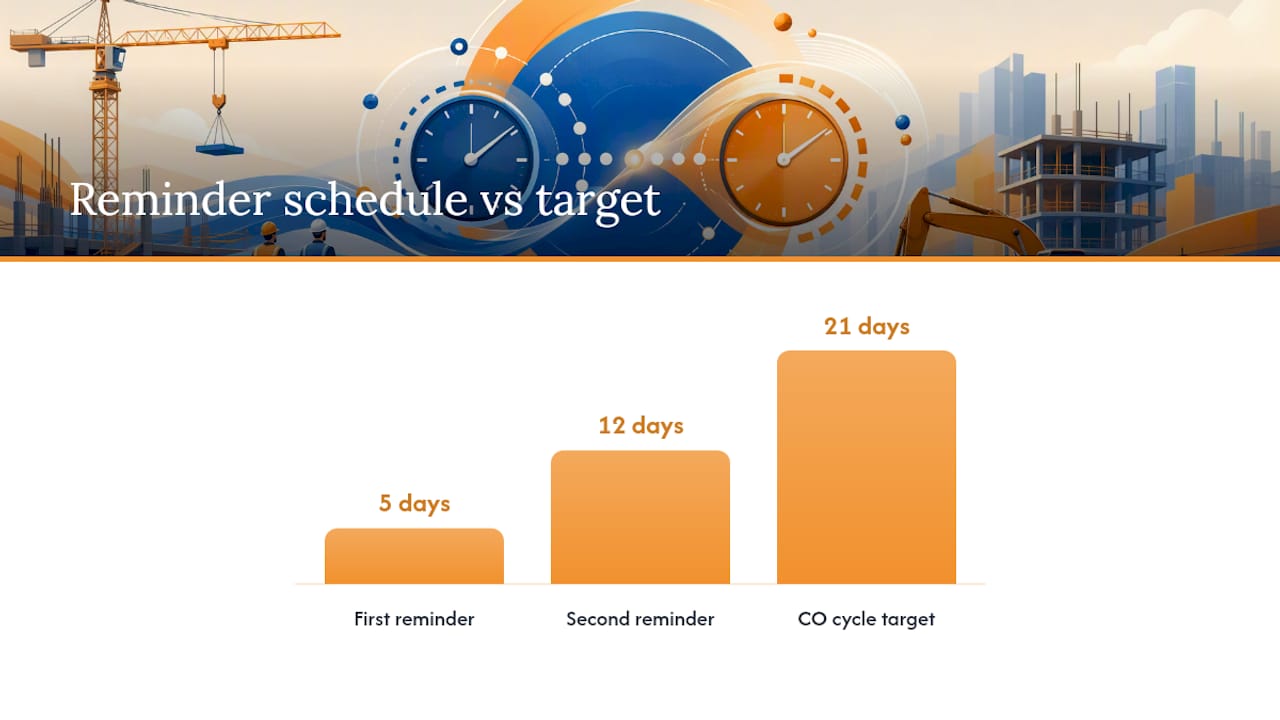
- Set automatic reminders at day 5 and day 12 to nudge stalled approvals before they become a problem.
- Confirm e-signature legality for your contract type before rolling it out project-wide.
Pro Tip: Route the same change order template through your CRM or project management tool for the first two weeks after adoption. Field crews adapt to new templates faster when the format looks familiar, not brand new.
Common Mistakes That Stretch Change Order Turnaround
A handful of recurring errors account for most of the long tails you’ll see on a change order log:
- Ambiguous scope language. Vague descriptions invite back-and-forth clarification that eats the entire 7-day pricing window before pricing even starts.
- Multiple approvers with no clear hierarchy. When three people can say yes but nobody’s designated to say it first, decisions default to whoever’s slowest.
- Informal verbal authorizations. Work proceeds, but nothing’s in writing, so the eventual paperwork becomes reconstruction instead of confirmation.
- Late priced quotes. Missing the 7-day window trains owners to expect delay, which erodes your leverage on every future change.
- No time-impact position stated. Silence on schedule effect gets read as a waiver later, even when that was never the intent.
The fixes are direct: designate a single approver for pricing decisions, require every provisional quote to carry an expiry date, and use conditional authorization (work proceeds, valuation follows within a stated number of days) instead of open-ended verbal go-aheads. One legal trap deserves specific attention: never accept payment on a change order without a clear written time position attached. Accepting payment is often read as accepting the schedule terms that came with it, even if you never agreed to them out loud.
Measuring and Improving Your Change Order Cycle Time
You can’t shorten what you don’t measure. Four KPIs cover the essentials:
- Days to first response: From trigger event to written notice sent.
- Days to priced quote: From notice to submitted pricing, target 7.
- Days to owner decision: From submission to approval or rejection, target 14.
- Percent resolved within target: The share of COs closing inside the full 21-day window.
| KPI | Target | Review frequency |
|---|---|---|
| Days to first response | 1 day | Weekly |
| Days to priced quote | 7 days | Weekly |
| Days to owner decision | 14 days | Monthly |
| Percent within target | Track trend | Monthly |
Run a monthly review that pulls every open change order into age bands: 0 to 7 days, 8 to 14, 15 to 21, and anything past 21 flagged red. That backlog view tells you instantly which changes need escalation attention before they become month-old problems nobody remembers the context for. Set stretch targets tied to specific process changes, not vague aspirations. If you rolled out digital routing this quarter, your stretch goal should be a measurable drop in days-to-decision, tracked against the prior quarter’s average.
A 30/60/90 Plan for Faster Change Orders
Start with what’s free and fast. In the first 30 days, standardize your priced quote template and name a single point of contact for change order intake on every active project. That alone removes the ambiguity that causes half the delays I see in project files.
Days 30 to 60 is where digital routing earns its place. Move approvals off email into a system with automatic reminders and e-signature, and start tracking your four core KPIs even if the numbers look rough at first. By day 90, you should be running monthly reviews, adjusting stretch targets, and tying performance to how your team gets evaluated. Disciplined time-impact recording and digital routing aren’t nice-to-haves bolted onto an existing process. They’re the process. Everything else in this playbook supports those two things.
Won2build maintains templates and implementation guidance for teams building this out, and it’s worth pulling from those resources rather than reinventing your own tracking sheet from scratch.
— Jen Reese
Speed Up Change Orders Without Losing Contract Protection
Spreadsheets and email chains are the default for most subcontractors handling change orders, and they’re exactly why the 7-day pricing window and 14-day decision window slip so often. CO Hub replaces that manual routing with a field-ready priced quote template, automatic approver routing, built-in e-signature, and a record that updates the moment a signature lands, no re-entry, no lost attachments.

Because CO Hub runs on the same single sign-on as Time Budge and Takeoff, labor hours and digital plan quantities flow straight into your priced quotes instead of getting retyped from a separate system. That’s where most subcontractors lose both time and margin: not in the pricing math itself, but in reconciling numbers across three disconnected tools. If your pricing prep already starts with digital takeoffs, the Takeoff product page shows how quantification and change order pricing connect inside one workflow. Start a free trial and time your own next change order from trigger to signature. Most teams are surprised by where the delay actually lives.
Sources
- Construction contract administration | GSA
- Change Order in Construction: Meaning, Process, Pricing, Types, and Common Risks - Construction Front
- Chapter 5: Contract Administration, Section 3: Change Orders | Caltrans
Recommended
One login for estimating, bid tracking, change orders, and labor.
The Hub is free. Pay only for the apps you turn on.
Create your free Hub account- Managers: Make Mobile Field Workflows Resilient for 72 Hour OutagesPlaybook for field managers: offline first mobile workflows, resilient sync and conflict handling, compliance first AI guardrails, and practical pilot steps.
- Daily Signed Records: Force Account Tracking for Managers & InspectorsField checklist for project managers and inspectors to keep force account tracking audit-ready: use daily signed records for labor, equipment, and...
- Stop Timecard to Report Drift: Labor Cost Codes for SubcontractorsFix the timecard to report chain with labor cost codes that tie crews to budgets. Includes a 6 code starter and a burdened rate example.