
How to Manage Subcontractor Backlog Effectively
Learn how to manage your subcontractor backlog effectively with simple steps. Improve efficiency by calculating backlog and scheduling reviews.

If you want to manage subcontractor backlog effectively, the fastest fix is this: calculate your months-of-backlog this week, cap new bid acceptance until that number sits inside a healthy range for your trade, and put a recurring three-week lookahead meeting on the calendar before you do anything else. Everything downstream, capacity planning, change-order discipline, subcontractor coordination, depends on knowing that one number and reviewing it on a fixed schedule.
Here’s what to do in the next 72 hours:
- Pull every active contract value and every dollar billed to date, then calculate total backlog in dollars.
- Divide that backlog by your trailing monthly revenue to get months-of-backlog. Write the number down somewhere visible.
- Freeze acceptance of new bids above a set dollar threshold until your project manager and superintendent agree on capacity.
- Schedule a recurring three-week lookahead review, even if it’s just you and a whiteboard, for the next Monday morning.
- Flag any crew or subcontractor that has dropped headcount, missed a submittal, or complained about supplier delays in the last two weeks.
At 30 days, revisit the backlog number and compare it to your capacity. At 90 days, check whether your burn rate (the dollar value of work you’re actually completing per month) is closing the gap or widening it.
Pro Tip: A three-week lookahead isn’t just a schedule, it’s a forcing function. If a crew can’t tell you what they’re doing in week three, that’s your earliest warning sign of an overloaded backlog, weeks before it shows up in your financials.
Key Takeaways
Managing subcontractor backlog effectively comes down to tracking months-of-backlog weekly, running a three-week lookahead without skipping it, and controlling change orders before they inflate your numbers.
| Point | Details |
|---|---|
| Calculate months-of-backlog weekly | Divide total backlog by monthly revenue and keep most trades between 3 and 6 months. |
| Run the three-week lookahead every week | Skipping it during busy stretches is when overload risk goes unnoticed the longest. |
| Prequalify every new job the same way | Check backlog, working capital, and crew capacity before signing, not after. |
| Control change orders at the source | Require written scope and pre-approved rates before work starts. |
| Track burn rate against forecast accuracy | A widening gap between the two is an early sign of capacity trouble. |
| Won2Build maps tools to each step | Time Budge, CO Hub, Bid Track, and Takeoff cover labor, change orders, bidding, and quantities in one login. |
Table of Contents
- What Is Subcontractor Backlog and How Do You Calculate It?
- What Steps Actually Reduce Subcontractor Backlog Delays?
- How Do You Measure Backlog Health Month to Month?
- How Much Backlog Is Too Much for Your Capacity?
- What Software Features Actually Help Manage Backlog?
- What Tactics Prevent Subcontractor Overbooking and Delays?
- How Do You Structure Backlog Review Meetings?
- What Does a Reliable Backlog Report Actually Include?
- How Long Does It Take to Fix a Backlog Problem?
- How Won2Build Supports This Backlog Playbook
- Frequently Asked Questions
- Sources
What Is Subcontractor Backlog and How Do You Calculate It?
Subcontractor backlog is the total dollar value of contracted work that hasn’t been completed yet. It’s every signed contract, every awarded change order, minus everything already billed. Contractors who ignore this number tend to find out about capacity problems the hard way, when a crew misses a milestone or a supplier stops extending credit.
Backlog matters for three reasons. It predicts cash flow, since backlog converts to revenue only as work gets billed and paid. It signals bonding risk, since sureties look at backlog relative to working capital before approving new bonded work. And it exposes scheduling risk, since a backlog that’s too large for your crew capacity guarantees delays somewhere on the schedule.
The two formulas you need are straightforward:
Total Backlog ($) = Sum of remaining contract value across all active jobs (contract value minus amount billed to date)
Months-of-Backlog = Total Backlog ÷ (Annual Revenue ÷ 12)
Here’s a worked example with round numbers. Say your company has $2.4 million in total backlog across active contracts, and your trailing twelve-month revenue is $7.2 million. Monthly revenue works out to $600,000. Divide $2.4 million by $600,000 and you get 4 months-of-backlog. That means, at your current production rate, you have four months of guaranteed work already contracted.
A backlog that’s transparent and ordered by priority, with near-term work small and clearly scoped and far-term work larger and less detailed, is what keeps a queue useful instead of overwhelming. The same clarity gradient that governs product backlog health in software applies just as well to a stack of active construction contracts.
Two other ratios deserve a spot on your dashboard. Backlog-to-working-capital compares your backlog dollars against liquid capital, and sureties often get nervous above a 10:1 ratio. Backlog as a percent of trailing revenue tells you how much of next year’s income is already locked in versus how much you still need to sell. Neither replaces months-of-backlog, but both add context when a lender or bonding agent asks harder questions.
What Steps Actually Reduce Subcontractor Backlog Delays?
Reducing backlog risk isn’t one action, it’s a sequence. Skip a step and the ones after it get harder.
- Prequalify before you commit. Check a subcontractor’s current backlog, labor capacity, financial statements, and bonding limits before signing them onto a new job. Prequalification that ignores backlog is prequalification in name only, since a sub already stretched thin on other jobs will underperform on yours regardless of how good their references look.
- Level bids before award. Compare scope line by line across bidders so you’re not comparing a thorough number against a stripped-down one. Bid leveling catches scope gaps before they become change-order fights three months into the job.
- Match schedule needs to actual capacity. Before adding a project to a subcontractor’s plate, confirm they have crew hours available in the weeks the schedule requires, not just availability “eventually.”
- Lock down contract terms and payment discipline. Clear payment milestones, defined retainage terms, and a fixed billing cadence keep cash moving in both directions and reduce disputes that stall progress.
- Control change orders at the source. Require written scope changes and pre-approved rates before work starts, not after. Uncontrolled T&M work is one of the fastest ways backlog balloons without anyone noticing.
A mid-sized electrical subcontractor we’ve seen described in industry case studies illustrates the payoff. When a scheduler resequenced two trades so that rough-in work started two weeks earlier on a delayed job, the crew recovered nearly three weeks of lost schedule without adding a single extra worker. The fix wasn’t more labor, it was better sequencing against existing capacity, standardized prequalification and bid leveling applied to the resequencing decision itself.
Pro Tip: Watch for the quiet warning signs before the loud ones. A subcontractor’s crew size dropping between site visits, a supplier complaint about a slow payment, or a foreman suddenly unreachable for two days straight are all earlier indicators of overload than a missed deadline. By the time a deadline slips, the underlying capacity problem has usually existed for weeks.
How Do You Measure Backlog Health Month to Month?
Months-of-backlog tells you the headline number, but backlog health needs more than one metric. Backlog health frameworks built around clarity, prioritization, sizing, and dependency tracking translate directly into construction once you swap “user stories” for “work packages.”
Track these seven metrics on a recurring basis:
| Metric | Formula | Healthy Benchmark |
|---|---|---|
| Months-of-backlog | Total backlog ÷ (annual revenue ÷ 12) | Roughly 3 to 6 months for most trades |
| Backlog-to-revenue | Total backlog ÷ trailing 12-month revenue | Generally 25% to 50% |
| Backlog-to-working-capital | Total backlog ÷ working capital | Watch closely above 10:1 |
| Burn rate | Value billed and completed ÷ month | Should track close to production schedule |
| Forecast accuracy | Actual billed vs. forecasted billed | Within 10% variance is a good target |
| Open dependencies | Count of unresolved RFIs, submittals, or material holds | Trending down week over week |
| Technical-debt ratio | Rework hours ÷ total labor hours | Lower is better, watch for upward trend |
Update months-of-backlog and burn rate weekly. Forecast accuracy and backlog-to-working-capital work fine on a monthly cadence since they depend on financials that don’t shift daily. Assign ownership clearly:
- Project managers own open dependencies and forecast accuracy for their assigned jobs.
- Estimators or business development owns backlog-to-revenue and flags when new bid activity needs to slow down.
- Whoever handles accounting owns backlog-to-working-capital and burn rate, since both pull from the same financial data.
A months-of-backlog reading under 2 usually means you’re not winning enough work to sustain overhead. Above 8 or 9 months for most trades, and you’re likely overcommitted relative to crew capacity, which is when schedule slippage and quality problems start showing up on multiple jobs at once.
How Much Backlog Is Too Much for Your Capacity?
There’s no universal number that fits every trade, but the range most healthy subcontractors operate inside is 3 to 6 months of backlog. Specialty trades with shorter project cycles, electrical, plumbing, drywall, often run leaner, closer to 2 to 4 months, because their work moves fast and cash cycles quickly. Trades with longer install windows, structural steel or mechanical systems on larger commercial jobs, can carry more without it signaling trouble.
The caveat matters more than the number itself. A benchmark that ignores your crew size, your subcontractor relationships, and your regional labor market is a rough guide, not a rule. Firms tracking industry-wide trends through resources like the Associated Builders and Contractors’ backlog indicator use it as a market signal, not a company-specific target.
When backlog runs ahead of capacity, you have a handful of real options:
- Pause new bid submissions above a dollar threshold until existing jobs clear enough to free up crew hours.
- Scope down or subcontract portions of oversized jobs to a trusted second-tier sub rather than stretching your own crew thin.
- Phase delivery on multi-building or multi-phase jobs so you’re not committing full crews to every phase simultaneously.
- Choose scheduled overtime over rushed hiring for short-term peaks, since a hiring binge to cover six weeks of overload often costs more in onboarding and mistakes than it saves.
Different situations call for different fixes. A short-term overload from one bad estimate needs a quick reallocation of crew hours, not a hiring spree. A seasonal peak, common in regions with a hard winter shutdown, calls for planned overtime and pre-negotiated second-tier sub relationships arranged months in advance. Persistent overbooking, the kind that shows up quarter after quarter, usually means your estimating or sales targets need resetting, not another round of firefighting.
Watch for these warning signs that a subcontractor, yours or one you’re hiring, is carrying too much: a backlog-to-working-capital ratio creeping past 10:1, a crew roster that’s shrunk over the last two site visits, or submittals that used to arrive on time now trickling in late without explanation.
What Software Features Actually Help Manage Backlog?
The right software doesn’t fix backlog by itself, but it removes the manual reporting drag that keeps most subcontractors from tracking these metrics consistently in the first place. When you’re evaluating construction software solutions, look for a specific feature set rather than a long marketing list.
Prioritize these capabilities:
- Real-time field-to-office sync, so labor hours and job progress logged on-site show up in office reports the same day, not the following week.
- Bid leveling support, giving you a structured way to compare scope across bidders without rebuilding spreadsheets every time.
- Change-order tracking, with a clear audit trail from request to approval to billing.
- Mobile time capture, since accurate labor data is the backbone of burn-rate and forecast-accuracy calculations.
- Three-week lookahead scheduling, built into the platform rather than maintained separately in a spreadsheet nobody updates.
- Compliance and document tracking, covering certified payroll, insurance certificates, and submittal status in one place.
- Reporting templates that generate a backlog report on demand instead of requiring someone to rebuild it from four different spreadsheets.
Run a short evaluation checklist before committing: does the tool sync data in near real time, does it handle change orders without a separate system, and can your field crews actually use it without a half-day training session? Pilot on one trade or one job before rolling it out company-wide.
Pro Tip: During the first month of any new tool rollout, don’t measure login counts, measure process compliance. Are field supervisors actually logging time daily instead of batching it on Fridays? Are change orders getting entered the same day they’re verbally approved? Usage numbers look good early and mean nothing if the underlying habits haven’t changed.
What Tactics Prevent Subcontractor Overbooking and Delays?
Subcontractor-specific backlog problems usually trace back to one of three causes: crews spread across too many jobs at once, payment friction that slows supply chains, and loose change-order practices that let scope creep in unnoticed.
On the crew side, a rolling three-week lookahead schedule is the single most effective habit a subcontractor can adopt. It forces someone to answer, in writing, exactly which crew is on which job in each of the next three weeks. Pair it with a monthly headcount validation, confirming actual crew size against what’s needed for upcoming milestones, and cross-training key workers so a single absence doesn’t stall a whole crew.

On the payment side, progress billing cadence matters more than most subcontractors realize. A subcontractor billing monthly on a job with weekly cash needs is financing that gap out of pocket, which strains working capital and, eventually, backlog capacity. Clear retainage terms, joint checks for material suppliers on larger jobs, and a documented supplier payment plan protect the supply chain that keeps crews moving.
On change orders, the discipline is simple to describe and hard to enforce without a system: written scope for every change, pre-approved unit rates baked into the original contract where possible, and standardized ticketing so a verbal “yes, go ahead” from a super in the field doesn’t turn into a billing dispute later.
Sample clause language worth adapting into your own contracts:
“Any change to the scope of work described in Exhibit A requires written authorization prior to commencement. T&M rates for labor and equipment are fixed per the attached rate schedule and apply to all approved change work.”
“Progress payments are due within 15 days of application approval. Retainage of [X]% is released upon substantial completion and final punch list sign-off.”
These aren’t legal advice, run any contract language past your attorney, but they show the level of specificity that keeps scope and payment disputes from eating into your backlog capacity.
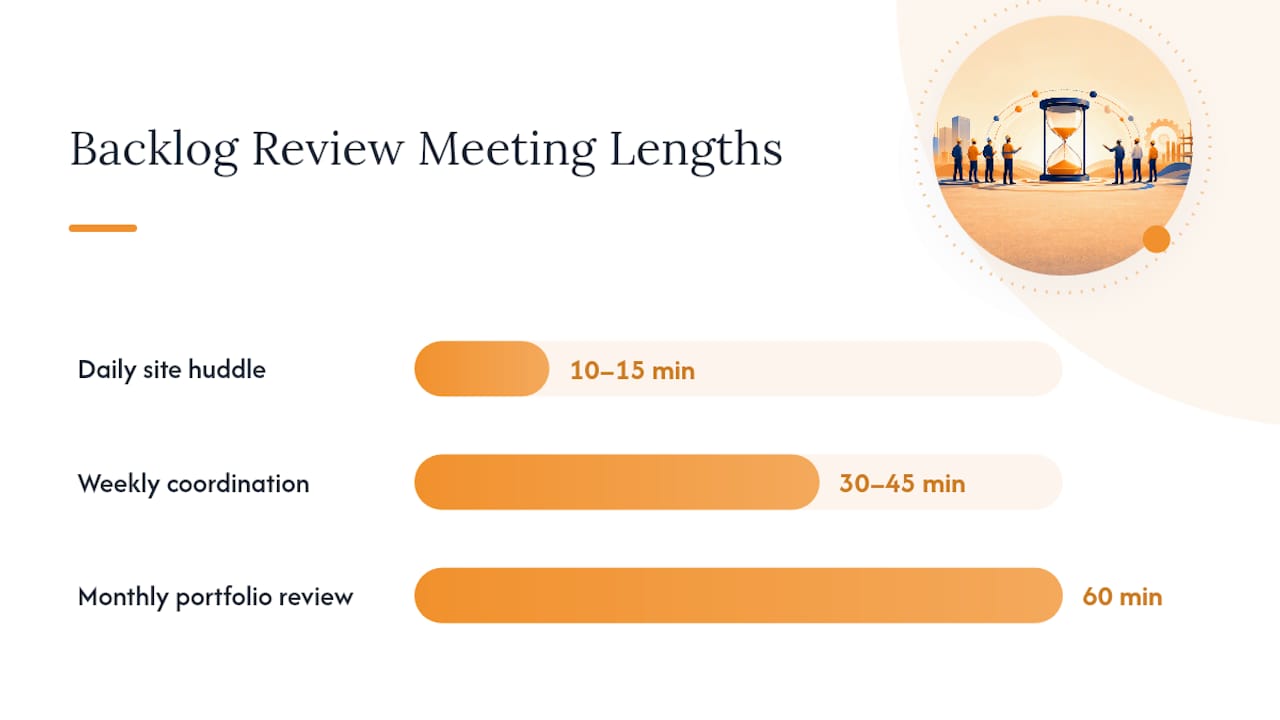
How Do You Structure Backlog Review Meetings?
A review cadence only works if it’s specific enough that people show up prepared. Three meeting types cover most of what you need.
Daily site huddle (10 to 15 minutes). Superintendent leads. Cover what’s happening today, what’s blocking tomorrow, and any crew or material issue that came up overnight. Output: a short list of blockers escalated to the project manager.
Weekly coordination meeting (30 to 45 minutes). Project manager leads, with superintendent and key trades present. Review the three-week lookahead, confirm crew commitments for the coming week, and walk through open RFIs and submittal status. Output: an updated lookahead schedule and a list of items needing office follow-up.
Monthly portfolio backlog review (60 minutes). Owner or operations lead reviews months-of-backlog, burn rate, and forecast accuracy across every active job. This is where you decide whether to slow down bidding or greenlight new work. Output: a go/no-go decision on accepting new bids for the coming month.
| Role | Owns | Deliverable |
|---|---|---|
| Project manager | Weekly coordination, forecast accuracy | Updated schedule, RFI status report |
| Superintendent | Daily huddle, crew status | Daily blocker list |
| Scheduler | Three-week lookahead | Weekly lookahead document |
| Estimator | Bid pipeline, backlog-to-revenue | Monthly pipeline summary |
Bring the same core data to every meeting regardless of cadence: current WIP report, open RFI count, change-order status, and the latest months-of-backlog figure. If that data isn’t ready before the meeting starts, the meeting turns into a status-gathering session instead of a decision-making one, and you’ve wasted everyone’s time.
What Does a Reliable Backlog Report Actually Include?
A backlog report that holds up under scrutiny, whether you’re showing it to a bonding agent or your own operations team, needs a consistent set of data fields pulled the same way every time. At minimum, structure your data around these columns: project ID, trade, contract value, billed-to-date, percent complete, estimated cost to complete, and months-of-backlog for that job specifically.
Keeping that report current means assigning one owner, usually a project accountant or operations coordinator, who pulls the data on a fixed schedule, weekly at minimum. Validation checks matter here: percent complete should roughly track with billed-to-date, and any job where those two numbers diverge significantly deserves a second look before the report goes out.
Here’s how each Won2Build module maps to keeping that report accurate without manual re-entry:
| Report field | Won2Build module | What it feeds |
|---|---|---|
| Billed-to-date, labor hours | Time Budge | Burn rate, forecast accuracy |
| Change-order value | CO Hub | Backlog adjustments, T&M tracking |
| Contract value, pipeline | Bid Track | Total backlog, backlog-to-revenue |
| Quantities, scope accuracy | Takeoff | Estimated cost to complete |
Accurate labor tracking feeds burn rate directly, since burn rate is only as good as the hours and billing data behind it. Change-order tracking through a dedicated system rather than email threads keeps your backlog number honest, since unrecorded change work is invisible backlog that throws off every ratio downstream. None of this replaces judgment, a report is only useful if someone reads it and acts on what it shows.
How Long Does It Take to Fix a Backlog Problem?
Real change to how a subcontractor manages backlog rarely happens in a single quarter, and I think most guides oversell how fast it moves. The formulas take an afternoon to calculate. The habits, prequalifying every new job the same way, running a three-week lookahead every single week without skipping it during a busy stretch, take three to six months to become automatic rather than an extra chore someone has to remember.
The biggest adoption blocker isn’t the math, it’s consistency during the weeks when a company is already stretched. That’s exactly when the review cadence gets skipped, and exactly when skipping it costs the most. Teams that stick with a weekly lookahead meeting through a bad month, rather than dropping it “until things calm down,” are the ones who catch the next overload before it becomes a missed deadline.
The return on effort is lopsided in a good way. A single hour spent each week on a three-week lookahead and an honest months-of-backlog check tends to prevent far more than an hour’s worth of schedule recovery later. Small, boring, repeated process changes outperform any single big fix, and that’s the part that’s hardest to sell to a busy operations team looking for a quick win.
How Won2Build Supports This Backlog Playbook
Won2Build is built around the exact workflow this playbook describes: prequalify, bid level, track labor, control change orders, and keep the office and the field looking at the same numbers in real time. Instead of stitching together spreadsheets for months-of-backlog, burn rate, and change-order status, the four modules feed each other through a single login, so a labor hour logged in the field shows up in your job-cost report the same day, not the following week.

Here’s how the modules map to the highest-value activities in this guide:
- Time Budge captures labor hours in real time and syncs them straight into burn-rate and forecast-accuracy calculations, no manual re-entry between field and office.
- CO Hub gives you a written, timestamped trail for every change order and T&M ticket, so scope creep shows up in your backlog number before it becomes a billing fight.
- Bid Track and Takeoff work together to level bids accurately and quantify scope from digital plans, keeping your backlog-to-revenue ratio built on real numbers instead of estimating guesswork.
If change-order control is your biggest pain point right now, start with CO Hub and run a short pilot on one active job. You’ll see within a few weeks whether standardized ticketing catches scope creep your current process is missing.
Frequently Asked Questions
What is a healthy months-of-backlog for a subcontractor? Most subcontractors run healthiest between 3 and 6 months of backlog. Fast-cycle trades like electrical or drywall often sit lower, closer to 2 to 4 months, while trades with longer install windows can carry more without it signaling a problem.
How often should I recalculate my backlog numbers? Update months-of-backlog and burn rate weekly. Backlog-to-working-capital and forecast accuracy work fine on a monthly cycle since they depend on financial statements that don’t change daily.
What’s the fastest way to reduce subcontractor delays? Standardized prequalification and a rolling three-week lookahead schedule tend to produce the fastest visible improvement, since both catch capacity problems before they turn into missed milestones.
Does software alone fix backlog problems? No. Tools remove the manual reporting drag, but the underlying habits, weekly reviews, prequalification discipline, written change-order approval, are what actually reduce delays. Software makes those habits easier to sustain, not automatic.
What’s the difference between backlog-to-revenue and months-of-backlog? Months-of-backlog tells you how many months of guaranteed work you have at your current production rate. Backlog-to-revenue compares your backlog against trailing annual revenue as a percentage, which is more useful for year-over-year trend tracking than day-to-day capacity decisions.
Sources
- Backlog health — NextAgile
- Product backlog health — Mountain Goat Software
- The Complete Guide to Subcontractor Prequalification — Highwire
Recommended
One login for estimating, bid tracking, change orders, and labor.
The Hub is free. Pay only for the apps you turn on.
Create your free Hub account- 7 Concrete Takeoff Steps Estimators Use to Avoid Ordering ShortfallsFollow seven concrete takeoff steps to calculate cubic yards, size rebar and formwork, convert volumes to supplier units, and verify quantities before bid...
- Are E-Signature Change Orders Legal and Worth the Switch?E-signature change orders streamline your workflow, ensuring faster approvals, fewer disputes, and quicker invoicing—discover the benefits now!
- How to Link Takeoff to Estimate for Accurate BidsLink your takeoff quantities to your estimate for accurate bids. Discover the seamless integration method that reduces errors and saves time.