
Stop 40 Hour Surprises: Field First Overtime Tracking for Subcontractors
Field first guide for subcontractors capture job level hours, spot overtime midweek, and export payroll ready reports. Time Budge pricing.

Track overtime at the job level: capture every hour against a specific cost code, encode your overtime rules into the software instead of a spreadsheet, and lock each week behind a foreman approval before it hits payroll. That combination is what keeps subcontractors compliant with the FLSA and, on covered projects, ready for certified payroll. Won2Build Hub’s Time Budge module is built to do exactly this without a second system.
TL;DR:
- Accurate, job-specific time capture prevents margin loss and ensures that overtime is correctly classified, especially under complex rules like California daily overtime or union premiums.
- Using field data integrated directly into payroll and project management systems reduces manual errors, speeds up certification compliance, and streamlines mid-week budget adjustments.
- Real-time dashboards and threshold alerts enable managers to identify and address potential overtime issues before they impact costs or violate labor rules.
- Consistent foreman training and clear communication of overtime policies increase compliance and help reinforce accountability at the jobsite.
- Implementing field-to-office software like Won2Build Hub’s Time Budge can eliminate double entry, improve data accuracy, and support audit-proof recordkeeping for federal and state regulations.
Table of Contents
- Why Accuracy Matters for Overtime and Job Profitability
- Compliance and Recordkeeping: FLSA Basics and Certified Payroll for Covered Projects
- Field Time-Capture Options That Actually Work on Jobsites
- Cost Code and Job-Level Tracking: Turning Hours Into Job-Cost Data
- Configuring Overtime Rules and Producing Payroll-Ready Hours
- Real-Time Monitoring, Reports, and Catching Overtime Before It Happens
- Field-Tested Best Practices to Reduce Unnecessary Overtime
- Why Won2Build Hub (Time Budge) Is a Practical Option for Subcontractors
- Best Practices for Communicating Overtime Policies and Expectations to Construction Crews
- Common Compliance Pitfalls and How to Avoid Overtime Misclassification
- Integrating Overtime Tracking Data With Project Management and Accounting Software
- Impact of Overtime on Worker Safety and Productivity in Construction
- Legal Consequences and Penalties for Improper Overtime Tracking
- Author Perspective: Practical Implementation Timeline and Priorities
- Get Payroll-Ready Overtime Tracking Without the Double Entry
- Sources
- FAQ
Why Accuracy Matters for Overtime and Job Profitability
Uncaptured or miscoded overtime is a margin problem before it’s a compliance problem. A crew that works 46 hours but gets logged under the wrong cost code doesn’t just create a payroll headache. It hides which phase of the job actually burned the extra hours, which means your next bid on similar work is built on bad data.
Payroll disputes compound the damage. When a worker’s overtime doesn’t match what they remember working, you get grievances, slower payroll close, and crew members who start double-checking their own hours instead of trusting the system. That friction shows up in turnover on jobs where labor is already tight.
Certified payroll makes worker-level accuracy non-negotiable. If a project falls under Davis-Bacon rules, every hour, classification, and wage rate has to reconcile at the individual level, not just the crew total. A single miscoded entry can throw off an entire weekly report.
The stakes show up in a few recurring patterns:
- Overtime hours logged under the wrong job or cost code, which distorts job costing on both the overworked project and the one that “absorbed” the hours by default.
- Manual timesheets that round hours to the nearest quarter, quietly shaving or padding overtime totals.
- Foremen approving hours without checking classification, which creates certified payroll exposure on federally assisted work.
- Payroll teams re-keying field data into accounting software, introducing transcription errors right before a deadline.
Pro Tip: Run a quick audit of last month’s overtime hours against your cost code report. If more than a handful of entries default to a generic “labor” code instead of a specific phase, your job costing is probably off in ways you haven’t caught yet.
Compliance and Recordkeeping: FLSA Basics and Certified Payroll for Covered Projects
The federal baseline is simple even if the paperwork isn’t. Under the FLSA, covered nonexempt employees must be paid at least 1.5 times their regular rate for every hour worked over 40 in a single workweek. State law, a project labor agreement, or a collective bargaining agreement can require more, but 40 hours is the floor everywhere.
Federal and federally assisted construction work adds a second layer. Davis-Bacon projects require detailed weekly certified payroll reporting, typically formatted like the WH-347, and it has to include:
- Each worker’s name, address, and a unique identifying number instead of a full Social Security number.
- Work classification (electrician, laborer, operator) tied to the correct prevailing wage determination.
- Daily and weekly hours, straight time and overtime shown separately.
- Gross wages, deductions, and net pay.
- Fringe benefit contributions, whether paid into a plan or added to the hourly rate.
Getting this right starts with what you capture in the field, not what you reconstruct at payroll time. Build your daily and weekly recordkeeping around a short checklist:
- Worker classification confirmed at clock-in, not assumed from the roster.
- Job, phase, and cost code attached to every entry, including split shifts.
- Actual start and stop times, with breaks recorded separately from worked hours.
- Fringe benefit status flagged where it affects the certified payroll calculation.
- Foreman sign-off before the week closes, not after payroll asks questions.
Software that automates certified payroll generation from field data eliminates most of this manual reconciliation, because the classifications and cost codes are already attached to the hour when it’s logged, not guessed at three weeks later.
Field Time-Capture Options That Actually Work on Jobsites
Mobile apps with GPS timers are the most common choice, and for good reason: crews already carry phones, and start/stop buttons with location stamps cut down on “forgot to clock in” disputes. The tradeoff is signal. A site with weak cell coverage will drop entries unless the app is built to hold data locally.
Trailer tablets and kiosk-style clocks solve the shared-device problem. One tablet at the gate, one punch per worker, no personal phone required. They’re fast for large crews but need a physical location, which doesn’t help for scattered multi-site subcontractors.
Biometric clocks address a specific problem: buddy punching, where one worker clocks in for another. Fingerprint or facial recognition removes that risk, though several states restrict biometric data collection, so check your state’s rules before deploying one.
Whatever method you pick, offline-first sync is what actually determines whether it survives real jobsite conditions. Time-tracking systems built for construction need to accept entries with no signal and sync automatically once connectivity returns, because a system that requires live connection to log an hour will lose hours on exactly the sites where accuracy matters most.
- Keep the clock-in flow to three taps or fewer, or crews will find workarounds.
- Require job and cost code selection at punch-in, not as an optional field.
- Route every entry through foreman review before it reaches payroll.
Adoption usually fails not because the tool is bad, but because it asks crews to do more data entry than the old paper timesheet did.
Cost Code and Job-Level Tracking: Turning Hours Into Job-Cost Data
Every time entry should carry five things at minimum: worker, job, phase, cost code, and classification, plus a short note when the task changes mid-shift. That structure is what turns raw hours into usable job-cost data instead of a number that only tells you total labor spent.
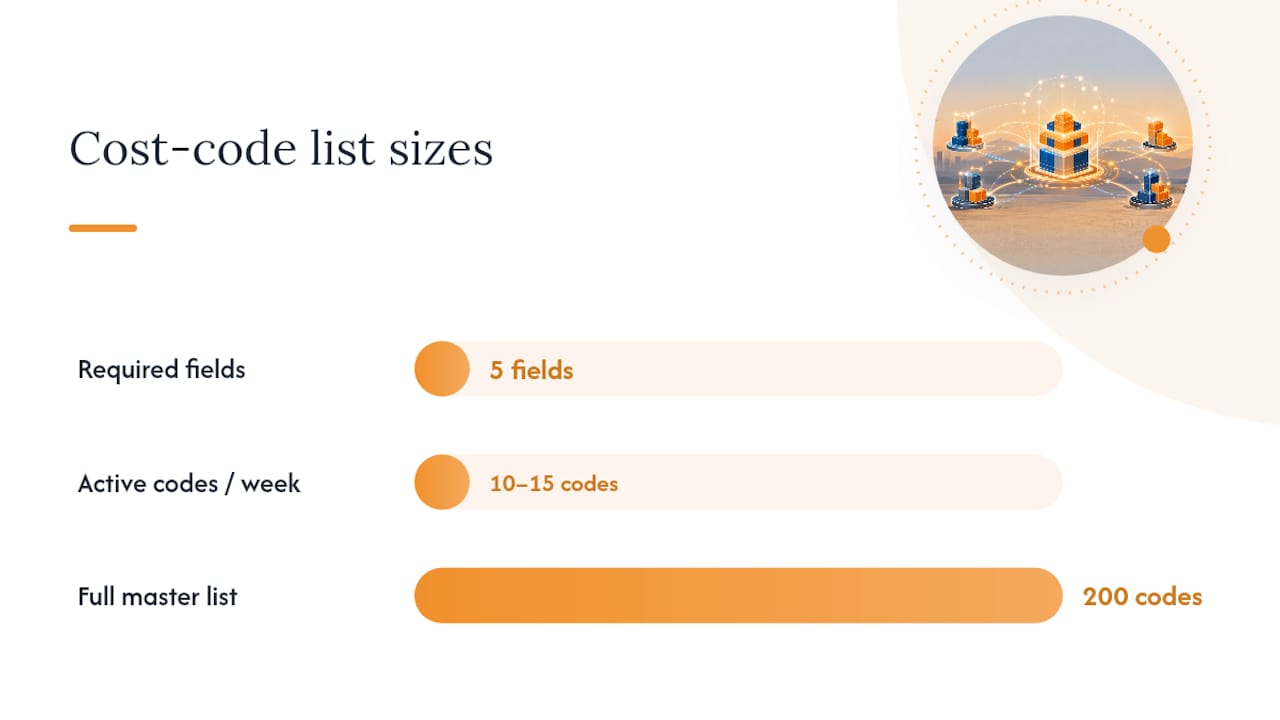
The design choice that matters most is restraint. A cost code list with 200 entries sounds thorough, but foremen faced with that many options either guess or default to whatever code is easiest to find. Shorter, well-organized lists with smart defaults per job cut miscoding dramatically. Werx Academy’s guidance on tracking by phase and cost code points to the same conclusion: simple naming conventions paired with required fields outperform exhaustive code libraries every time.
A few structural rules keep the data clean without slowing crews down:
- Limit each active job to the 10 to 15 cost codes actually in use that week, not the full master list.
- Set a default code per crew assignment so most entries need zero extra input.
- Require a split entry when a worker changes tasks mid-day rather than letting one entry cover the whole shift.
- Flag entries missing a cost code before they can be submitted, not after.
Once entries are clean, a mid-week cost-code burn report becomes genuinely useful. Cost detail reports that filter by date range and cost type and roll up totals by code let you see Tuesday afternoon that framing is running 20% over budget, while there’s still time to adjust crew size before Friday.
Configuring Overtime Rules and Producing Payroll-Ready Hours
Manual overtime math breaks down fast once you add state daily-overtime rules, double-time thresholds, or union premiums on top of the federal 40-hour baseline. California alone has daily overtime and double-time rules that a spreadsheet formula rarely handles correctly across a full crew roster. Encoding those rules in software once, then letting every entry calculate against them automatically, removes that guesswork from every payroll cycle.
Build the workflow in four steps:
- Set up FLSA, state, and any union-specific overtime rules as configuration, not as a manual calculation someone redoes weekly.
- Have crews log hours daily against job and cost code, with foreman review happening the same day, not batched at week’s end.
- Run mid-week adjustments when a foreman catches a misclassified entry or missing cost code, before the week locks.
- Lock the payroll week once approved, so no entry can change after export without a visible audit trail.
Locking payweeks and requiring foreman approval before export, a practice Everhour highlights as reducing reconciliation work, cuts down the back-and-forth between field and payroll that eats hours every cycle. Payroll-ready exports should carry classification, straight time, and overtime as separate fields, formatted to drop into your accounting system or certified payroll report without manual reformatting.
Real-Time Monitoring, Reports, and Catching Overtime Before It Happens
Waiting until Friday to see overtime totals means the overtime has already happened. Real-time, mid-week checks against budget catch labor leakage while there’s still a schedule change or crew reassignment that can fix it, a pattern DOL’s own overtime guidance implicitly supports by treating the workweek, not the pay period, as the unit that matters for compliance.
Three dashboards cover most of what a project manager needs day to day:
- Hours by job and cost code, updated as entries sync, not overnight.
- Crew daily totals against scheduled hours, flagging anyone trending toward overtime before Thursday.
- Labor burn rate versus the phase budget, so a framing crew running hot shows up before the invoice does.
Threshold alerts turn those dashboards from something you check into something that checks you. Set a flag at 75% of planned hours for a phase, and the exception list shows only the jobs that need attention instead of forcing a manager to scan every line.
Pro Tip: Give foremen a stripped-down daily view showing just their crew’s hours and any missing cost codes. Save the deeper burn-rate analytics and trend charts for the project manager’s weekly review. Nobody in the trailer needs a dashboard built for the office.
Field-Tested Best Practices to Reduce Unnecessary Overtime
Staggered shift starts across trades reduce the bottleneck effect where every crew hits overtime at the same hour because they all started at 7:00 AM. Cross-training a few workers to cover two roles gives you flexibility to shift labor instead of adding hours when one trade falls behind.
Temporary or peak-period crews absorb short-term spikes without pushing your core team into weekly overtime that becomes a permanent budget line. Enforcing required cost codes and a short note field for any overtime entry forces a moment of accountability at the point of entry, not a guess during payroll review.
A few habits keep this consistent across a crew:
- Review overtime exceptions every Wednesday, not just at week’s end.
- Require a one-line reason code for any shift running past eight hours.
- Tie a small incentive, even recognition-based, to crews that consistently hit planned hours without padding.
- Rotate scheduling duties so one foreman isn’t defaulting to overtime out of habit.
None of this eliminates overtime. Some weeks need it. The goal is making sure every hour you pay for is a decision, not a surprise.
Why Won2Build Hub (Time Budge) Is a Practical Option for Subcontractors
Time Budge is one of four connected apps inside Won2Build Hub, alongside CO Hub, Bid Track, and Takeoff, all reached through a single login. That matters for overtime tracking specifically because field hours logged in Time Budge flow into the same system tracking change orders and job costs, instead of living in a separate app that someone has to reconcile by hand.
That single sign-on setup addresses the double-entry problem directly: a cost code entered once in the field stays attached to the hour all the way through to payroll export, which preserves the audit trail certified payroll reviews depend on.
- Field-to-office sync keeps hours current without a separate import step.
- Cost codes and classifications carry through from time entry to job costing automatically.
- Change order hours logged in CO Hub connect to the same job data Time Budge tracks.
Best Practices for Communicating Overtime Policies and Expectations to Construction Crews
Crews follow overtime rules they understand, not rules buried in an employee handbook nobody reopens after orientation. State the policy in plain terms at the pre-job meeting: what counts as overtime, how it gets approved, and what happens if hours aren’t logged against the right job.
Put the policy where crews actually look. A laminated card at the time clock or a one-page insert in the daily briefing works better than a document filed away in HR. Repeat it at the start of any project where the schedule or classification mix changes, since a crew moving from a straight 40-hour job to one with weekend work needs the rules restated, not assumed.
Foremen are the actual messengers, whatever the office writes. If a foreman treats mid-shift cost code corrections as busywork, the crew will too. Training foremen to explain why accurate coding matters, protecting their own crew’s job cost numbers and keeping the project profitable, gets more buy-in than a mandate from the office.
A few things worth stating explicitly, every time:
- Overtime requires prior approval except in genuine emergencies, and workers should know who can grant that approval on-site.
- Any change in task during a shift needs a split entry, not a note added after the fact.
- Missing or vague entries get flagged and sent back before payroll, not corrected silently by the office.
Clear, repeated, foreman-delivered communication closes more compliance gaps than any policy memo ever will.
Common Compliance Pitfalls and How to Avoid Overtime Misclassification
The most common pitfall is misclassifying workers as exempt when their actual duties don’t meet the exemption test. Job titles like “supervisor” or “lead” don’t automatically exempt someone from overtime under the FLSA; the actual duties performed do. A lead carpenter who spends most of the day doing hands-on work alongside the crew is very likely still overtime-eligible regardless of title.
A second pitfall is averaging hours across two workweeks to avoid paying overtime, for example letting a worker log 30 hours one week and 50 the next to average to 40. The FLSA calculates overtime per workweek, not as a rolling average, and this practice is a straightforward violation.
Rounding practices cause quieter problems. Consistently rounding down at the end of a shift, even by a few minutes, adds up across a crew and a project into real unpaid overtime liability.
Independent contractor misclassification is the pitfall with the sharpest penalties. Treating someone as a 1099 contractor when they work under the same supervision and schedule as your W-2 crew doesn’t just risk overtime back pay. It risks payroll tax liability and penalties on top of it.
The fix in every case is the same: build classification decisions into the software configuration up front, based on actual job duties and work arrangement, rather than leaving it to a payroll clerk’s judgment call each cycle. Reviewing classifications whenever a worker’s role changes, not just at hire, closes most of the gap.
Integrating Overtime Tracking Data With Project Management and Accounting Software
Overtime data that lives only in a time clock app is only half useful. It needs to reach two other systems: whatever tracks project costs and schedule, and whatever runs payroll and general ledger accounting.
The integration failure point is almost always re-entry. A time clock exports a CSV, someone imports it into accounting software, and somewhere in that transfer a cost code gets dropped or a classification gets mismatched. That’s where certified payroll errors and job costing drift both originate.
The fix is a data model where job, phase, and cost code are attached at the point of entry and travel with the hour through every downstream system. When change orders, bid estimates, and time tracking sit in one connected suite rather than three disconnected tools, the labor hours behind a change order automatically show up in the right project’s cost report instead of requiring someone to manually reconcile which hours belonged to which change order after the fact.
For subcontractors running lean office staff, this integration isn’t a convenience feature. It’s the difference between a payroll close that takes an afternoon and one that takes three days of chasing down which timesheet matches which invoice.
Impact of Overtime on Worker Safety and Productivity in Construction
Extended hours on a jobsite carry real safety risk, and it compounds the longer a crew runs past a standard shift. Fatigue slows reaction time on tasks that depend on precise timing, whether that’s operating heavy equipment or working at height, and construction already carries higher injury rates than most industries even without extended hours in the mix.
Productivity follows a similar curve. The extra hours worked in overtime tend to produce less output per hour than the first eight hours of a shift, because fatigue sets in and error rates climb. A crew paid time-and-a-half for hour ten isn’t necessarily producing time-and-a-half of value, which is exactly why mid-week budget checks matter: they catch overtime that’s costing more than it’s delivering before the week closes.
Chronic overtime, not just an occasional long week, is where the risk concentrates. A crew running consistent 50 hour weeks for months accumulates fatigue that doesn’t reset over a single weekend, and that shows up in both incident reports and rework. Tracking overtime accurately isn’t only about payroll correctness. It’s an early warning system for a crew that’s being pushed past what a schedule should realistically ask of them.
Legal Consequences and Penalties for Improper Overtime Tracking
Overtime violations under the FLSA carry back pay liability for every underpaid hour, going back up to two years for ordinary violations and up to three years where the violation is found to be willful. On top of back wages, the Department of Labor can assess liquidated damages equal to the back pay owed, effectively doubling the liability.
Willful violations can also trigger civil penalties on a per-violation basis, and repeat offenders face closer scrutiny in future audits. For subcontractors working under Davis-Bacon, inaccurate certified payroll reporting adds a separate risk: contract termination, debarment from future federal work, and referral for further investigation if records don’t match actual hours worked.
The recordkeeping failure is often what turns a minor error into a bigger liability. If your time records can’t demonstrate what was actually worked, the burden of proof in a dispute tends to favor the worker’s account, not the employer’s estimate. Accurate, timestamped, job-level records aren’t just a compliance nicety. They’re the primary defense if a wage claim or audit ever happens.
Author Perspective: Practical Implementation Timeline and Priorities
Roll this out in phases: pilot on one site with one foreman first, then expand sitewide, then connect it to payroll last. Watch uncoded hours and mid-week OT alerts drop during the pilot before scaling. The biggest failure I see isn’t the software. It’s a 200-line cost code list nobody can navigate and a foreman who never got trained on why split entries matter.
— Jen Reese
Get Payroll-Ready Overtime Tracking Without the Double Entry
Most time-tracking tools stop at the punch clock and leave you to reconcile cost codes, change orders, and certified payroll reports by hand across three separate systems. Won2Build Hub connects Time Budge’s field time capture directly to CO Hub, Bid Track, and Takeoff through one login, so the cost code a worker selects at punch-in is the same data that shows up in your job cost report and certified payroll export, with no re-entry in between.

Time Budge runs at $199 per month per company, plus a $2 monthly fee per active field worker, and connects to the same suite tracking your bids and change orders. If your crews are still reconciling paper timesheets against a separate accounting system every Friday, start with the Time Budge product page to see how field-to-office sync works, then request a demo to see your own cost codes running through it before you commit.
Sources
- Wage and Hour Division (DOL) — Fact Sheet #23: Overtime Pay
- Trimble ProContractor — Project cost detail with labor hours (help doc)
FAQ
What Is Overtime Tracking in Construction?
Overtime tracking is the process of capturing worker hours against the correct job, cost code, and classification so any hours worked past 40 in a workweek calculate correctly and feed directly into payroll and job costing.
How Do Contractors Track Their Own Hours Worked?
Contractors and crews typically use a mobile app, jobsite kiosk, or time clock that requires selecting a job and cost code at clock-in, with a foreman reviewing entries daily before the week locks for payroll.
What Does OT Mean in Construction?
OT stands for overtime, which under the FLSA means any hours worked over 40 in a single workweek, paid at 1.5 times the regular hourly rate for covered nonexempt workers.
What Is the Best Construction Time Tracking App?
The right app depends on crew size, jobsite connectivity, and whether hours need to flow into job costing or certified payroll. Won2Build Hub’s Time Budge module is built specifically for subcontractors who need field time capture connected to cost codes, change orders, and bid data in one system rather than three.
How Much Does Construction Time Tracking Software Cost?
Pricing varies by vendor and feature set. Time Budge from Won2Build Hub costs $199 per month per company plus $2 per month for each active field worker, with current pricing details available on Won2Build’s pricing page.
Recommended
One login for estimating, bid tracking, change orders, and labor.
The Hub is free. Pay only for the apps you turn on.
Create your free Hub account- Managers: Make Mobile Field Workflows Resilient for 72 Hour OutagesPlaybook for field managers: offline first mobile workflows, resilient sync and conflict handling, compliance first AI guardrails, and practical pilot steps.
- Daily Signed Records: Force Account Tracking for Managers & InspectorsField checklist for project managers and inspectors to keep force account tracking audit-ready: use daily signed records for labor, equipment, and...
- Stop Timecard to Report Drift: Labor Cost Codes for SubcontractorsFix the timecard to report chain with labor cost codes that tie crews to budgets. Includes a 6 code starter and a burdened rate example.