
Contractors: Cut Construction Software Pricing From $50 to $2,000+
A budget first playbook for contractors to compare construction software pricing, spot hidden fees, and lower total ownership costs.

Construction software pricing breaks down into five families: per-user subscriptions, tiered bundles, flat company fees, usage or revenue-based billing, and perpetual licenses. The trade-off is always the same one. Per-user and usage-based plans scale with your activity, so costs stay proportional but harder to forecast; flat and tiered plans are predictable but can charge you for capacity you don’t use. Before comparing quotes, ask one question: do subcontractors and field crews count as billable users?
TL;DR:
- Subscription models are predictable but can become costly if external collaborators or intermittent users are billed as full seats.
- Tiered and flat-rate plans may limit features or project volume upfront, requiring careful feature matching to avoid paying for unused capabilities.
- Usage-based pricing can lead to unpredictable costs during peak seasons unless contracts include caps or smoothing provisions.
- Perpetual licenses involve high upfront costs plus ongoing maintenance, while open-source tools demand operational management from users.
- Always request detailed, written definitions of user types, implementation costs, and potential hidden fees before signing a construction software contract.
Table of Contents
- What Are the Main Construction Software Pricing Models?
- How Does Per-User Pricing Work in Construction Software?
- Tiered, Flat-Rate, and Modular Plans: What Am I Actually Buying?
- How Do Usage-Based and Revenue Pricing Models Work?
- When Do Perpetual Licenses or Open-Source Tools Make Sense?
- What Hidden Fees Should I Budget for Beyond the Subscription Price?
- What Do Construction Software Plans Typically Cost by Company Size?
- What Should I Ask Vendors Before Signing a Construction Software Contract?
- What Do Practitioners Say About Reducing Software Costs?
- How Should I Think About Software Contracts as a Contractor?
- Try a Simpler Way to Price Your Software Stack
- Sources
What Are the Main Construction Software Pricing Models?
Every pricing model construction software vendors sell falls into one of four structural buckets, and understanding which bucket you’re buying from tells you more about your future costs than any feature list.
Subscription pricing charges monthly or annually per user, per company, or per feature tier. It’s the dominant model in the industry now, largely because cloud hosting made it cheap for vendors to bill incrementally instead of collecting one huge check upfront. Perpetual licensing flips that: you pay a large sum once, own the software outright, and typically pay separate annual maintenance fees to keep receiving updates and support. Usage-based pricing ties your bill to activity, such as the number of active projects, square footage measured, or documents processed. Modular and freemium models let you start free or cheap and pay only as you add capabilities.
The billing cadence matters almost as much as the model itself. Monthly billing gives you flexibility to downgrade during slow seasons. Annual billing usually earns a discount but locks you in even if your crew size shrinks. Quote-only pricing, common with enterprise platforms, hides the real number until a sales call, which is itself worth noting: opaque pricing correlates with more negotiating room, but also more room for surprise fees.
The pricing model construction management software rates use directly shapes how you budget and negotiate. A flat monthly fee is easy to forecast twelve months out. A usage-based model means your finance team needs to model a range instead of a fixed number, and it means renegotiating terms becomes a recurring task rather than a once-a-year event.
Here’s how the four families typically break down:
- Subscription (per-user or tiered): predictable per-seat costs, scales with headcount, usually billed monthly or annually.
- Perpetual license: high one-time cost, separate maintenance fees, ownership of the software itself.
- Usage or revenue-based: bill tracks activity like project count or processed volume, harder to forecast but can be cheaper for low-activity periods.
- Modular/freemium: low or no entry cost, pay-as-you-grow, but core functionality often sits behind a paywall.
Vendors commonly combine these. A platform might charge a flat company fee for the core system, then bill per active field worker for time tracking. That hybrid structure is worth flagging early, because it means “the price” isn’t one number. It’s a formula, and you need to know every variable before you sign.
How Does Per-User Pricing Work in Construction Software?
Per-user pricing sounds simple until you read the fine print on what counts as a “user.” Vendors split this two ways: named user billing charges for every person with a login, whether they touch the software daily or once a month. Active user billing only charges for accounts that actually log in during a billing period. The difference can swing your bill by hundreds of dollars a month if you have seasonal staff or infrequent office users.
Role-based seat types add another layer. Field workers clocking hours might cost less per seat than project managers with full administrative access, and estimators with takeoff and bid tools often sit in a premium tier. Market pricing across the industry runs from roughly $50 a month for entry-level tools to $1,000 or more for mid-market platforms, and per-user add-ons stack on top of that base.
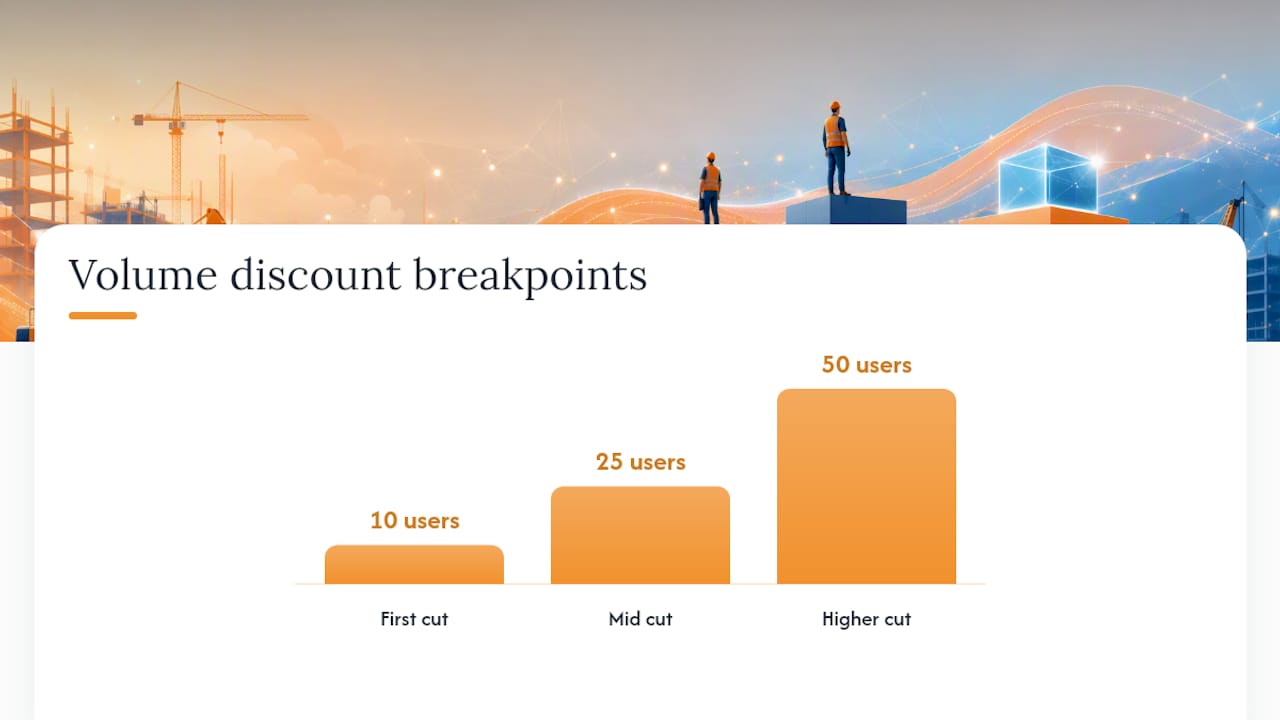
Volume discounts follow a predictable curve: most vendors start cutting per-seat rates once you cross 10, 25, or 50 users, and annual commitments typically shave another slice off the monthly rate. The math rewards companies that can commit to headcount projections, which is exactly the problem for subcontractors whose crew size swings with the season.
The real trap: subcontractors, vendors, or outside collaborators who need occasional access to a project can get billed as full paid users, even when they log in once to check a schedule.
- Ask the vendor directly whether external collaborators (subs, inspectors, clients) count toward your user total.
- Request a written definition of “active user” before signing, not after your first invoice.
- Model your peak season headcount, not your average, since seat pricing usually bills at your highest point.
- Check whether view-only or read-only roles are free or discounted.
Pro Tip: Get the user definition in writing as a contract clause, not a verbal assurance from your sales rep. Verbal promises about “free guest access” have a way of disappearing once billing starts.
Tiered, Flat-Rate, and Modular Plans: What Am I Actually Buying?
Tiered pricing gates features behind purchase levels. Everyone gets the same base app, but takeoff tools, advanced reporting, or API access only unlock once you upgrade a tier. This works fine until the one feature your team needs, say, change order tracking, only exists in the tier that costs triple your current plan. Vendor listings on Capterra show this gating pattern across nearly every major construction platform, and it’s worth mapping which tier holds your must-have feature before you commit to a lower one.
Flat-rate company plans charge one price regardless of user count, which sounds ideal for growing teams. The catch is usually hidden in caps: a flat fee might cover unlimited users but cap you at five active projects, or include storage that runs out fast once you’re uploading drawing sets and photos daily.
Modular, or add-on, pricing lets you buy only what you need. A subcontractor that only needs time tracking and change order management shouldn’t have to pay for a bid management module they’ll never open.
- Tiered bundles reward companies with stable, well-defined needs who can pick the right level once and stay there.
- Flat-rate plans favor larger teams with fluctuating headcount but stable project volume.
- Modular pricing suits companies replacing one broken workflow at a time rather than overhauling everything at once.
The mistake to avoid is buying a bundle for features you’ll grow into over time. Pay for what solves this year’s problem, and treat next year’s expansion as a separate negotiation.
How Do Usage-Based and Revenue Pricing Models Work?
Usage-based pricing charges you for what you do, not who you employ. Common metrics include the number of active projects, square footage or pages processed through takeoff tools, and total project value or company revenue. Each metric maps differently to your bill: a vendor charging per active project punishes companies juggling many small jobs, while one charging by project value hits larger general contractors harder than small specialty subcontractors.
Run the numbers before you sign anything tied to usage. Say a platform charges $15 per active project per month. A subcontractor running eight concurrent jobs pays $120 a month in that fee alone, on top of any base subscription.
That unpredictability is the core weakness of usage-based models. Usage pricing tied to projects, documents, or revenue can spike unpredictably during peak season unless the contract includes protective language.
- Ask for a monthly cap or ceiling on usage-based charges before you sign.
- Request smoothing provisions that average your bill across quarters instead of billing raw monthly spikes.
- Negotiate a maximum true-up amount so a surprise busy month doesn’t blow your annual software budget.
Contracts without these guardrails leave you exposed to exactly the kind of seasonal swing construction businesses already deal with in labor and material costs.
When Do Perpetual Licenses or Open-Source Tools Make Sense?
Perpetual licenses ask for a large check upfront, sometimes tens of thousands of dollars, in exchange for owning the software outright. The appeal is obvious on a spreadsheet: no recurring fee. The reality is that most vendors charge separate annual maintenance fees for updates and support, often 15% to 20% of the original license cost, and someone on your team has to manage servers, backups, and security patches that a cloud vendor would otherwise handle.
Open-source construction tools offer similar trade-offs. You get customization freedom and no license fee, but you inherit the engineering and operational burden of maintaining, securing, and updating the system yourself, which few subcontractors have the internal staff to do.
Freemium tools work fine for very small operations testing a workflow, but the free tier almost always excludes the features that matter for scaling, like multi-project reporting or integrations, and the upgrade trigger usually arrives right when you need the tool most.
What Hidden Fees Should I Budget for Beyond the Subscription Price?
The subscription price on a vendor’s website is rarely the number you’ll actually pay. Implementation and data migration costs come first, and they’re commonly underbudgeted because vendors quote the software fee prominently and bury the setup fee in a separate line item, or skip mentioning it until the contract stage. The Construction Financial Management Association points to implementation, integration, and training as the biggest drivers of total technology cost in construction firms, often exceeding the software subscription itself in year one.
Integration costs are the second trap. Connecting your new platform to accounting software, an existing estimating tool, or a CRM often requires either a native integration (sometimes free, sometimes a paid add-on) or custom API work that can run into thousands of dollars depending on complexity.
Here’s what to line-item before you sign anything:
- Implementation and data migration: one-time fees plus internal staff hours pulling data out of your old system.
- Integrations: accounting, estimating, and CRM connections, plus any API access fees for custom builds.
- Training and support: live onboarding sessions, video libraries, and premium support tiers with dedicated account managers.
- Storage and overage fees: charges once you exceed included document storage or project limits.
- Subcontractor and collaborator access: per-seat charges for external users who only need limited visibility.
G2’s construction management category reviews repeatedly surface hidden fees and unclear user definitions as the top complaints from buyers after purchase, which tells you these aren’t edge cases. They’re the norm unless you push for clarity before signing.
Pro Tip: Ask every vendor for a full first-year cost estimate in writing, including implementation, training, and expected integration fees, not just the monthly subscription number. If they hesitate to put it in writing, that hesitation is itself useful information.
What Do Construction Software Plans Typically Cost by Company Size?
Price bands vary widely, but three ranges show up consistently across the market. Entry-level tools for small teams run roughly $50 per month, often covering basic scheduling or time tracking for a handful of users. Mid-market platforms with estimating, bid management, and reporting typically run $1,000 or more per month once you factor in per-user fees. Enterprise deployments across multiple divisions or offices often land between $1,000 and $2,000 or higher per month, with implementation and integration costs adding substantially on top.
Three quick examples show how this plays out:
- A 5-person subcontractor using an entry-level time tracking and bidding tool might pay $150 to $300 a month total, assuming a small base fee plus a handful of seats.
- A 25-person specialty contractor running an integrated suite with estimating, change orders, and field time tracking could land between $800 and $1,500 a month once seat counts and modules are factored in.
- An enterprise multi-division contractor deploying across several offices with custom integrations and dedicated support commonly exceeds $2,000 a month, with implementation costs sometimes matching or exceeding the first year’s subscription fees.
Contract length changes the effective annual number too. A vendor offering 15% off for an annual commitment looks attractive, but if your crew size is uncertain three months out, that discount can cost you more than a flexible monthly plan if you end up overpaying for unused seats. According to Bureau of Labor Statistics industry data, specialty trade contractor firm sizes vary enormously, which is exactly why seat-based annual commitments carry real risk for smaller companies whose headcount shifts season to season.
What Should I Ask Vendors Before Signing a Construction Software Contract?
A pricing conversation with a vendor should feel more like a cross-examination than a sales call. Use this checklist before you commit to anything.
- Who counts as a user? Get a written definition covering subcontractors, inspectors, and view-only accounts.
- What’s actually included in the base price? Ask for a line-item breakdown, not a feature list.
- What does implementation cost, and how long does it take? Get a number and a timeline in writing, not a verbal estimate.
- What support level is included, and what costs extra? Confirm whether a dedicated success manager is standard or a paid upsell.
- Can I export my data if I leave? A vendor unwilling to guarantee data export on exit is a red flag by itself.
- Is there a usage cap or smoothing provision? If pricing ties to activity, get the ceiling in writing.
Watch for red flags during these conversations: pricing that’s only available after a sales call, reluctance to define “active user” in writing, or contracts that renew automatically without a clear cancellation window. Gartner’s research on B2B buying behavior points to documented, transparent pricing as the strongest predictor of avoiding disputes after the sale, which lines up with what construction buyers report after the fact.
Pro Tip: Request a trial period long enough to run one full billing cycle of your actual workflow, not just a demo environment. A two-week trial rarely surfaces the seat-count or usage surprises that show up on your first real invoice.
What Do Practitioners Say About Reducing Software Costs?
Jen Reese, who covers construction technology and pricing structures, points to a pattern that shows up across the industry: the biggest cost overruns rarely come from the base subscription. They come from seat counts creeping up as subcontractors and field crews get added one login at a time.
Integrated software suites that bundle time tracking, change order management, bid estimating, and takeoff under one login, rather than four separate vendor relationships, cut down on the duplicate seat fees that stack up when each tool bills its own users separately. Won2Build’s single sign-on structure across Time Budge, CO Hub, Bid Track, and Takeoff reflects that same logic: one login, one billing relationship, less room for the hidden per-seat charges that show up when field workers need access to three or four disconnected systems. For a deeper look at how integrated estimating affects cost predictability, see Won2Build’s breakdown of estimating workflows for project managers.
How Should I Think About Software Contracts as a Contractor?
The mistake I see most often is contractors optimizing for the lowest monthly number instead of the lowest total cost. A $50-a-month tool that charges $15 per subcontractor login gets expensive fast once you add five subs to a job.
Prioritize transparent billing over a flashy discount. Ask for a staged rollout, one module first, rather than committing to a full suite before you know it fits your workflow. And always run a real trial, not a sales demo, before signing an annual contract.
If I had one rule: never sign a contract you can’t explain to your bookkeeper in one sentence.
— Jen Reese
Try a Simpler Way to Price Your Software Stack
Some platforms aim to replace the seat-stacking problem by using one login for multiple construction apps, avoiding separate per-user fees across disconnected tools. Billing may run as a flat monthly company fee plus per-active-field-worker charges where applicable, keeping costs tied to actual usage rather than every created login.

The takeoff-to-estimate flow inside Won2Build Takeoff moves digital plan quantification straight into your bid estimates without re-entering data twice, which is where a lot of hidden labor cost hides in disconnected software stacks. If you’re evaluating your current software spend or comparing quotes from other platforms, start a trial of Takeoff and run one real project through it before your next contract renewal comes up. Seeing the actual workflow beats reading another spec sheet.
Sources
- How Much Does Construction Management Software Cost? — JobTread (blog)
- Construction — U.S. Bureau of Labor Statistics (industry context)
- Construction management software category — G2
Recommended
One login for estimating, bid tracking, change orders, and labor.
The Hub is free. Pay only for the apps you turn on.
Create your free Hub account- Managers: Make Mobile Field Workflows Resilient for 72 Hour OutagesPlaybook for field managers: offline first mobile workflows, resilient sync and conflict handling, compliance first AI guardrails, and practical pilot steps.
- Daily Signed Records: Force Account Tracking for Managers & InspectorsField checklist for project managers and inspectors to keep force account tracking audit-ready: use daily signed records for labor, equipment, and...
- Stop Timecard to Report Drift: Labor Cost Codes for SubcontractorsFix the timecard to report chain with labor cost codes that tie crews to budgets. Includes a 6 code starter and a burdened rate example.