
The Best Estimating Tools for Construction Subcontractors
Discover top estimating tools designed for construction subcontractors. Boost productivity and protect margins with Won2Build Hub's integrated modules.

For U.S. commercial subcontractors, the right estimating tools aren’t just a productivity upgrade — they’re a margin protection strategy. The clearest recommendation: run Won2Build Hub’s Bid Track and Takeoff modules together on a single project for two weeks, then measure three things: bid turnaround time, estimate-to-actual variance, and change-order capture rate. Those three numbers will tell you more about whether a platform fits your shop than any feature checklist.
Won2Build Hub integrates four purpose-built modules — Bid Track for estimating and bid pipeline, Takeoff for digital plan quantification, CO Hub for change-order and T&M capture, and Time Budge for field labor tracking — all under a single login. That single sign-on eliminates the double entry that quietly bleeds hours out of every project cycle. Real-time field-to-office sync means your foreman’s timecard and your estimator’s cost model are drawing from the same data, not two spreadsheets that diverge by Thursday.
If you’re still running estimates in Excel and tracking change orders by email, the gap between where you are and where a purpose-built suite puts you is measurable in dollars per project.
Key Takeaways
For subcontractors evaluating construction estimating software, the decision comes down to integration depth, change-order linkage, and whether the platform can be validated on a real project within two weeks.
| Point | Details |
|---|---|
| Integration beats features | A connected suite (takeoff → bid → change order → time tracking) outperforms four separate tools with better individual specs. |
| Three trial metrics matter | Measure bid turnaround time, estimate-to-actual variance, and change-order capture rate during any pilot. |
| Change orders protect margin | Untracked change orders are direct margin loss; the field-side workflow must be fast enough for foremen to use on-site. |
| Pilot one project first | Run one estimator on one repeatable scope before migrating the full team to surface configuration gaps early. |
| Won2Build Hub | Bid Track + Takeoff + CO Hub + Time Budge under a single login, built for U.S. commercial subcontractors, with a two-week trial available. |
Table of Contents
- What are construction estimating tools, and which types do you need?
- What features and buyer criteria actually matter for subcontractors?
- Free vs. paid estimating tools: how do you calculate the ROI?
- How do estimators actually use these tools across a project?
- Why Won2Build Hub fits U.S. subcontractors better than a patchwork toolset
- What most subcontractors get wrong about estimating software adoption
- Ready to run a Won2Build trial on your next project?
- Where to verify reviews, pricing, and industry data
- Sources
What are construction estimating tools, and which types do you need?
A construction estimating tool is any software or system that helps a subcontractor quantify scope, assign unit rates, manage bids, and connect cost data to change orders and labor tracking. The term covers a wide range of products, from standalone PDF markup apps to fully integrated cloud suites. Knowing the categories helps you match the right tool to the right stage of a project.
Digital plan takeoff tools convert PDF or CAD drawings into measurable quantities — linear feet of conduit, square feet of drywall, cubic yards of concrete. Estimators use these at the bid stage to pull counts directly from plans rather than scaling by hand.
Estimating and bid-management platforms hold your unit-price libraries, assemble line-item estimates, and manage the bid pipeline from invitation to award. These are the core of any commercial estimating workflow.
Change-order and T&M management tools capture scope additions in the field, generate T&M tickets, and connect approved changes back to the project cost model. Without this link, approved change orders often fail to reach the invoice — a common source of margin leakage.
Time and labor tracking tools record field hours by project, cost code, and worker. When integrated with estimating, they let you compare budgeted labor hours against actuals in near real time.
Supporting tools include cost databases (RSMeans, for example), PDF markup applications like Bluebeam Revu, and Excel-based templates. These often sit alongside a primary platform rather than replacing it.
Here’s how the categories map to the project lifecycle:
- Concept/early design: Parametric estimating tools and cost databases for order-of-magnitude pricing
- Bid stage: Takeoff tools + estimating/bid-management platforms
- Contract execution: Change-order tools + time tracking
- Closeout: Reporting and audit trails from the estimating and labor platforms
Typical users by category:
- Estimators: takeoff tools, estimating/bid-management platforms, cost databases
- Project managers: change-order tools, reporting, bid-to-actual comparison
- Foremen: mobile time tracking, field change-order capture
- Accountants: integrations with accounting/payroll, job-cost reports
What features and buyer criteria actually matter for subcontractors?
Most feature lists for construction estimating software run 30 items long. For a subcontractor, about eight of them actually drive the decision.
The features that earn their place
Digital takeoff accuracy is the foundation. If the tool can’t import your plan format cleanly and produce reliable counts, nothing downstream is trustworthy. Test this with a real project plan during your demo — not a vendor-supplied sample.
Unit-price libraries and configurable assemblies determine how fast you can build an estimate. A library you can’t customize to your trade’s labor rates and material costs forces manual overrides on every bid.
Bid pipeline management tracks which invitations you’ve received, which bids are in progress, and which are submitted. Without it, bids fall through the cracks during busy seasons.
Change-order and T&M workflows need to be fast enough for field use. If issuing a change order takes more than a few minutes on a phone, your foremen won’t use it.
Mobile access is non-negotiable for field teams. Test the mobile interface on an actual device during your trial, not just the desktop version.
Integrations with your accounting software (QuickBooks, Sage, or similar), payroll, and plan viewers determine how much manual re-entry your office staff absorbs.
Reporting and audit trails protect you in disputes. Every cost decision, change order, and timecard entry should carry a timestamp and a user ID.
Single sign-on and role-based access reduce friction and prevent unauthorized edits to live estimates.
Buyer checklist: what to test during a trial
Run this sequence on a real project during any vendor evaluation:
- Import a live project plan (PDF or CAD) and confirm scale accuracy
- Perform a 2D takeoff on at least two trade scopes
- Build a line-item estimate using the platform’s price library
- Produce a formatted bid proposal
- Create a test change order and trace it back to the project cost model
- Sync a field timecard and verify it appears in the job-cost report
If you can’t complete all six steps within the trial period without calling support, the platform’s learning curve is steeper than the vendor admitted.
Questions to ask vendors directly
- How often is the built-in cost database updated, and can I override rates at the trade level?
- What user roles exist, and can I restrict estimators from editing submitted bids?
- Where is data hosted, and what is the backup frequency?
- Does the API connect to my accounting software without a middleware layer?
- What does onboarding include — live training, documentation, or just a help center?
Red flags to watch for
A vendor who won’t demo with your actual project data is hiding something about usability. No audit trail on change orders is a billing dispute waiting to happen. Limited mobile functionality usually means the platform was built for the office and bolted onto a phone as an afterthought. Hidden per-field-worker fees can double your monthly cost once you scale past a handful of workers — ask for a full pricing scenario at your actual crew size before signing.
How tool categories compare on core features
| Feature | Entry-level field apps | Mid-market estimating platforms | Integrated suites |
|---|---|---|---|
| Digital takeoff | Basic or none | Yes, 2D | Yes, 2D + cloud sync |
| Unit-price libraries | Manual entry | Pre-built, limited customization | Configurable by trade |
| Bid pipeline management | None | Basic | Full pipeline with status tracking |
| Change-order/T&M workflows | None | Partial | Integrated, field-accessible |
| Mobile field access | Yes | Limited | Yes, full-featured |
| Accounting integrations | None or manual export | Common formats | API-level integrations |
| Audit trails and reporting | Minimal | Basic | Per-project, timestamped |
| Single sign-on | No | Sometimes | Yes |
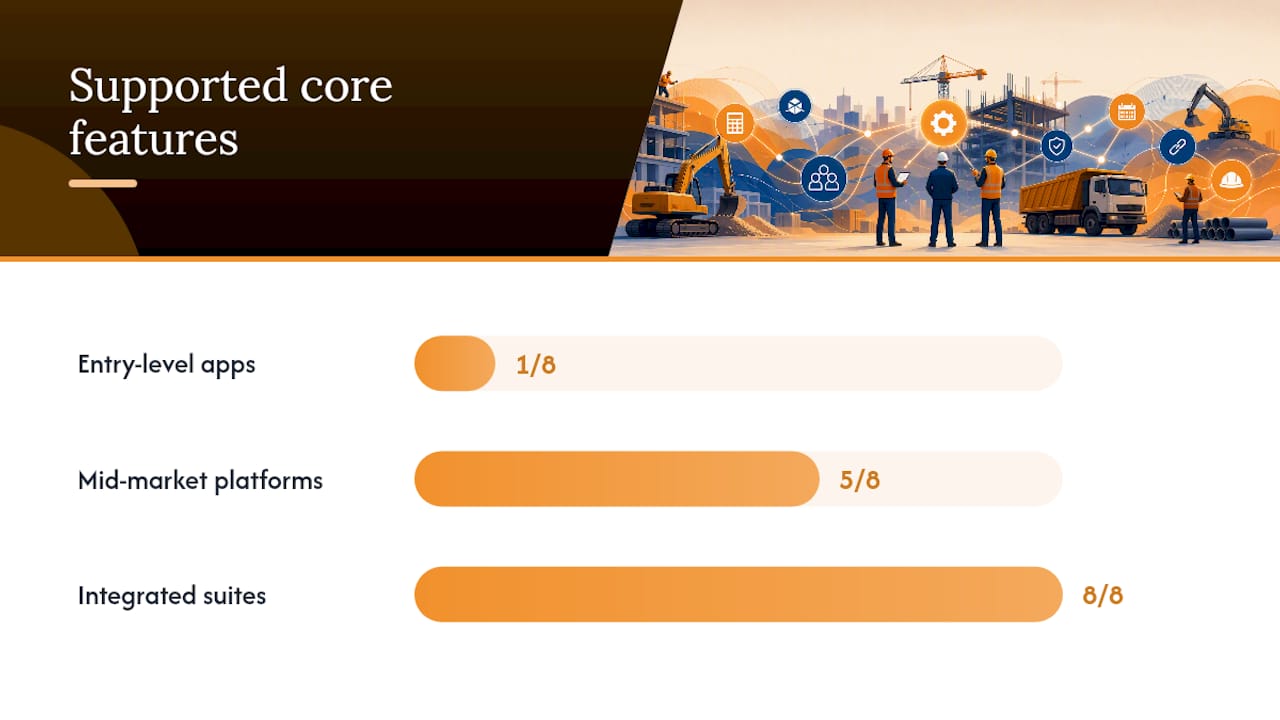
Pro Tip: Ask the vendor to walk through a change-order scenario using your trade’s typical scope language. Generic demos use simple examples that rarely expose the friction your team will actually hit.
Free vs. paid estimating tools: how do you calculate the ROI?
The honest answer on free tools: they work until they don’t. Excel is free, flexible, and familiar — and it breaks down the moment two estimators are editing the same file, a change order needs to trace back to a bid line, or a project manager needs a real-time cost report.
Common pricing models
Per-company flat fee gives you predictable monthly costs regardless of how many bids you run. Good for shops with stable team sizes.
Per-active-field-worker fees scale with your crew. Expect these on time-tracking and field-access modules specifically. Always model your peak crew size, not your average.
Module-based pricing lets you subscribe to takeoff, estimating, or change-order tools individually. Useful if you only need one piece, but integration costs rise when modules come from different vendors.
Percent-of-bid add-ons appear in some specialty platforms. They look affordable on small projects and become expensive fast on larger commercial work.
What to expect by tier
Entry-level tools (basic takeoff apps, simple bid templates) typically carry low monthly costs but require significant manual work to connect data across the project lifecycle. Mid-market estimating platforms add cost libraries and basic bid management but often lack field-side change-order and time-tracking integration. Integrated suites carry higher monthly fees and deliver the full workflow — takeoff through closeout — in a single data environment.
A simple ROI template
Three levers drive the payback calculation for any paid estimating suite:
-
Saved estimator hours: How many hours per bid does your team currently spend on manual takeoff, price lookups, and proposal formatting? Multiply by your fully loaded estimator hourly cost. Even modest time savings on a high-bid-volume shop add up quickly. Commercial estimating software consistently shows measurable time reductions once teams move past the learning curve.
-
Reduced estimate-to-actual variance: If your estimates often vary significantly from actuals, tighter takeoff accuracy and updated cost libraries narrow that gap. A single avoided cost overrun on a mid-size project often covers a year of software fees.
-
Improved change-order capture: Untracked change orders are pure margin loss. If your shop completes 20 change orders per month and misses billing on even two of them, the revenue leakage likely exceeds your software cost.
When to move from free tools to a paid suite
- Your estimators are spending more than 30% of their time on manual data entry and reformatting
- Change orders are tracked in email threads or a separate spreadsheet
- You can’t produce a job-cost report without pulling data from three different places
- You’ve lost a dispute because you couldn’t produce a timestamped change-order record
Pro Tip: Before your first vendor demo, pull your last six months of change orders and calculate how many were billed at full value. That number is your baseline for measuring change-order capture improvement during a trial.
How do estimators actually use these tools across a project?
Understanding the four common estimating methods helps you pick the right tool for each stage — and avoid using a detailed bid-level tool when a quick parametric number is all the situation calls for.
The four estimating methods
Conceptual estimates use cost-per-square-foot or cost-per-unit benchmarks to produce an order-of-magnitude number early in design. Speed matters more than precision here. AI-assisted tools like Projectmaven claim to accelerate this stage by extracting scope from plain-English briefs, though any conceptual number still needs validation against your own historical data before it influences a bid.
Parametric estimates apply historical cost factors to project parameters — square footage, system counts, or equipment quantities. Useful for early-stage budgets and go/no-go decisions.
Unit-rate (preliminary) estimates break scope into measurable units and apply trade-specific rates. This is where a cost database earns its keep. The components of a commercial estimate at this stage include labor, material, equipment, subcontractor markups, and overhead allocation.
Detailed bid estimates are takeoff-driven. Every quantity is measured from the plans, every rate is confirmed against current market pricing, and the result is a number you’re willing to sign a contract on. This is where digital takeoff tools and integrated bid-management platforms do their heaviest lifting.
Two workflow examples
Small subcontractor bid process: An estimator receives a plan set, imports it into a takeoff tool, measures quantities for their trade scope, pulls rates from a unit-price library, and exports a formatted proposal. The whole cycle might run two to four hours on a straightforward scope. Without a takeoff tool, the same process runs longer and introduces more manual error.

Commercial subcontractor preconstruction process: A preconstruction team receives an invitation to bid, logs it in a bid pipeline, assigns an estimator, runs takeoff on multiple plan sheets, prices assemblies against a configurable library, reviews with the PM, and submits. Change orders during construction feed back into the cost model. Labor hours from the field are compared against the estimate weekly. This workflow requires integration across takeoff, estimating, change-order, and time-tracking tools — which is exactly where a siloed toolset breaks down.
Team roles and handoffs
Estimators own the bid. Project managers own the cost model during execution. Foremen own field data capture. Accountants need clean exports to job-cost reports. A tool that handles the estimator’s workflow but produces a PDF the accountant has to re-key defeats half the purpose. Look for platforms where integrated estimating connects directly to project controls rather than requiring a manual handoff at each stage.
Common adoption pitfalls
Data silos are the most common failure mode. A takeoff tool that doesn’t feed the estimating platform, or a change-order tool that doesn’t connect to the invoice, creates the same fragmentation problem you had with spreadsheets — just with more software licenses. Inconsistent price libraries across estimators produce bids that can’t be compared or audited. And the absence of a change-order linkage from field to billing is where margin disappears on otherwise well-run projects.
Why Won2Build Hub fits U.S. subcontractors better than a patchwork toolset
The U.S. construction sector is large enough that margin pressure is constant — the Census Bureau’s construction spending data puts the scale of ongoing activity in context, and in a competitive bid environment, the difference between winning work and winning profitable work comes down to estimate accuracy and change-order discipline.
Won2Build Hub addresses both directly through four integrated modules:
- Takeoff handles digital plan quantification. Import a PDF plan set, run a 2D takeoff by trade scope, and push quantities directly into Bid Track without re-entering a single number.
- Bid Track manages the estimating and bid pipeline. Build line-item estimates from a configurable unit-price library, track bids from invitation to award, and produce formatted proposals — all in the same environment where your takeoff quantities already live.
- CO Hub captures change orders and T&M tickets in the field. Foremen can issue a change order from a phone; the record timestamps automatically and connects back to the project cost model.
- Time Budge tracks field labor by project and cost code. Hours sync in real time to the office, so your PM can compare budgeted versus actual labor without waiting for a Friday timesheet dump.
The single sign-on across all four modules is the feature that separates Won2Build from a stack of disconnected apps. Estimators, PMs, foremen, and accountants all work from the same project data. No export-import cycle, no version mismatch between the bid and the field.
Won2Build demo checklist
Run these five steps during your trial to validate the platform against your actual workflow:
- Import your plan: Upload a real project PDF and confirm scale accuracy on at least two sheets
- Run a takeoff: Measure a trade scope and verify quantities push to Bid Track automatically
- Create a bid: Build a line-item estimate using your trade’s rates and produce a formatted proposal
- Issue a test change order: Create a CO Hub ticket in the field view and confirm it appears in the project cost model
- Sync a timecard: Enter field hours in Time Budge and verify they appear in the job-cost report within the same session
If all five steps complete without a support call, you’ve validated the core workflow. The Bid Track product page outlines additional trial steps and demo options for teams that want a guided walkthrough.
Cloud-based takeoff also means your estimators aren’t tied to a single workstation — plans are accessible from any device, which matters when a bid deadline hits on a Friday afternoon and your lead estimator is on-site.
What most subcontractors get wrong about estimating software adoption
The conventional wisdom says pick the tool with the best feature set. The actual problem is almost never features — it’s integration and adoption sequence.
Most subcontractors who struggle with estimating software bought a capable platform and then tried to migrate their entire workflow at once. Three estimators, six active projects, and a new system all at the same time. The result is a painful two-month period where nothing works cleanly, the team reverts to spreadsheets for “just this one bid,” and the software never gets a fair evaluation.
The smarter path: pilot one estimator on one project type. Pick your most repeatable scope — the trade work you bid most often — and run it through the new platform start to finish before touching anything else. That single project will surface every configuration gap, every missing rate in the library, and every workflow friction point. Fix those before you scale.
The other thing most articles won’t tell you: the change-order module matters more than the takeoff module for protecting margin on active projects. Takeoff accuracy wins you the bid. Change-order discipline is what keeps the money once the work starts. If you’re evaluating platforms and the change-order workflow feels clunky or requires desktop access to issue a ticket, that’s a real problem — not a minor inconvenience.
Estimating best practices consistently point to library maintenance and change-order linkage as the two highest-leverage habits for improving estimate-to-actual performance over time. Both require a platform that makes those habits easy, not a platform that makes them possible in theory.
Ready to run a Won2Build trial on your next project?
Won2Build Hub gives commercial subcontractors a concrete alternative to managing bids in Excel and change orders in email. The trial puts Bid Track and Takeoff in your hands on a single real project — no sample data, no vendor-curated demo environment.

The suggested pilot is two weeks, one project, and the five-step demo checklist above. By the end, you’ll have real numbers on bid turnaround time, estimate-to-actual variance, and change-order capture rate — the three metrics that tell you whether a platform is actually protecting your margin or just adding another login to your day.
Request a demo or activate a trial directly through the Bid Track product page. Onboarding resources and live support are available from day one, so you’re not figuring out configuration on your own during a live bid cycle.
Where to verify reviews, pricing, and industry data
Third-party review platforms are the fastest way to pressure-test a vendor’s claims before you commit to a trial. For construction estimating software, two aggregators are worth checking:
G2 carries detailed user reviews for most commercial estimating platforms. Bluebeam Revu reviews on G2 are a useful example of how reviewers describe real-world trade-offs — in Bluebeam’s case, strong PDF takeoff and markup capabilities alongside a noted learning curve for advanced workflows. Use that same review pattern to evaluate any platform: look for comments about mobile use, onboarding time, and support responsiveness, not just star ratings.
Capterra provides similar user sentiment data. Bluebeam PDF Revu on Capterra shows positive feedback on drawing markup and measurement tools — a good baseline for understanding what specialist takeoff users value versus what integrated-suite users prioritize differently.
For market context, the U.S. Census Bureau’s construction spending releases give you a grounded sense of the sector’s scale and activity level — useful when building an internal business case for software investment.
For Won2Build-specific resources: the Won2Build blog covers estimating methodology, measurement tools, and adoption guidance in depth. Product pages for Bid Track, Takeoff, CO Hub, and Time Budge include feature details and demo request options. When evaluating any vendor, cross-reference their product documentation against what reviewers on G2 and Capterra actually describe using — the gap between the two is where the real evaluation happens.
Sources
Recommended
One login for estimating, bid tracking, change orders, and labor.
The Hub is free. Pay only for the apps you turn on.
Create your free Hub account- 7 Concrete Takeoff Steps Estimators Use to Avoid Ordering ShortfallsFollow seven concrete takeoff steps to calculate cubic yards, size rebar and formwork, convert volumes to supplier units, and verify quantities before bid...
- Are E-Signature Change Orders Legal and Worth the Switch?E-signature change orders streamline your workflow, ensuring faster approvals, fewer disputes, and quicker invoicing—discover the benefits now!
- How to Link Takeoff to Estimate for Accurate BidsLink your takeoff quantities to your estimate for accurate bids. Discover the seamless integration method that reduces errors and saves time.