
Digital Quantity Takeoff: A Contractor's Complete Guide
Discover how digital quantity takeoff transforms estimating for contractors, making it efficient and auditable with modern software tools.

A digital quantity takeoff is a software-driven process that measures lengths, areas, counts, and volumes directly from imported PDF plans or BIM models, then exports those vetted quantities into your estimating workflow as a traceable, auditable record. If you’re a subcontractor bidding commercial work, adopting this process now is one of the highest-leverage moves you can make. Tools like Won2Build’s Takeoff module, cost-data integrations like RSMeans Data Online, and model-based workflows built around BIM have made the transition faster and cheaper than it was even three years ago. According to Autodesk’s construction blog, a quantity takeoff captures measurable contract quantities from drawings and links them to bill items — the digital version simply does it on-screen, without a scale ruler or a pad of paper.
Key Takeaways
Digital quantity takeoff significantly cuts bid time for most teams while producing auditable, revision-ready quantities that protect margin from award through change orders.
| Point | Details |
|---|---|
| What digital takeoff is | Software-driven measurement from PDF or BIM plans, producing traceable quantities linked to cost items. |
| Time savings reported | Contractors typically report 50–80% reduction in takeoff time after switching to on-screen digital workflows. |
| Core capabilities to require | Per-sheet calibration, assembly takeoffs, item catalog with cost-code mapping, and direct export to your estimating platform. |
| Biggest adoption risk | Untested export integration and an unmaintained item catalog, not the software itself. |
| Won2Build Takeoff | Integrated with Bid Track, CO Hub, and Time Budge for subcontractors who need a single-platform workflow. |
Table of Contents
- What is a digital quantity takeoff, and how does it differ from manual methods?
- Why digital takeoffs matter for your bids and your bottom line
- Understanding the different takeoff approaches
- How to perform a digital quantity takeoff, step by step
- What to look for in digital takeoff software
- How digital takeoff fits into your estimating pipeline
- Accuracy, ROI, and what adoption actually costs
- Who performs takeoffs and who owns the QA
- Best practices and common mistakes to avoid
- An honest take on where digital takeoff adoption actually stalls
- Won2Build Takeoff gives subcontractors an integrated starting point
- Sources
What is a digital quantity takeoff, and how does it differ from manual methods?
A quantity takeoff answers one question: how much of each material or work item does this project require? You pull counts, linear measurements, surface areas, and volumes from the construction drawings, then tie those numbers to cost items in your estimate.
Manual takeoffs do this with a printed plan set, a scale ruler, and a highlighter. You measure by hand, log numbers in a spreadsheet, and hope nothing gets transposed. The process works, but it’s slow, hard to audit, and nearly impossible to update cleanly when the architect issues a revision.
An on-screen quantity takeoff replaces the ruler with digital measurement tools overlaid directly on an imported PDF or BIM model. You click to define a line, trace a polygon, or count objects, and the software records every measurement with a timestamp and a link to the plan sheet it came from. That audit trail is the practical difference.
How digital and manual methods compare:
- Speed: Digital workflows eliminate manual transcription; measurements populate item fields directly.
- Repeatability: Any estimator on your team can reopen the file and see exactly what was measured and why.
- Revision handling: When a plan revision arrives, you update the affected sheet and re-measure only the changed areas rather than starting over.
- Audit trail: Every measurement is logged to a specific plan sheet, scale setting, and date — useful for disputes and bid reviews.
- Error rate: Manual methods introduce transcription errors at every handoff; digital tools remove most of those steps.
Quantity takeoff vs. material takeoff: A quantity takeoff measures how much (linear feet of pipe, square feet of drywall, cubic yards of concrete). A material takeoff goes one step further and specifies the exact product, grade, and supplier unit for procurement. Both start from the same measurements; the material takeoff adds the purchasing layer on top.
Why digital takeoffs matter for your bids and your bottom line
Speed and accuracy are the obvious wins, but the business case goes deeper than that. When your quantities are traceable and consistent, your bids are defensible. When a GC questions a line item, you can pull up the exact measurement, the plan sheet, and the scale calibration that produced it. That kind of documentation protects margin on change orders and T&M work.
Core benefits contractors care about most:
- Faster bid turnaround, which lets you chase more work in the same time window
- Fewer quantity errors that erode margin after award
- Consistent unit definitions across every estimator on your team
- Clean revision workflow when plan sets change mid-bid
- Exportable quantities that feed directly into your cost estimate without re-entry
- Auditable records that support change order claims and dispute resolution
The time savings alone justify the switch for most teams. Industry-reported figures suggest contractors typically cut takeoff time by 50–80% after moving to on-screen digital workflows. That’s not a marginal improvement. On a complex commercial bid that used to take two estimators three days, you’re looking at finishing in less than a day with one person.
Accurate takeoffs also have a direct impact on bid-win rates. When your numbers are tight and your quantities are verifiable, you can price more confidently without padding for uncertainty. The business impact of accurate takeoffs on profitability is well-documented: underestimates kill margin, overestimates lose bids.
Pro Tip: Standardize your item catalog and unit definitions before running your first batch of digital takeoffs. Inconsistent units (mixing linear feet and linear yards, for example) create reconciliation problems that are far harder to fix after the fact than before.
Understanding the different takeoff approaches
Not every project calls for the same method. Here’s how the three main approaches break down, and when each makes sense.
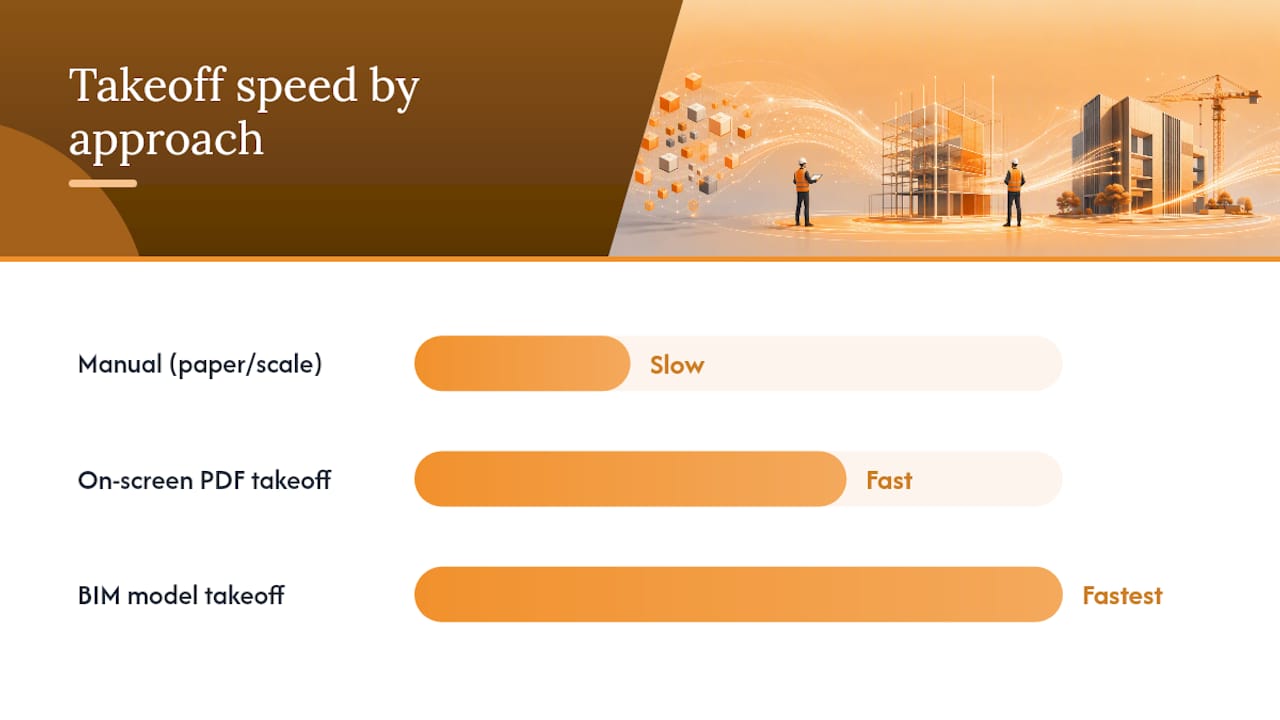
Manual takeoff uses printed plans and physical measurement tools. It’s appropriate when you’re dealing with a single-trade, low-complexity bid and don’t have digital plan files. The setup cost is zero, but the time cost per takeoff is high and revision handling is painful.
On-screen (PDF) takeoff imports a PDF plan set into takeoff software and lets you measure directly on the digital image. This is the right choice for the vast majority of commercial subcontractor bids. Plan files are almost always available digitally, the learning curve is manageable, and the accuracy improvement over manual methods is immediate.
BIM-model takeoff extracts quantities directly from a 3D model, often using IFC files or native BIM formats. Nemetschek and similar platforms position model-based quantities as the future of coordinated construction data, and they’re right for large commercial and infrastructure projects where a BIM model exists. The setup requires more technical skill and the model has to be built to a sufficient level of detail, but the payoff in speed and coordination is significant.
| Approach | Best for | Speed | Accuracy | Setup effort |
|---|---|---|---|---|
| Manual (paper/scale) | Simple bids, no digital plans | Slow | Moderate | Minimal |
| On-screen PDF takeoff | Most commercial subcontractor bids | Fast | High | Low to moderate |
| BIM model takeoff | Large commercial, infrastructure, coordinated projects | Fastest at scale | Highest | High |
Project-type guidance:
- Residential and small commercial: on-screen PDF takeoff covers nearly every scenario.
- Mid-size commercial (retail, office, light industrial): on-screen PDF with assembly takeoffs handles complexity well.
- Large commercial, healthcare, or infrastructure: BIM-model takeoff pays off when the model is available and detailed enough.
For residential subcontractors evaluating tools, this breakdown of top takeoff tools covers the specific features that matter most at that scale.
How to perform a digital quantity takeoff, step by step
This is the workflow your estimating team should follow on every bid. It’s repeatable, auditable, and designed to hand off cleanly to your cost estimate.
Step 1: Prepare your plan set
Import the current-revision PDF into your takeoff software. Confirm the plan revision date matches the bid documents. Set the scale for each sheet individually — don’t assume all sheets share the same scale. Most software lets you calibrate by clicking two known points on a dimension line. Verify calibration on at least two separate dimensions before measuring anything.
Step 2: Build or load your item catalog
Your item catalog maps measurement types (linear, area, count, volume) to specific cost items in your estimate. If your software connects to RSMeans Data Online, you can pull localized unit costs directly into the catalog. Define your units here: linear feet, square feet, each, cubic yard. This is the step most teams skip, and it’s the one that causes the most cleanup later.
Step 3: Measure and assign items
Work sheet by sheet, trade by trade. Use the linear tool for pipe runs, conduit, and framing. Use the area tool for flooring, drywall, and roofing. Use the count tool for fixtures, outlets, and openings. Assign each measurement to the correct catalog item as you go. Use snapping and grid tools to keep measurements precise, especially at corners and intersections. Color-code by trade or system so you can visually verify coverage at a glance.
Step 4: QA review
Before exporting, run a quick overlay check: toggle your measurement layer on and off against the plan to confirm full coverage. Cross-check key quantities against the specification — if the spec calls for 12,000 square feet of a particular flooring type and your takeoff shows 9,400, find the gap before the bid goes out. A second estimator reviewing the takeoff for 30 minutes catches more errors than any software check.
QA checklist:
- Scale calibration verified on each sheet
- All sheets measured, none skipped
- Units consistent throughout
- Quantities cross-checked against spec quantities where listed
- Revision date confirmed against bid documents
Step 5: Export to your estimate
Export quantities as a CSV or push them directly via API into your estimating platform. Direct integration, where measurements flow into the estimate without a manual export step, eliminates one of the most error-prone handoffs in the process. Vendors who have built this connection report measurable reductions in errors and faster estimate completion — Hyphen Solutions describes this outcome for their integrated on-screen takeoff feature. Save the takeoff file with the project name, revision number, and date in the filename.
Pro Tip: For small teams doing takeoffs alone, work in 90-minute focused blocks per trade. Switching between trades mid-sheet is where coverage gaps happen.
What to look for in digital takeoff software
Choosing the right tool comes down to whether it fits your actual workflow, not whether it has the longest feature list. Here’s what to evaluate.
Core capabilities checklist:
- PDF and BIM/IFC import with multi-sheet handling
- Calibration tools that work per sheet, not just per project
- Linear, area, count, and volume measurement types
- Assembly takeoffs (measure a system once, not every component separately) — assembly takeoffs speed complex commercial estimates significantly
- Item catalog with customizable units and cost-code mapping
- Layer and color management for multi-trade projects
- Version control and plan revision tracking
- Audit log showing who measured what and when
- Cloud access and mobile viewing for field teams
- Export options: CSV, Excel, direct API to estimating platforms
- Integration with cost data (RSMeans or local pricing databases)
Evaluation questions to ask during a trial:
- How does the tool handle sheets with different scales in the same plan set?
- Can you update a single sheet when a revision arrives without re-measuring the whole project?
- Does the item catalog sync with your estimating platform, or does it require a manual export?
- How does the tool handle multi-sheet projects with 50+ sheets?
- What does the audit log capture, and can you export it for dispute documentation?
- Is mobile access read-only, or can field teams add measurements from the job site?
Real users consistently flag file handling, multi-sheet navigation, and export reliability as the make-or-break factors when reviewing takeoff tools. User reviews on Software Advice for tools like Bluebeam Revu highlight these exact pain points. Mobile cloud access, like what Bluebeam Cloud offers on iOS, is increasingly expected for distributed estimating teams.
Integration examples that save real time:
Connecting your takeoff tool to RSMeans applies localized labor and material costs the moment quantities are assigned. Connecting to your estimating platform eliminates the CSV export step entirely. Connecting to a procurement system means your purchase orders pull from the same quantities your estimate was built on. Each integration removes a manual handoff and the errors that come with it.
For a broader look at construction measurement tools and how estimators apply them in practice, that resource covers the hands-on side in more detail.
How digital takeoff fits into your estimating pipeline
A takeoff doesn’t live in isolation. It sits at the center of a data flow that runs from plan receipt all the way to field procurement, and every handoff in that chain is a potential error point.
The end-to-end workflow:
Plans arrive → Import and calibrate in takeoff software → Measure and assign to catalog items → QA review → Export quantities to estimate → Estimate reviewed and bid submitted → Award → Quantities pushed to procurement → Field team receives material schedule
Integration checkpoints to validate during a pilot:
- Unit consistency: confirm that “LF” in your takeoff maps to “linear feet” in your estimate, not “LF” as a different unit in a different system
- Cost-code mapping: every takeoff item should map to a specific cost code in your estimate and your job-cost tracking system
- Update propagation: when you revise a quantity in the takeoff, confirm the change flows through to the estimate automatically rather than requiring a re-export
- Field handoff: quantities that go to procurement or the field superintendent should carry the same revision date as the takeoff file they came from
Cloud-based field capture tools like GoCanvas support the reverse flow: field-verified quantities and change information can flow back into estimating, keeping your cost tracking current as work progresses. SiteDocs addresses the plan-version side, giving field and office teams access to the same current plan set and reducing the version-mismatch errors that generate unnecessary change orders.
For teams building out their estimating process alongside digital takeoff adoption, this estimating process guide covers practical checkpoints that align well with the integration steps above.
Export and field checklist:
- Takeoff file saved with project name, revision number, and date
- Quantities exported with unit labels and cost-code assignments
- Procurement list generated from final quantities, not from memory
- Field superintendent has the same plan revision the takeoff was built from
- Change orders tracked against original takeoff quantities
The benefits of cloud-based takeoff software for collaboration and version control are worth reading if your team is split between office and field.
Accuracy, ROI, and what adoption actually costs
The 50–80% reduction in takeoff time that contractors report after switching to digital workflows is the headline number, but it’s not the only metric worth tracking. Bid accuracy, rework reduction, and change order defensibility all improve when quantities are traceable.
ROI metrics to track from day one:
- Time per takeoff (hours) before and after adoption
- Number of bid errors caught in QA vs. discovered post-award
- Change order approval rate (traceable quantities support faster approvals)
- Bid-win rate over a 6-month rolling window
- Rework costs tied to quantity errors
Typical cost factors:
- Software subscription: most takeoff platforms charge monthly per user or per company; some add per-active-field-worker fees for mobile access
- Training: expect 4–8 hours of hands-on training per estimator for basic proficiency; more for BIM workflows
- Integration setup: connecting to RSMeans, your estimating platform, or a procurement system may require one-time configuration time
- Plan management: a document control tool for version tracking adds a small recurring cost but prevents expensive revision errors
Pilot plan for small-to-medium teams:
- Scope: pick two to three active bids of similar complexity
- Success criteria: time per takeoff, number of QA catches, export accuracy
- Measurement cadence: compare results after the first three bids, then again at 30 days
- Timeline: most teams reach basic proficiency within two to three weeks; full workflow integration typically takes 30–60 days
For commercial subcontractors, improving bid accuracy is the clearest path to protecting margin, and digital takeoff is one of the most direct levers available.
Who performs takeoffs and who owns the QA
Takeoffs sit at the intersection of estimating and field knowledge, which means the right person to run them depends on the project’s complexity and your team’s structure.
Common roles and responsibilities:
- Estimator: runs the takeoff, assigns items to catalog, exports to estimate; owns the measurement accuracy
- Senior estimator or chief estimator: reviews quantities on complex or high-value bids; signs off before submission
- Project manager: validates that takeoff quantities align with scope and spec; flags discrepancies before award
- BIM specialist: handles model-based takeoffs on large commercial projects; manages IFC exports and layer structure
- Field superintendent: confirms that quantities match field conditions; flags discrepancies that generate change orders
QA checklist for handoffs:
- Estimator confirms scale calibration on each sheet before sending for review
- Reviewer checks total quantities against spec-listed quantities where available
- PM confirms scope alignment before bid submission
- Field team receives final quantities with revision date attached
Centralizing vs. distributing takeoff work:
For most subcontractors, centralizing takeoffs with one or two trained estimators produces more consistent results than distributing the work to junior staff or field teams. Train field staff to read takeoff outputs and flag discrepancies, but keep measurement responsibility with people who know the software and the cost catalog. As your team grows and the software becomes familiar, you can expand who runs takeoffs without sacrificing consistency.
Best practices and common mistakes to avoid
Best practices:
- Standardize your item catalog before your first takeoff and update it quarterly
- Control plan versions: never measure from an unconfirmed revision
- Calibrate scale on every sheet, every time — don’t copy calibration from a previous project
- Use assemblies for repetitive systems (a typical bathroom rough-in, a standard electrical panel setup) to cut measurement time on commercial work
- Save takeoff files with version-controlled filenames that include the plan revision date
- Run a second-estimator review on any bid over a threshold your team sets (e.g., over $500K in scope)
Common mistakes and how to fix them:
- Skipping QA: the most expensive mistake. Build a 30-minute review into every takeoff workflow, not just high-value bids.
- Inconsistent units: mixing linear feet and linear yards, or square feet and square yards, creates errors that survive all the way to procurement. Lock units in the catalog.
- Mixing plan revisions: measuring half a project from revision B and half from revision C produces quantities that belong to neither. Confirm the full plan set revision before starting.
- Not linking measurements to cost items: raw measurements with no catalog assignment are useless for estimating. Assign items as you measure, not after.
- Ignoring the audit log: the audit log is your dispute documentation. Check that it’s capturing what you need before a problem arises.
For teams building their first estimating checklist, these QA items translate directly into checklist line items.
An honest take on where digital takeoff adoption actually stalls
The technology isn’t the hard part. Most takeoff software is genuinely usable within a week, and the measurement accuracy improvement over manual methods is obvious from the first project. What stalls adoption is almost always one of three things: an item catalog that nobody maintains, a plan-version control process that doesn’t exist yet, or an estimating platform that doesn’t accept the takeoff export cleanly.
Teams that succeed with digital takeoff treat it as a workflow change, not a software purchase. They spend the first two weeks building the catalog, testing the export, and confirming that quantities land correctly in the estimate before they run a live bid through the system. That’s a small investment. The teams that struggle are the ones who buy the software, run a takeoff on a real bid without testing the integration, and discover the export problem the night before the bid is due.
The other thing worth saying: integrated platforms, where takeoff, estimating, and job-cost tracking share the same data, produce better outcomes than stitched-together point solutions. Not because the individual tools are worse, but because every manual handoff between systems is a place where a number gets changed, mistyped, or lost. For subcontractors specifically, that integration matters more than it does for GCs, because subcontractors are often running multiple bids simultaneously with smaller teams.
Won2Build Takeoff gives subcontractors an integrated starting point
Subcontractors who need fast, auditable quantity measurements without managing three separate software subscriptions have a direct path with Won2Build Takeoff. The Takeoff module connects directly to Bid Track for estimating, CO Hub for change order management, and Time Budge for labor tracking, all under a single login with real-time field-to-office sync.

To pilot Won2Build Takeoff on a real project: pick one active bid, import the plan set, calibrate scale on each sheet, run your first takeoff against your existing item catalog, and export quantities directly into Bid Track. Check that units and cost codes match. That single test tells you whether the integration fits your workflow before you commit to a full rollout. The platform is built specifically for commercial subcontractors in the United States, with a bilingual interface and per-project reporting that keeps office and field on the same data. Start your free trial at Won2Build Takeoff and run your first live bid through it within the week.
Sources
These resources support the guidance in this guide and are worth bookmarking for deeper study:
- How to Use Digital Takeoff Tools for Faster Quantity Calculations
- Electronic Takeoff Software and RSMeans Data | eTakeoff Dimension
- GoCanvas
- SiteDocs
Recommended
One login for estimating, bid tracking, change orders, and labor.
The Hub is free. Pay only for the apps you turn on.
Create your free Hub account- 7 Concrete Takeoff Steps Estimators Use to Avoid Ordering ShortfallsFollow seven concrete takeoff steps to calculate cubic yards, size rebar and formwork, convert volumes to supplier units, and verify quantities before bid...
- Are E-Signature Change Orders Legal and Worth the Switch?E-signature change orders streamline your workflow, ensuring faster approvals, fewer disputes, and quicker invoicing—discover the benefits now!
- How to Link Takeoff to Estimate for Accurate BidsLink your takeoff quantities to your estimate for accurate bids. Discover the seamless integration method that reduces errors and saves time.