
Top Takeoff Tools for Residential Subcontractors in 2026
Discover the top takeoff tools for residential subcontractors in 2026. Streamline your estimating process with Won2Build Takeoff today!

Won2Build Takeoff, part of the Won2Build Hub, is the recommended digital takeoff tool for US residential subcontractors who need plan quantification, bid integration, and field sync under one login. If you're estimating framing, drywall, roofing, or MEP work and still re-entering measurements by hand, that's where margins go quiet. The fix is straightforward: import your plans, measure once, and let the quantities flow directly into Won2Build Bid Track without retyping a number.
Start by running one recent finished job through a free trial of Won2Build Takeoff. Compare your takeoff quantities against the materials you actually used. That single test tells you more than any demo ever will.
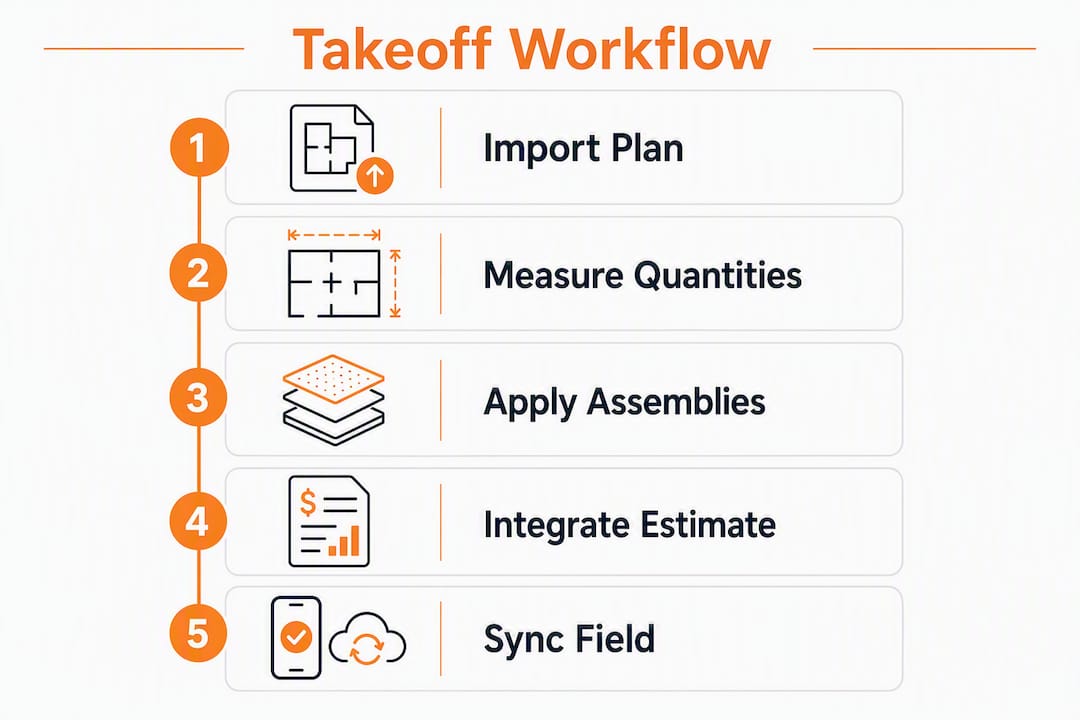
- Plan import and calibration: PDF plans load directly; scale calibration takes under two minutes per sheet.
- Measurement types: Linear, area, volume, and count measurements cover every residential trade.
- Assemblies: Group materials into reusable templates so a "framed exterior wall" pulls lumber, sheathing, and fasteners in one click.
- Bid integration: Quantities push to Won2Build Bid Track automatically, no CSV export required.
- Field sync: Changes made in the field update the office in real time through Won2Build's cloud layer.
- Audit trail: Every revision is logged, which matters the moment a change order is disputed.
Pro Tip: Before your trial ends, import a plan from a job you already completed and compare the takeoff output to your actual material invoices. A notable gap on a standard measurement type signals the need to adjust your assembly templates, not a reason to abandon the tool.
Table of Contents
- What do digital takeoff tools actually do for subcontractors?
- Key features to prioritize when choosing takeoff software
- How should you evaluate takeoff vendors before committing?
- Why Won2Build Takeoff fits residential subcontractors
- How to roll out a digital takeoff in 6–8 weeks
- Key Takeaways
- The part most subcontractors get wrong about switching tools
- Ready to run your first digital takeoff with Won2Build?
- Useful sources and further reading
What do digital takeoff tools actually do for subcontractors?
Digital takeoff tools replace the paper-and-scale-wheel process with on-screen measurement directly on imported plan files. You upload a PDF or CAD drawing, set the scale, and measure. The software calculates linear footage, square footage, cubic volume, or item counts depending on what you're quantifying. Those quantities then feed your estimate, rather than sitting in a notepad that only one person can read.
For residential subcontractors, the practical payoff shows up in three places. Bids get faster because you're not re-measuring the same walls twice. Scope gaps shrink because assemblies force you to account for every component of a task, not just the headline material. And change-order documentation gets cleaner because the original measured scope is on record.
Won2Build Takeoff is built specifically to push quantities through to the estimating pipeline rather than stopping at a spreadsheet export. The subcontractor takeoff guide on the Won2Build blog walks through the full measurement workflow if you want the technical detail. Cloud-based tools also give crews and estimators access to the same plan version simultaneously, which cuts the "wrong revision" problem that plagues paper-based workflows.
Key features to prioritize when choosing takeoff software
The single most important filter: does the tool eliminate manual re-entry between takeoff and estimate? If quantities don't flow automatically into your bid system, you've only solved half the problem.
Measurement accuracy tools matter most at the plan-import stage. Look for automatic scale detection, the ability to override scale per sheet, and support for PDF, DWF, and DWG formats. Residential plans rarely arrive in a single format.

Assemblies and material libraries are where experienced estimators save the most time. A well-built framing assembly that includes plates, studs, headers, and blocking means you measure the wall once and get a complete material list. The Won2Build blog's material takeoff guide covers how to build trade-specific assemblies that hold up across multiple jobs.
Integration with estimating and bid workflows is non-negotiable for any subcontractor running more than a handful of bids per month. Quantities that require a manual export step will eventually be entered wrong or skipped under deadline pressure.
Mobile and field sync matters most for trades where field conditions change the scope mid-job. Roofing and MEP subcontractors in particular need the office and field working from the same numbers.
Revision control and audit trail protect you when a GC disputes a change order. If you can't show the original measured scope versus the revised scope, you're negotiating blind.
Trade-specific priorities worth noting: carpentry and framing subcontractors benefit most from strong assembly libraries; roofing subs need accurate area and pitch calculations; drywall subs rely on linear and area precision; MEP trades lean hardest on count measurements and integration with labor-hour databases like those outlined in the estimate components guide.
Pro Tip: During your trial, import one plan and run three measurement types: a linear wall measurement, an area calculation for a room, and a count of a repeated item like windows. Export the results and check whether the output matches what you'd calculate manually. Running a brief test validates accuracy before you commit.
How should you evaluate takeoff vendors before committing?
Evaluate on three things first: fit for your trade's measurement types, direct integration with your estimating workflow, and how fast your team can get productive. Everything else is secondary.
Demo checklist — run these tasks yourself:
- Import a real plan file (PDF preferred) and calibrate the scale.
- Create one assembly with at least three components.
- Run a linear, an area, and a count measurement on the same plan.
- Export or sync quantities to your estimating tool and confirm the values match.
- Open the mobile app and verify the plan is accessible without a desktop login.
Questions to ask during any vendor demo:
- How long does onboarding take for a two-person estimating team?
- Is there a two-way sync with bid or estimating tools, or export-only?
- How is licensing structured for field workers versus office estimators?
- Who owns the data if we cancel, and how do we export it?
- What's the SLA for support response during bid season?
Red flags that should stop a purchase:
- No audit trail or revision history on measurements.
- Quantities only leave the system via manual CSV export.
- Pricing that changes based on "active field workers" with no clear definition of what counts as active.
- No trial period with real plan support, only a canned demo dataset.
Why Won2Build Takeoff fits residential subcontractors
Won2Build Takeoff connects directly to Won2Build Bid Track, CO Hub, and Time Budge under a single login. That means quantities measured in Takeoff become the basis for a priced bid in Bid Track, then feed the labor budget in Time Budge, and anchor the original scope when a change order lands in CO Hub. No re-entry at any step.
Core features at a glance:
- PDF plan import with per-sheet scale calibration
- Linear, area, volume, and count measurement tools
- Reusable assembly and material library templates
- Direct quantity sync to Won2Build Bid Track
- Real-time mobile field sync for crews and estimators
- Full revision history and measurement audit trail
- Bilingual interface for mixed-language crews
A realistic ROI example: A residential framing subcontractor estimating multiple bids per month at an average of several hours of takeoff per bid spends significant time monthly on measurement alone. Cutting that time substantially with digital assemblies and plan import frees up considerable estimator hours, recovering a notable amount in labor costs per month, before accounting for fewer re-measures and tighter change-order capture. Subscription recovery on a per-company flat fee typically happens within the first billing cycle for a team running that volume.
The cloud-based takeoff benefits post on the Won2Build blog details how autosave and multi-device sync reduce the version-control errors that cost subcontractors real money on residential jobs.
How to roll out a digital takeoff in 6–8 weeks
A several-week pilot is enough time for a small-to-mid residential subcontractor to validate accuracy, train the team, and confirm the tool fits the workflow before full commitment.
- Week 1 — Trial setup: Import two or three recent job plans. Calibrate scale, run basic measurements, compare output to actual materials used.
- Weeks 2–4 — Live pilot: Run 1–3 active jobs through Won2Build Takeoff in parallel with your existing process. Assign one internal champion to own the tool and field questions.
- Weeks 4–6 — Template refinement: Build trade-specific assemblies, connect Takeoff to Bid Track, and set up Time Budge labor budgets from the same quantities.
- Weeks 6–8 — Full rollout: Retire the parallel process, set user permissions, define success metrics (bid turnaround time, change-order capture rate, estimation accuracy versus actuals).
During the pilot, tool and equipment readiness on the job site matters too. A takeoff is only as useful as the crew's ability to execute against it, so confirming field resources are in place before rollout prevents the "great estimate, wrong materials on site" problem.
Pro Tip: Keep your old process running in parallel for one full job cycle during the pilot. Don't retire the spreadsheet until you've closed at least one job entirely through Won2Build and confirmed the final quantities matched your invoices.
Key Takeaways
Won2Build Takeoff is the strongest starting point for residential subcontractors who need takeoff, estimating, and change-order management connected under one login with no manual re-entry.
| Point | Details |
|---|---|
| Start with a sample job | Import a completed job plan during trial and compare output to actual material invoices to validate accuracy. |
| Prioritize integration | Choose a tool where quantities flow directly to your bid system; export-only workflows create re-entry errors under deadline pressure. |
| Pilot for 6–8 weeks | Run a few live jobs before full rollout; measure bid turnaround time and change-order capture as your success metrics. |
| ROI recovers fast | Cutting takeoff time substantially per bid frees significant estimator hours monthly. |
| Won2Build Hub | Won2Build Takeoff connects to Bid Track, CO Hub, and Time Budge under one login, eliminating double entry across the full project cycle. |
The part most subcontractors get wrong about switching tools
The conventional advice is to pick the tool with the most features. That's usually the wrong move for a residential subcontractor running a lean estimating operation.
The real question is whether the tool closes the loop from measurement to invoice without requiring a human to carry data between systems. Most platforms stop at the takeoff. They produce a quantity sheet, and then it's your problem to get those numbers into a bid, a labor budget, and eventually a change order. That gap is where margin leaks.
Won2Build's approach, connecting Takeoff to Bid Track to CO Hub to Time Budge in a single environment, addresses the actual workflow rather than just the measurement step. The audit trail and revision control built into that chain also gives subcontractors something most tools don't: a defensible paper trail when a GC pushes back on a change order scope.
The other thing worth saying plainly: a 6–8 week pilot with real jobs is not optional. Any vendor who discourages running your own data through the system during a trial is telling you something important about what the tool actually does under real conditions.
Ready to run your first digital takeoff with Won2Build?
Won2Build Takeoff gives residential subcontractors a direct path from plan import to priced bid, with quantities that carry through to change orders and labor budgets without a single re-entry step. The subscription runs on a flat company fee plus per-active-field-worker pricing for specific modules, so a two-person estimating team can pilot the full Hub without a large upfront commitment.

Start a free trial of Won2Build Takeoff and import your first plan today. If you want to see the full Hub in action, including Bid Track sync and CO Hub integration, schedule a 30–60 minute demo walkthrough where the Won2Build team will run a sample job through the complete workflow with your plan files.
Useful sources and further reading
- Won2Build Takeoff — Product page for the digital plan takeoff application; start here for trial access and feature details.
- Won2Build Bid Track — Estimating and bid pipeline tool that receives quantities directly from Takeoff.
- Won2Build CO Hub — Change-order and T&M ticket management; closes the loop from original scope to field changes.
- What Is a Subcontractor Takeoff? A 2026 Guide — Technical primer on measurement types and takeoff workflows for subcontractors.
- Material Takeoff in Construction: A Professional's Guide — How to build assemblies and material libraries for repeatable, trade-specific takeoffs.
- Benefits of Cloud Based Takeoff Software for Contractors — Covers autosave, multi-device sync, and collaboration benefits for mixed office-field teams.
- Construction Estimate Components List: 2026 Field Guide — Maps takeoff quantities to estimate line items including material, labor, and overhead.
- Common Takeoff Measurement Errors Subcontractors Must Fix — Practical error checklist for validating takeoff results during trials and audits.
- Top 4 Sureboard.com Alternatives for 2026 — Third-party perspective on vendor evaluation criteria and shortlisting approaches for construction software.
Recommended
One login for estimating, bid tracking, change orders, and labor.
The Hub is free. Pay only for the apps you turn on.
Create your free Hub account- Work Order vs Change Order: What Subcontractors Need to KnowA work order authorizes work under an existing agreement. A change order amends the contract. Learn the difference, when to use each, and how to get paid.
- Bid Calendar for Subcontractors: Build One That WorksBuild a bid calendar that keeps every due date, addendum and follow-up in view. Includes the fields to track, a countdown schedule and a review routine.
- Construction Change Directive: A Subcontractor's GuideWhat a construction change directive is, how it differs from a change order, and how subcontractors should document and price directed work to get paid.