
Contractors: Stop 16% Budget vs Actuals Labor Misses with Same Day Sync
Practical guide for contractors to reconcile labor budget vs actuals. Build fully burdened rates, run focused variance reports, and use same day field to...

Labor budget vs actuals compares what you planned to pay a crew, fully burdened, against what the job actually cost. The fix starts today: pull a cost-code labor variance report and flag anything past your controllable threshold. Every gap you find breaks into two buckets, rate and efficiency, and each one points to a different problem to solve.
TL;DR:
- Labor efficiency variances are typically much larger than rate variances, often indicating issues like understaffing, rework, or incorrect standards.
- Automating real-time field time capture and immediate burden application prevents data delays that obscure actual job performance.
- Building detailed, controlled budgets with accurate burden calculations and separate cost codes helps identify precise sources of labor overruns.
- Weekly variance reports with clear root-cause notes support timely corrective actions and prevent costly backlog in data analysis.
- Prioritizing a fast, synchronized data pipeline ensures current labor information is available to address problems during the job, not weeks after the fact.
Table of Contents
- What Is Labor Budget vs Actuals, and What Do the Formulas Tell You?
- How Do You Calculate the Variance Step by Step?
- How Should You Structure Budgets and Standards to Make Variances Usable?
- What Should a Labor Variance Report Include, and How Often Should You Run It?
- How Real-Time Labor Tracking Closes the Gap Between Budget and Action
- The Real Problem Isn’t the Math, It’s the Timing
- Fix the Data Gap Before You Fix the Formula
- Where to Go Next
- Sources
What Is Labor Budget vs Actuals, and What Do the Formulas Tell You?
Budgeted labor is standard hours multiplied by standard rate, the number your estimator baked into the job before anyone picked up a tool. Actual labor is the real hours a crew logged multiplied by the real, fully burdened rate you paid them, including payroll taxes, workers’ comp, and benefits. The distance between those two numbers is your total labor variance, and it splits cleanly into two components that tell very different stories.
Labor rate variance (LRV) measures whether you paid more or less per hour than planned:
LRV = (Actual Hours × Actual Rate) − (Actual Hours × Standard Rate)
Labor efficiency variance (LEV), sometimes called labor time variance, measures whether the crew took more or fewer hours than the standard allowed:
LEV = (Actual Hours × Standard Rate) − (Standard Hours × Standard Rate)
Add LRV and LEV together and you get the total direct labor variance, a reconciliation confirmed in the standard cost variance framework used in managerial accounting. A negative result under this convention means you spent more than budgeted (unfavorable); positive means you came in under (favorable).
For reporting to owners or partners who think in percentages rather than dollars, convert with:
- Percent variance = (Actual − Budget) ÷ Budget × 100
- Use dollar variance for internal cost-code triage, where the size of the miss in real money matters most
- Use percent variance for cross-job comparison, since a $2,000 miss on a $20,000 phase hits differently than the same miss on a $200,000 phase
Statistic to keep in front of you: benefits alone made up 30.1% of total compensation for private industry workers as of March 2026. If your labor budget is built on base wage only, you are underestimating true cost by roughly a third before you even account for payroll taxes or workers’ comp. That gap is exactly why “fully burdened” isn’t optional language in a labor budget. It’s the whole point.
How Do You Calculate the Variance Step by Step?
Take a framing crew scheduled for a phase budgeted at 200 hours at a $28 base wage.
Step 1: Build the fully burdened standard rate. $28 base × 1.38 burden multiplier = $38.64 standard burdened rate. The Level Accounting burden methodology recommends dividing annual burden costs by productive hours, not paid hours, since PTO and non-billable travel inflate the denominator and understate true cost per hour worked.
Step 2: Set the budget. 200 standard hours × $38.64 standard rate = $7,728 budgeted labor cost.
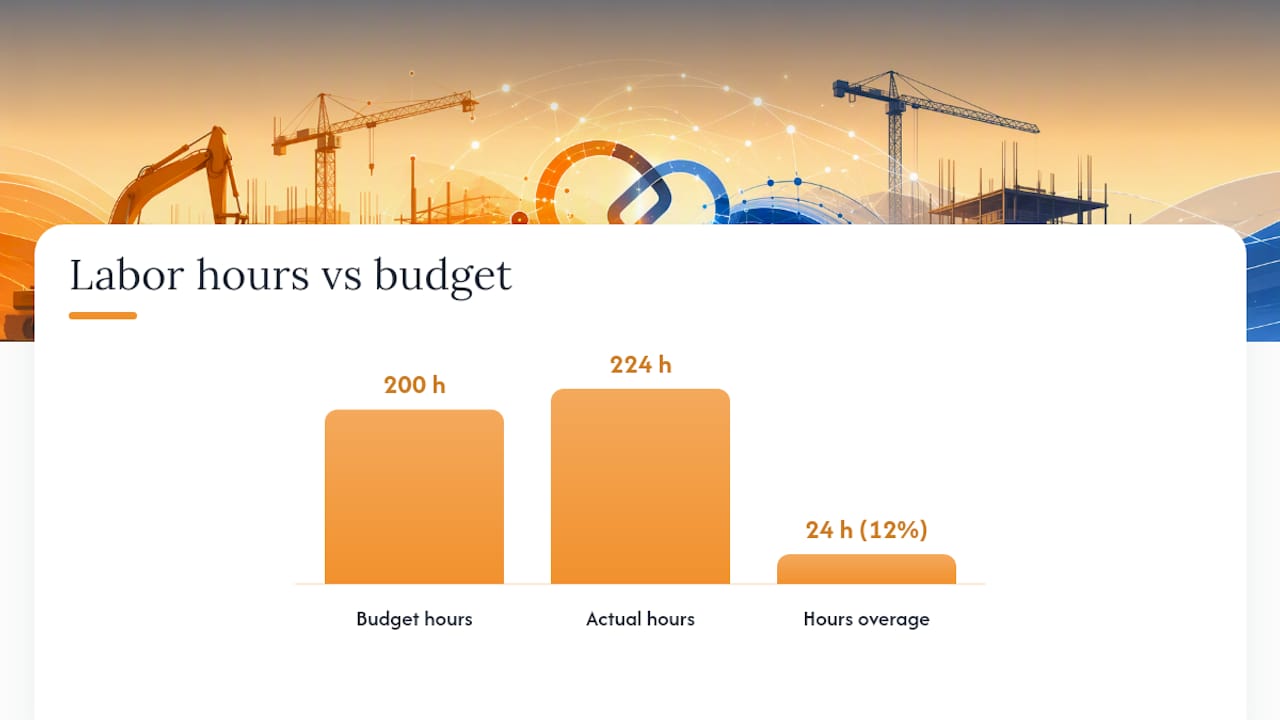
Step 3: Record actuals. The crew actually logged 224 hours, and a mid-phase raise plus overtime premiums pushed the fully burdened actual rate to $40.10.
| Metric | Standard (Budget) | Actual |
|---|---|---|
| Hours | 200 | 224 |
| Burdened rate | $38.64 | $40.10 |
| Total cost | $7,728 | $8,982.40 |
Step 4: Calculate the variances.
- Total variance = $8,982.40 − $7,728 = $1,254.40 unfavorable (16.2% over budget)
- LRV = (224 × $40.10) − (224 × $38.64) = $327.04 unfavorable
- LEV = (224 × $38.64) − (200 × $38.64) = $927.36 unfavorable
- Reconcile: $327.04 + $927.36 = $1,254.40, matching the total exactly
The rate variance is small. The efficiency variance is the real story here, 24 extra hours against a 200-hour standard, a 12% overage in time alone.
Pro Tip: When LEV dwarfs LRV like this, don’t waste time interrogating payroll. Go straight to the field: was the crew short-staffed, working around a design change, or was the original standard simply wrong? Interpretation guidance from cost variance analysis ties efficiency misses to supervision, scheduling, or bad standard-setting almost every time, while rate misses usually trace back to hiring decisions or pay-rate errors.
Run through this root-cause checklist before you close the variance out: Was the standard hour count realistic for this scope? Did the crew mix change mid-phase (more apprentices, fewer journeymen)? Was there rework from a design or field conflict? Did overtime premiums get coded to this cost code correctly?
How Should You Structure Budgets and Standards to Make Variances Usable?
A variance report only helps if the budget underneath it was built to be compared against, not just estimated in a hurry. Loose cost-code structure is the most common reason finance teams distrust their own labor budget vs actuals reports.
Start with cost-code granularity. Breaking labor out by phase and crew type, rather than one lump “labor” line per job, lets you isolate exactly where a variance originates instead of averaging it away across the whole project. A framing overage and a finish-carpentry underage can cancel out on a single labor line and hide two real problems.
Decide how you set standards. Historical averages from past jobs are faster to build and reflect your actual crew’s real productivity, while engineered standards (time studies, industry benchmarks) are more defensible but slower to maintain. Most subcontractors do best blending the two: engineered standards for repeatable scope, historical averages for everything else, revisited at least once a year.
Get the burden line right. Your burden calculation should include:
- Payroll taxes (FICA, FUTA, SUTA).
- Workers’ compensation premiums, which vary by trade classification
- Health insurance and retirement contributions
- Vehicle and equipment allocation where field crews use company assets
Pro Tip: Structuring budgets by controllable versus uncontrollable cost before the job starts saves you from arguing about it during a variance review. Labor and productivity are almost always controllable. Permit delays and material price spikes usually are not.
The most common setup mistake is mixing general overhead into the burden calculation, which inflates your standard rate and makes every job look artificially profitable on paper until the overhead bill comes due. A close second: posting payroll journal entries late, which means your “actuals” for last week’s report were actually two weeks old.
What Should a Labor Variance Report Include, and How Often Should You Run It?
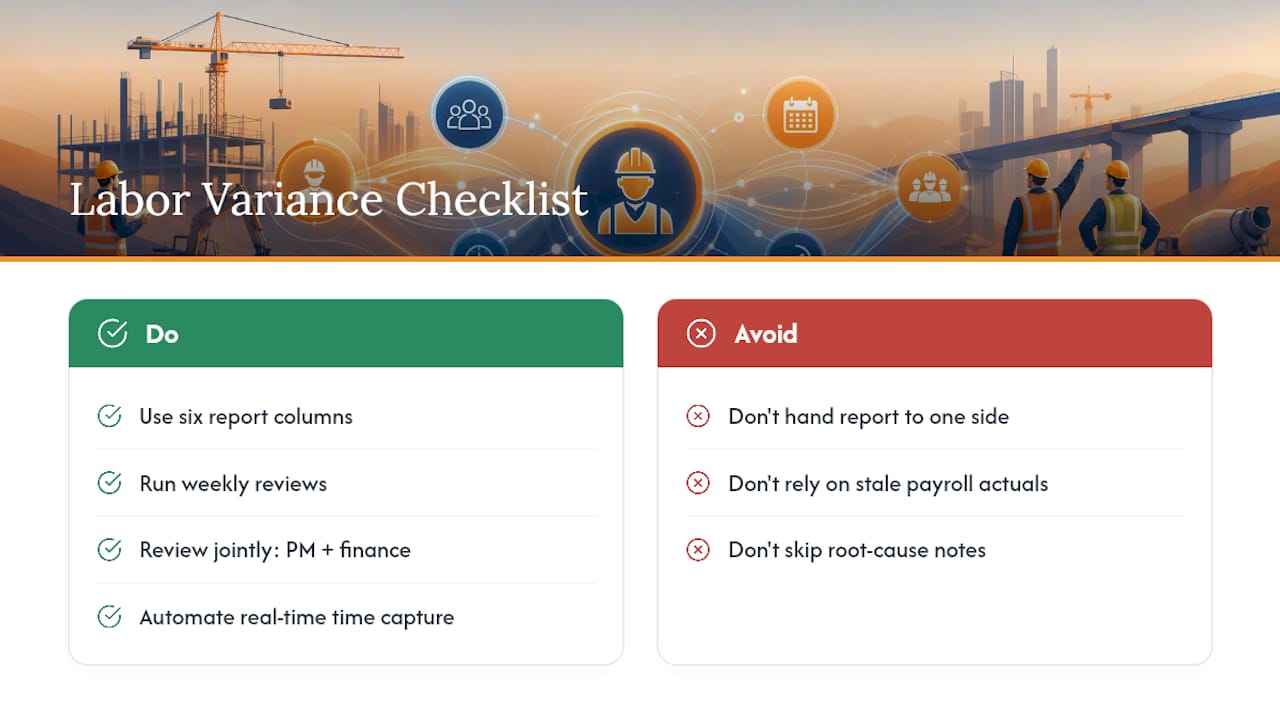
A usable report has six columns, no more, no fewer: cost code, budgeted amount, actual amount, dollar variance, percent complete on that phase, and a controllable/uncontrollable tag. Add a short root-cause note field for anything over your flag threshold, because a number without an explanation just gets re-discussed at the next meeting instead of acted on.
Weekly is the right cadence for active jobs, reviewed jointly by the project manager and finance, not handed off entirely to one side. The PM knows why the crew ran long; finance knows whether the number actually reconciles to payroll.
For structure, a pivot table in Excel built off your job cost export works, provided the underlying data is clean: cost code, date, hours, rate, and burden category all need to live in the same feed. Where this breaks down is timing. Manual timesheets and end-of-week payroll batches mean your “actuals” are stale by the time anyone reads the report.
That is what automation actually buys you: real-time field time capture that syncs straight to job cost, so the report reflects Tuesday’s labor on Tuesday, not two Fridays from now. Look for software that applies burden multipliers automatically per cost code, keeps an audit trail on every entry, and can alert you when a variance crosses a threshold you set. Product documentation from tools like ServiceTitan’s budget-vs-actual tracking shows the general shape of what a modern job-cost table should surface: committed cost, actual cost, and variance side by side, updated as entries post.
How Real-Time Labor Tracking Closes the Gap Between Budget and Action
Most labor variance problems trace back to a data timing issue, not a math problem. If field hours land in a spreadsheet Friday and payroll posts the following Wednesday, your “actuals” are already a week and a half stale by the time anyone reviews them.
Removing double entry between field time capture and job cost fixes three recurring failures at once:
- Uncoded labor hours that never make it to the right cost code
- Late payroll journal entries that push variance reviews past the point where action still helps
- Missing burden allocation because someone forgot to apply the multiplier before the report ran
This matters most on fast-moving jobs, subcontractor-heavy scopes with multiple crews reporting time differently, and any contract where labor is the dominant cost share. On those jobs, a two-week reporting lag isn’t an inconvenience. It’s the difference between catching an efficiency variance in week two versus discovering it at closeout.
The Real Problem Isn’t the Math, It’s the Timing
Every subcontractor I’ve watched struggle with labor cost control already knows the formulas. Rate variance, efficiency variance, that part isn’t the gap. The gap is that by the time the spreadsheet gets built, the job that caused the overrun is three weeks in the past and the crew has moved to the next site.
Conventional advice on this topic leans hard into “build better standards” and “review variances weekly,” and both of those are correct as far as they go. But they assume your input data is current, and for most contractors running timesheets on paper or in a disconnected app, it isn’t. You can have a mathematically perfect variance report built on data that’s two pay periods old, and that report will tell you exactly nothing useful about the job you’re on right now.
Prioritize the data pipeline before you perfect the formula. Get field hours into job cost the same day they happen, apply burden automatically instead of manually, and only then worry about whether your standards are historical or engineered. A rough standard reviewed daily beats a precise one reviewed monthly.
— Jen Reese
Fix the Data Gap Before You Fix the Formula
Specialized software exists for exactly the problem described above: labor data that arrives too late to change anything. It captures field hours by cost code, applies your burden multiplier automatically, and syncs to job cost in near real time, so the report a PM pulls on Tuesday reflects Tuesday’s labor, not last month’s.

That directly answers the checklist built through this guide: cost-code mapping so variances isolate to the right phase, automatic burden application so nobody forgets a multiplier, and real-time sync so a variance gets caught while the crew is still on site to fix it. Because some software suites offer single sign-on across multiple construction tools, labor data can feed the same job cost picture your estimators used to build the original budget, closing the loop between what you planned and what actually happened.
If your labor variance reports are consistently a week behind the job, view the Time Budge product page and see how field-to-office sync works, or check Takeoff if inaccurate upstream quantities are part of what’s driving your labor standards off in the first place.
Where to Go Next
- Direct Labor Variance Analysis for formula derivations and worked textbook examples
- Won2build’s Labor Cost Calculator to build fully burdened rates fast
- Field Guide to Tracking Labor Hours for reducing late or missing entries
- Job Cost Tracking and Margins for a broader view of margin dashboards
Sources
- 10.5: Direct Labor Variance Analysis - Business LibreTexts
- Direct Labour Variances: Efficiency and Rate Impacts on Costing • SLM
- How to Calculate Labor Burden For Construction (Free Calculator) - Level Accounting
Recommended
One login for estimating, bid tracking, change orders, and labor.
The Hub is free. Pay only for the apps you turn on.
Create your free Hub account- Managers: Make Mobile Field Workflows Resilient for 72 Hour OutagesPlaybook for field managers: offline first mobile workflows, resilient sync and conflict handling, compliance first AI guardrails, and practical pilot steps.
- Daily Signed Records: Force Account Tracking for Managers & InspectorsField checklist for project managers and inspectors to keep force account tracking audit-ready: use daily signed records for labor, equipment, and...
- Stop Timecard to Report Drift: Labor Cost Codes for SubcontractorsFix the timecard to report chain with labor cost codes that tie crews to budgets. Includes a 6 code starter and a burdened rate example.