
Stop Unbilled Work: 5 Step Scope Creep Control for Subcontractors
Practical scope creep control for subcontractors and PMs: a 5 step field playbook with scripts, change order discipline, and templates to stop unbilled work.

Scope creep control means blocking unapproved additions to budget, schedule, or quality before they take root, not cleaning up after they do. The immediate move when a new request lands: stop work on anything that hasn’t been formally approved, log the request in your change register, and notify the approver the same day. Everything else in scope creep control, the paperwork, the sign-offs, the field discipline, exists to make that one habit stick.
TL;DR:
- Small, informal requests often lead to scope creep when they are not logged, assessed, and approved through a formal change control process.
- Using a clear scope statement, detailed work breakdown structure, and specific acceptance criteria before work starts significantly reduces unapproved scope additions.
- Implementing a five-step change request workflow with impact assessment and signed approvals helps prevent untracked scope increases during the project.
- Daily scope register reviews and assigned scope gatekeepers improve visibility and accountability for small requests that could otherwise slip by unnoticed.
- Construction-specific tools like automated change request software and detailed documentation are critical for legally protecting against scope creep and ensuring proper billing.
Table of Contents
- What Does Scope Creep Control Actually Involve?
- Building the Documents That Stop Creep Before It Starts
- How Do You Run a Formal Change Control Process?
- How Do You Keep Scope Visible Day to Day?
- What Tools and Templates Keep the Process Low-Friction?
- Why Do Construction Change Orders Need to Be Written?
- How Do You Recover When Scope Creep Has Already Happened?
- A Field-Level View on Where Scope Control Actually Breaks Down
- The Uncomfortable Truth About Scope Creep
- Let Won2Build Handle the Paper Trail While You Handle the Job
- Sources
- FAQ
What Does Scope Creep Control Actually Involve?
Scope creep and scope change are not the same thing, and mixing them up is where most projects lose their footing. A scope change is a documented, approved adjustment with a signature and a budget line attached to it. Scope creep is the same addition arriving through a side door: a text message, a hallway conversation, an email that says “while you’re at it, can you also…” Nobody signed off, nobody adjusted the timeline, and the work still gets absorbed.
Most scope creep traces back to a handful of repeat offenders. A vague scope statement leaves room for interpretation, and interpretation always trends toward “more.” Informal requests get amplified as they pass through a chain of people, until a small ask becomes a redesign. Stakeholder turnover brings in new voices who never agreed to the original boundaries. Optimistic scheduling leaves slack that gets quietly filled with extra tasks. And poor requirements documentation means nobody can point to a baseline and say, definitively, “that’s not in scope.”
The early warning signs are usually visible weeks before a budget blows up:
- A pattern of small, individually reasonable requests that add up fast
- Work happening that never appears on the WBS
- Milestones slipping by a few days here, a few days there, with no single dramatic cause
- Team members doing tasks nobody remembers formally assigning
A 2023 PMI report found that 28% of projects still experience scope creep even at organizations following established planning and collaboration practices. That figure matters because it shows discipline alone doesn’t guarantee immunity. Left unchecked, the consequences compound: cost overruns eat margin, schedules slip past contractual deadlines, quality suffers as teams rush to absorb extra work, and burnout sets in as the same crew keeps stretching to cover a scope nobody budgeted for.
Building the Documents That Stop Creep Before It Starts
Three documents do the heavy lifting in project scope management, and skipping any one of them is how creep gets a foothold.
1. The scope statement. This needs to spell out deliverables in specific, checkable language, list what’s explicitly excluded (exclusions stop more arguments than inclusions ever will), state the assumptions the estimate was built on, and define acceptance criteria that leave no room for a “close enough” negotiation later.
2. The work breakdown structure (WBS). A good WBS breaks the project into discrete, assignable chunks of work, each one small enough that anything outside it is obvious at a glance. Pair it with a WBS dictionary that defines exactly what each work package includes and excludes. When a request lands, you check it against the dictionary in under a minute. If it’s not there, it’s a change, not a clarification.
3. Acceptance criteria. Written specifically enough that two different people would sign off on the same finished product. A detailed scope of work built before the first shovel hits ground does more to prevent disputes than any change-order form filed after the fact.
Before work starts, run a kickoff sign-off checklist to include an early Avant Projet Autorisation de construire, which helps set clear authorizations and planning-phase documentation.
- Confirm who has signing authority for the client and for your own company
- Lock the scope statement, WBS, and acceptance criteria into a single baseline document
- Get dated signatures from every party who can authorize changes later
- Store the baseline somewhere everyone on the team can access, not buried in one person’s inbox
Skip this step and every future scope argument becomes a matter of memory instead of record.
How Do You Run a Formal Change Control Process?
A change-control workflow with five clear steps turns “can you just add this” into a decision with a paper trail. Here’s how each step should actually run.
- Capture the request. Log who’s asking, exactly what they want, and why. A one-line rationale forces the requester to justify the ask instead of treating it as a given.
- Assess the impact. Estimate the effect on time, cost, quality, and risk. You don’t need a week of analysis for this; you need an honest gut check backed by numbers.
- Decide, with the trade-offs on the table. Every approval should name what gets deferred, dropped, or resourced to make room for the new work. “Yes, and here’s what we’re not doing instead” is a very different conversation than a blanket yes.
- Record the decision. Approval, rationale, and signature go in the change register the same day, not “when things slow down.”
- Update the baseline and tell the team. The WBS, schedule, and budget all shift to reflect the new reality, and everyone touching the project hears about it before they start work.
For fast estimates on step two, use a simple three-tier gut check: rate the schedule and cost impact as low, likely, or high, with one sentence of rationale for each. It’s faster than building a full estimate for every request, and it’s far more defensible than a single number pulled from thin air.
Not every request needs the same level of scrutiny. Set approval thresholds up front: a site supervisor might approve changes under a few hundred dollars or a day of schedule impact, while anything larger routes to the project manager or client. Writing these thresholds into the kickoff documents means nobody has to guess who to call when a request comes in on a Friday afternoon.
Pro Tip: Require every change request to include a recommended trade-off, not just a description of the ask. Approvers who only see “add this” tend to say yes reflexively. Approvers who see “add this, and here’s what we’d defer to make room” actually weigh the decision.
How Do You Keep Scope Visible Day to Day?
Formal process handles the big asks. The daily grind of scope creep control is about catching the small stuff before it stacks up.
Run a short scope register review every week, ideally in fewer than ten minutes. A brief, current register that the whole team actually checks beats an exhaustive scope document nobody opens after kickoff. Keep the register visible, whether that’s a shared spreadsheet or a dashboard inside a project tool, so a superintendent in the field and a PM in the office are looking at the same list.
The hardest part isn’t the paperwork. It’s the conversation when someone asks for “just one small thing” in person. Having a script ready keeps you from saying yes on reflex:
- “That sounds reasonable. Can you send it over as a change request so I can check the impact on the schedule?”
- “I want to get this right, so let’s log it and I’ll have an answer by end of day.”
- “Happy to look at that. What should we push back or drop to make room for it?”
None of those scripts say no. They all buy time to run the request through the process instead of absorbing it on the spot.
Train the team on active listening and trade-off framing so this isn’t a one-person job. Teams that invest in negotiation and stakeholder-alignment skills tend to surface scope changes earlier instead of quietly absorbing extra work to avoid an awkward conversation.
Pro Tip: Assign one person on every project the explicit job of scope gatekeeper. When everyone is “sort of” responsible for catching creep, nobody actually does it.
What Tools and Templates Keep the Process Low-Friction?
A change request template only needs five fields to work: requester, description of the change, business rationale, impact summary (time, cost, quality), and a recommended trade-off. Anything more elaborate and field crews stop filling it out, which defeats the point.
Your scope register should function as the single source of truth, not one of three competing spreadsheets floating around different email threads. Structure it with columns for request date, description, status, impact, and approval, and make sure everyone touching the project pulls from the same file.
When you’re evaluating tools to enforce this, look for a short list of features that actually matter:
- Approval routing that sends requests to the right person automatically based on dollar or schedule thresholds
- An audit trail that timestamps every submission, assessment, and approval
- Baseline snapshots so you can compare current scope against the original at any point
- Mobile capture so field crews can log a request the moment it happens, not three days later from memory
Automating approval routing and keeping an auditable trail in one system cuts down on the informal changes that slip past the process entirely. A request that auto-routes to a project manager the moment it crosses a cost threshold never gets a chance to become a quiet verbal agreement in the field.
Why Do Construction Change Orders Need to Be Written?
Construction has its own version of scope creep, and it carries legal weight that other industries don’t deal with. An oral agreement to “just add a few outlets while the wall’s open” feels harmless in the moment. It becomes a serious problem when it’s time to get paid for it.
Courts often enforce written notice and change-order requirements strictly, and contractors who perform extra work without written authorization risk losing recovery even when the owner clearly asked for the work verbally. The contract’s notice clause, not the conversation on the job site, decides whether you get paid.
The fix is procedural, not complicated: convert every verbal request into a formal RFI or change-order submission immediately, before the work starts if at all possible. E-signature change orders make that conversion fast enough that it doesn’t slow down a crew waiting on an answer.
Field documentation backs up the paperwork when a dispute does arise:
- Daily logs noting weather, crew size, and work performed
- RFIs filed the same day a question comes up, with a written response attached
- Time-stamped photos of conditions before and after a disputed change
- Written confirmation of any verbal instruction, sent back to the requester the same day
Legal guidance is consistent on this point: relying on oral approvals is a high-risk practice, and written change orders paired with strict notice compliance are what actually preserve a contractor’s right to get paid for extra work. Documentation isn’t paperwork for its own sake. It’s the evidence that turns a disputed claim into a paid invoice.
How Do You Recover When Scope Creep Has Already Happened?
Once creep has taken hold, the fix starts with an honest comparison, not a blame session.
- Measure the real impact against baseline. Pull actual hours and costs from your labor tracking and compare them to the original WBS and budget. The gap tells you exactly how far off track the project has drifted, not a guess.
- Lay out recovery options with real trade-offs. Dropping or deferring lower-priority scope items, extending the timeline, adding resources, or value-engineering parts of the design are the standard levers, and each one has a different cost and schedule signature.
- Present the options with numbers attached, not vague warnings. Show the client or stakeholder what each path costs in dollars and days, and make a clear recommendation instead of leaving the decision entirely open-ended.
- Implement the chosen path and reset the baseline. Once a direction is picked, update the WBS and schedule to reflect it, and communicate the new baseline to everyone on the project.
The projects that recover well are the ones that treat this as a structured decision, not damage control delivered in a panic. A clear comparison against baseline, three honest options, and one confident recommendation will get a stakeholder to a decision faster than an open-ended “what do you want to do?”
A Field-Level View on Where Scope Control Actually Breaks Down
Scope creep control succeeds or fails at the point where field work meets paperwork, and that gap is where most subcontractors lose money. A superintendent gets a verbal ask, does the work to keep the job moving, and the documentation happens later, if it happens at all. By the time someone tries to reconcile hours against the original bid, the trail is cold.
The tools that map to each control step reduce that gap without adding a layer of bureaucracy nobody has time for. Change-order software that lets a field lead submit a request from a phone closes the loop between “someone asked for this” and “someone approved this” in minutes instead of days. Labor tracking tied to job costs shows a project manager, in real time, when hours on a task are running past what the bid assumed, long before the invoice reveals it. Digital takeoff reduces the estimation gaps that turn into “unexpected” scope in the first place, because the quantities were counted accurately from the start.
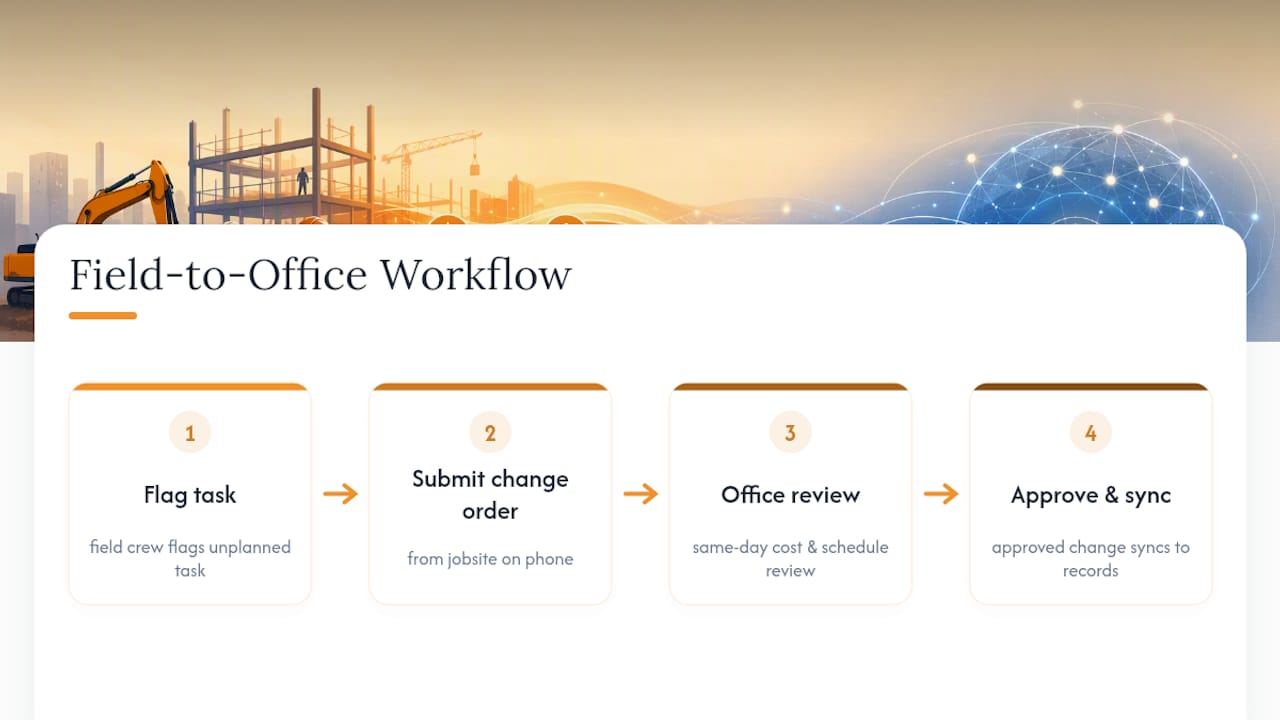
A workflow that actually works looks like this: a field crew flags an unplanned task, submits it as a change order from the job site, the office reviews the cost and schedule impact the same day, and an approved change syncs back to everyone’s records automatically. No re-entry, no lost paper trail, no dispute six weeks later about who agreed to what.
The Uncomfortable Truth About Scope Creep
Most advice on scope creep treats it as a documentation problem: write a better scope statement, build a tighter WBS, and the creep goes away. That’s incomplete.
The real gap is behavioral. Someone on the team says yes to a small, reasonable-sounding request because saying no in the moment feels awkward, and that single yes never gets logged. Multiply that by a dozen small yeses across a project, and you have a budget overrun with no single culprit. The conventional advice underweights this because it’s harder to template than a form.
What actually moves the needle is making the trade-off visible at the moment of the ask, not after the fact. A script that buys ten minutes to log a request beats any policy document sitting in a binder. Prioritize the daily habit of catching small asks before you invest more time refining templates nobody in the field will read anyway.
— Jen Reese
Let Won2Build Handle the Paper Trail While You Handle the Job
Won2Build is the alternative to juggling separate spreadsheets, texts, and paper change-order pads for subcontractors who need scope control that survives contact with a real job site. CO Hub captures a change request the moment it happens in the field and routes it for approval with a built-in audit trail, so a verbal ask never turns into an unbillable dispute six weeks later.

Time Budge ties labor hours directly to job costs, giving you the real-time variance data you need to catch a project drifting off its WBS before the invoice tells you the bad news. Takeoff sharpens your original quantities so fewer “surprises” show up mid-project in the first place. Because all three run through one login, a field request logged in the change order app shows up in your office reporting without anyone re-entering data by hand.
CO Hub runs $59 per month per company, and Time Budge runs $199 per month per company, with active field workers billed separately. Check the Won2Build pricing page for the full breakdown, or look at the complete product suite to see how the tools connect before you commit to a plan.
Sources
PMI’s Pulse of the Profession report backs the scope-creep statistics cited throughout this piece. Atlassian’s guide to scope creep lays out the five-step change-control workflow referenced above. PM Study Circle’s control scope process guide covers planning, monitoring, and recovery in more technical depth. For the legal side of construction change orders, Heckman Law’s breakdown of scope creep in construction explains the notice and documentation requirements that protect contractor pay.
- Pulse of the Profession™ 2023 — PMI
- Scope creep — Atlassian
- Control scope process: Steps, tools & real-world examples — PM Study Circle
- What Is Scope Creep in Construction? — Heckman Law PC
FAQ
How Do You Stop Scope Creep?
Stop work on any unapproved task immediately, log the request in a change register, and route it through a formal change-control process before any work resumes. A five-step workflow, capture, assess, decide, record, update, keeps requests from turning into unbilled labor.
What Is a Well-Known Example of Scope Creep?
Large public infrastructure projects are the most commonly cited examples, where added features, design changes, and stakeholder requests pile up after the original budget and timeline were locked in, often adding years and significant cost beyond the original plan. Construction projects see a smaller-scale version constantly: an owner’s verbal request for “one more change” during a walkthrough that never gets converted into a written change order.
What Is Scope Creep, With a Simple Example?
Scope creep is unapproved work that expands a project’s budget, schedule, or deliverables without a formal change order. A common example: a client asks a contractor to “just add a window” during a site visit, the crew does it to keep things moving, and nobody adjusts the contract price or timeline to reflect the extra labor and materials.
Why Is Scope Creep Bad for a Project?
Scope creep erodes profit margins, pushes schedules past contractual deadlines, and forces teams to absorb extra work without extra resources, which drives burnout and quality problems. A 2023 PMI report found that roughly 28% of projects still experience it despite established planning practices, showing that even disciplined teams remain exposed without active change control.
Can Software Like Won2Build Prevent Scope Creep in Construction?
Won2Build’s CO Hub captures field-level change requests and routes them for approval with a built-in audit trail, which closes the gap between a verbal ask and a documented, billable change order. Paired with Time Budge for labor tracking, it gives project managers the real-time data needed to catch scope drift before it becomes a budget overrun.
Recommended
One login for estimating, bid tracking, change orders, and labor.
The Hub is free. Pay only for the apps you turn on.
Create your free Hub account- Managers: Make Mobile Field Workflows Resilient for 72 Hour OutagesPlaybook for field managers: offline first mobile workflows, resilient sync and conflict handling, compliance first AI guardrails, and practical pilot steps.
- Daily Signed Records: Force Account Tracking for Managers & InspectorsField checklist for project managers and inspectors to keep force account tracking audit-ready: use daily signed records for labor, equipment, and...
- Stop Timecard to Report Drift: Labor Cost Codes for SubcontractorsFix the timecard to report chain with labor cost codes that tie crews to budgets. Includes a 6 code starter and a burdened rate example.