
One Foreman Pilot That Proves Crew Time Tracking for Subcontractors
Field first guide for subcontractors that shows how crew timesheets led by foremen, offline sync, and cost-code mapping cut double entry, speed approvals,...

The best crew time tracking approach for subcontractors combines foreman-led mobile or kiosk entry, offline capture for jobsites with no signal, job-cost mapping, and supervisor approvals before payroll runs. Tools with integrated workflows can cut payroll disputes and give project managers accurate labor costs in real time. The rest of this guide breaks down how that workflow runs day to day and what to prioritize when you set it up.
TL;DR:
- Crew-based time tracking allows foremen to log hours quickly for multiple workers, reducing errors and streamlining approval processes.
- Offline sync and GPS verification ensure accurate data capture and location tracking even in signal-dead zones with fast, under 10-second clock-in flows.
- Integrating crew timesheets with job and cost-code mapping enables real-time updates to project budgets and more accurate cost control mid-project.
- Many systems fail to protect margins because they do not connect field hours with change orders and bids, which requires software with seamless data sharing.
- Starting with a pilot crew at one site and customizing workflows helps maximize adoption and demonstrates faster payroll and fewer disputes.
Table of Contents
- What Crew Time Tracking Actually Does on a Jobsite
- How Crew-Based Time Entry Workflows Work in Practice
- What to Look for in a Crew Time Tracking Tool
- Implementation Best Practices for Field Adoption
- How Time Data Improves Job Costing and Forecasting
- The Real Gap in Most Crew Time Tracking Setups
- Why Time Budge Fits a Subcontractor’s Daily Reality
- Sources
- FAQ
What Crew Time Tracking Actually Does on a Jobsite
Most subcontractors don’t track timeworker by worker. A foreman opens one crew timesheet, taps through the names on-site that day, and logs hours against a job in a few minutes instead of chasing down five separate time cards. That single pattern, commonly used on construction sites to speed up collection, changes what happens downstream in the office.
Reliable crew tracking tends to produce:
- Fewer payroll disputes, because hours get recorded the same day instead of reconstructed from memory on Friday.
- More accurate job costing, since hours post against a specific project and task instead of a general labor bucket.
- Faster supervisor approvals, because a foreman signs off on one crew sheet instead of a stack of individual cards.
- Daily reports project managers can actually use to catch overruns before they become a bad month.
That last point matters more than most subcontractors realize. A crew that logs hours in real time gives your office a live labor number instead of a guess, and that number feeds straight into payroll exports and job cost reports without someone retyping it from a paper sheet.
How Crew-Based Time Entry Workflows Work in Practice
A working crew timesheet follows a predictable sequence, and once a foreman runs it a few times, it takes less effort than filling out paper.
- The foreman opens the crew timesheet for the day and pulls up the active job.
- They select which crew members worked and assign the right job or cost code to each task.
- Hours get entered directly, or workers clock in through a kiosk at the site entrance.
- Notes or photos get attached for anything unusual, a weather delay, a change order, a safety issue.
- The foreman submits the sheet for supervisor approval.
Mass entry saves real time when a crew splits across two tasks in one day or when someone shows up late because of traffic or a supply run. Systems built around crew timesheet workflows let a manager update crew membership and enter punches for multiple workers in one pass, which is exactly the exception handling paper timesheets struggle with.
Offline capture matters just as much. A foreman working in a basement or a rural site with no signal needs to log hours anyway, then sync once the device reconnects.
Pro Tip: Check your sync settings before the first day on a new site. A crew timesheet that sits unsynced for three days makes reconciliation on Friday a much bigger job than it needs to be.
What to Look for in a Crew Time Tracking Tool
Not every time tracking app was built with a construction crew in mind, and the gap shows up fast once you’re standing in mud with gloves on trying to clock in. Prioritize these features:
- Crew timesheet and kiosk modes. One entry point for the whole crew beats asking six tradespeople to open an app individually.
- A clock-in flow under 10 seconds. If it takes longer, adoption drops, especially with crews who don’t spend their day on a phone.
- Offline mode with automatic sync, so a dead zone doesn’t mean lost hours.
- Job and cost-code mapping, plus payroll export formats like CSV, QuickBooks, or ADP, so hours move into accounting without manual re-entry.
- Location verification through GPS or geofencing, handled with clear privacy practices so crews know what’s being tracked and why.
- Approval workflows with digital signatures, photo attachments, and an audit trail you can point to if a dispute ever comes up.
Construction-specific apps tend to bundle GPS tracking, photo attachments, job costing, and supervisor tools as standard, which is a reasonable baseline to measure any option against. A free GPS tracking option for vehicles can complement crew software when you’re also managing equipment or fleet movement between sites.
Implementation Best Practices for Field Adoption
The technology rarely fails first. Adoption does, usually because a rollout tries to cover every site and every foreman on day one. Start smaller.
- Pilot with one foreman-led crew on one site before expanding sitewide.
- Keep the clock-in flow short, and train foremen on cost-code allocation and approvals using a one-page job aid instead of a manual.
- Put the kiosk at the site entrance or hand it to the supervisor’s device, rather than asking every tradesperson to carry a phone for it.
- Run a short weekly availability review, a short 15 to 20 minutes, comparing planned hours against actual hours and reallocating crews where needed.
- Present the tool as a planning aid, not a monitoring device. Share reports that show faster payroll or fewer disputes so crews see the upside.
Crews are especially likely to resist individual tracking where tradespeople don’t carry reliable smartphones or stay occupied with tools in hand all day. That’s exactly why the crew-based, foreman-managed model fits construction better than tools designed for office teams.
Pro Tip: Give the pilot crew two weeks before judging the results. The first few days always run rough while foremen get used to the cost-code list.
For a deeper look at rollout templates and sample policies, see this field guide to timecard best practices.
How Time Data Improves Job Costing and Forecasting
Once hours post against the right cost code, your job budget updates the moment a foreman submits and a supervisor approves. That’s the whole point of crew time tracking beyond payroll: it turns a static bid into a living number you can check mid-project instead of after it’s too late to fix.
A simple version of the workflow looks like this:
- Crew logs hours against a task and cost code.
- Supervisor reviews and approves the sheet.
- Hours post to the job cost report.
- The project manager compares actual labor against the forecast and adjusts crew allocation if a task is running hot.
Planners also need to account for real availability, contracted hours minus meetings, admin work, PTO, and a buffer for the unexpected, not the full 40 hours on paper.
The Real Gap in Most Crew Time Tracking Setups
Most subcontractors don’t lose money because they lack a time tracking app. They lose it because time data lives in one system, change orders live in another, and the bid that set the labor budget in the first place lives somewhere else entirely. Someone has to manually reconcile all three, and that’s where hours and dollars quietly disappear.
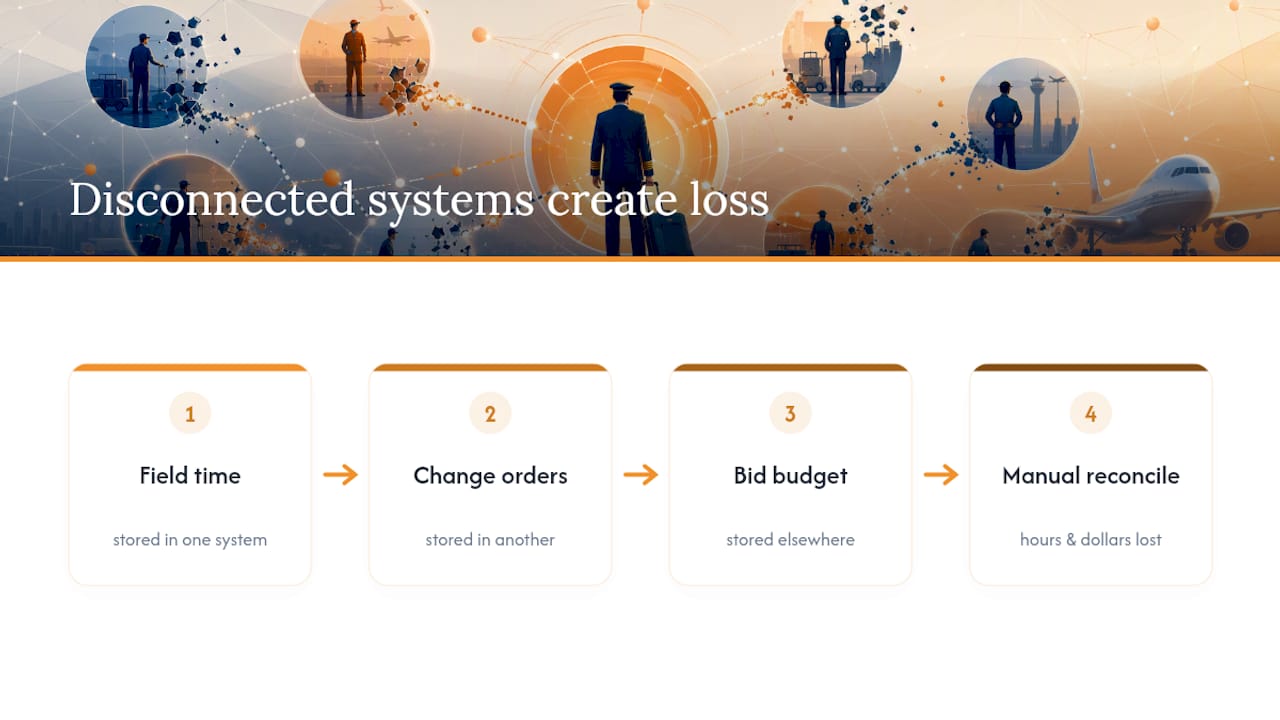
Some software suites are designed to share a single sign-on and sync data between field and office in real time, so a foreman’s crew timesheet connects to change orders and bids, helping protect margins. That connection is what actually protects margins, not the time tracking app on its own.
For more on how offline capture and mobile timesheets work in practice, the Won2Build blog on offline field tracking and its mobile timesheet guide go deeper into device setup and day-to-day workflows.
— Jen Reese
Why Time Budge Fits a Subcontractor’s Daily Reality
Time Budge covers the exact checklist above: crew timesheets with kiosk mode, offline sync that catches up automatically, job and cost-code mapping, and supervisor approvals with an audit trail. None of that lives in a separate app, either. When integrated with other modules like change order and bid management, a crew’s hours can connect directly to corresponding data, avoiding manual re-entry between systems.

A first trial works best with a narrow scope: one foreman, one active site, and a short cost-code list you can expand once the workflow feels natural. Most subcontractors know within the first two weeks whether their payroll process improved. If change orders are also part of your daily friction, the CO Hub product page walks through how it ties into the same time data. Start a trial and run your first crew through it this week.
Sources
This guide draws on crew-based construction time tracking research, crew timesheet workflow documentation, and team availability planning guidance. For a broader field guide, see tracking labor hours on job sites.
- Team availability management: Plan your team’s time
- Crew-based time tracking for construction foremen
- How crew timesheets work (Replicon / Deltek learning)
FAQ
What is the best way to track staff hours on a construction crew?
Crew-based entry, where a foreman logs hours for the whole crew against job and cost codes, works better for construction than individual clock-ins because it matches how field crews actually operate and cuts down on missed entries.
Is there a free way for employees to track their work hours?
Some basic time tracking apps offer free tiers, but they rarely include construction-specific features like job-cost mapping, offline sync, or crew-based entry, which subcontractors need to keep labor data accurate.
What is the best way to track employee time off?
Time off should run through the same system as regular hours so your availability calculations stay accurate. Subtracting PTO, admin time, and meetings from contracted hours gives a realistic picture of what a crew can actually deliver.
What apps do employers use to track employees on jobsites?
Construction subcontractors typically use field-built apps with GPS verification, offline capture, and job costing rather than generic office time trackers. Won2Build’s Time Budge is built specifically around crew-based entry and cost-code mapping for this reason.
How does crew time tracking improve job costing?
Once a supervisor approves a crew timesheet, hours post directly against the job’s cost codes, giving project managers a live labor number instead of a delayed estimate reconstructed after the fact.
Recommended
One login for estimating, bid tracking, change orders, and labor.
The Hub is free. Pay only for the apps you turn on.
Create your free Hub account- Managers: Make Mobile Field Workflows Resilient for 72 Hour OutagesPlaybook for field managers: offline first mobile workflows, resilient sync and conflict handling, compliance first AI guardrails, and practical pilot steps.
- Daily Signed Records: Force Account Tracking for Managers & InspectorsField checklist for project managers and inspectors to keep force account tracking audit-ready: use daily signed records for labor, equipment, and...
- Stop Timecard to Report Drift: Labor Cost Codes for SubcontractorsFix the timecard to report chain with labor cost codes that tie crews to budgets. Includes a 6 code starter and a burdened rate example.