
Offline Time Tracking for Construction Field Teams
Discover how offline time tracking can streamline labor management for construction teams, ensuring accurate records, zero lost hours, and real-time sync.

For construction subcontractors, Won2Build Time Budge is the recommended offline-capable time tracking solution. It captures labor hours locally on the device, queues every entry with full metadata, and syncs automatically to your office ledger the moment connectivity returns. No manual re-entry. No lost hours. No payroll surprises.
Three reasons this approach fits job sites specifically:
- Reliable local capture records clock-ins and clock-outs even in basements, tunnels, or dead zones where cell service is nonexistent.
- Foreman-led crew workflows let one person clock an entire crew from a single device, which is how most subcontractor sites actually operate.
- Full sync to the office ledger means project managers see accurate labor costs in real time once the device reconnects, with no double entry between field and office.
Time Budge product page covers the full feature set for subcontractors ready to evaluate it.
Key Takeaways
Offline time tracking for construction works when local capture, foreman-led workflows, and automatic sync are treated as the core requirements, not optional features.
| Point | Details |
|---|---|
| Prioritize local capture | Choose software that writes entries to the device first, with UTC timestamps set at capture, not sync time. |
| Require conflict resolution policy | Ask vendors in writing how overlapping entries from multiple devices are resolved before you sign. |
| Run a foreman-led pilot | Test on one bounded project for 2–4 weeks and track missing-hour rate, sync latency, and payroll export accuracy. |
| Audit before every payroll run | Pull a raw CSV export and verify every crew member appears, timestamps are intact, and hours match the foreman’s paper backup. |
| Won2Build Time Budge | Built for subcontractor crew workflows with local capture, foreman batch clocking, and direct sync to Won2Build Hub. |
Table of Contents
- How does offline time tracking actually work?
- What features should you require from any offline time tracker?
- How to implement offline tracking on a construction site
- Where offline tracking pays off in the field
- Data storage, privacy, and payroll compliance for U.S. teams
- Why Won2Build Time Budge fits offline field tracking
- The lesson most teams learn too late about offline deployment
- Try Won2Build Time Budge on your next project
- Sources
How does offline time tracking actually work?
Offline time tracking means the app journals every clock event locally on the device first, then queues those entries for authenticated sync when connectivity returns. The cloud is not involved in the capture step at all.
Here is the flow in practice:
- Local capture. The worker or foreman starts a timer or logs a clock-in. The app writes a timestamped event to local storage immediately, tagging it with user ID, device ID, project ID, and a UTC timestamp.
- Local queue. All events accumulate in an on-device ledger. If GPS is enabled, coordinates attach to each entry. The queue persists through app restarts, battery cycles, and device sleep.
- Conflict resolution. When two devices log overlapping entries for the same worker (common when a foreman clocks a crew and a worker self-clocks), the system applies a defined rule: last-write-wins, manual review flag, or supervisor override. The policy must be configured before deployment.
- Authenticated sync. Once the device reconnects, the app pushes the queue to the server. The server validates timestamps, checks for conflicts, and writes verified entries to the project ledger with an immutable audit log.
- Verification. The office sees a reconciliation report showing which entries synced cleanly and which flagged for review.
Device considerations matter more than most buyers expect. A standard Android or iOS phone works for most crews, but rugged devices (Zebra, Panasonic Toughbook tablets) handle dust, drops, and temperature extremes that kill consumer hardware within a season. Battery life is the hidden variable: a device that dies at 2 PM loses the afternoon queue unless the app checkpoints entries to non-volatile storage continuously. GPS and NFC permissions must be granted at the OS level before the crew leaves the yard.
Apps like ArcGIS Field Maps demonstrate how mature offline capture works: field workers download maps and data forms before going offline, collect standardized entries locally, and sync automatically on reconnect. The same pattern applies directly to time tracking.
Pro Tip: During a free trial, simulate a four-hour airplane-mode session with three crew members clocking in and out, then reconnect and check whether every entry appears in the correct order with intact timestamps. That single test surfaces more reliability issues than any vendor demo.
What features should you require from any offline time tracker?
Evaluation guides like Zapier’s time tracking app roundup consistently highlight offline capability, export formats, and integration depth as the criteria that separate field-ready tools from office-only ones. Here is how to apply that to a construction context.
Must-have features
- Persistent local timers that survive app crashes, device reboots, and OS-level battery optimization killing background processes.
- Reliable local storage with no data loss after 8+ hours offline and no cap on queue size.
- Queued sync with a documented conflict-resolution policy. Ask the vendor in writing: what happens when two entries overlap?
- Exportable audit logs in CSV or JSON, showing raw timestamps, user IDs, and device IDs, not just summarized totals.
- Offline project/job assignment so workers can tag hours to the correct cost code without a network call.
- Timestamp integrity. Entries must carry UTC timestamps set at capture time, not sync time. This distinction matters enormously for payroll disputes.
- Payroll-ready exports that map to your payroll system’s format (ADP, QuickBooks, Sage, or custom CSV).
Nice-to-have features
- Offline GPS geotagging attached to each clock event.
- NFC crew clock-in, where workers tap a tag at the site entrance and the foreman’s device records the event locally.
- Crew batch clocking: one foreman action clocks an entire crew in or out simultaneously.
- Automatic idle detection that pauses the timer after a configurable period of inactivity.
- Local-first licensing for air-gapped sites where no outbound network calls are permitted.
Construction-specific tools support foreman-led crew recording, NFC tag attendance, and payroll-ready exports as core capabilities, not add-ons. That feature set is what separates purpose-built field tools from general-purpose time trackers adapted for the job site.
Trial test plan
Run these four tests during any free trial:
- Clock in five workers offline, assign each to a different cost code, then sync and verify all five appear correctly in the project ledger.
- Edit an entry on Device A while Device B has a conflicting entry for the same worker. Sync both and check how the conflict resolves.
- Force-close the app mid-session and reopen it. Confirm the running timer resumed and the partial entry is intact.
- Export the audit log and open it in Excel. Confirm UTC timestamps, user IDs, and project codes are all present and human-readable.
How to implement offline tracking on a construction site
The fastest path to a working deployment is a foreman-led pilot on one bounded project. Trying to roll out to every crew simultaneously is where most implementations stall.
- Choose your pilot crew and site. Pick a foreman who is comfortable with mobile apps and a project with a defined start/end date. Two to four weeks is enough to surface real-world issues.
- Provision devices. Load the app, grant GPS and NFC permissions, and download any offline data packages (project lists, cost codes, crew rosters) before the crew leaves the yard. A mobile timesheet field guide covers device provisioning specifics for subcontractor crews.
- Configure offline settings. Set the conflict-resolution policy, define the sync frequency (end-of-shift minimum), and confirm local storage limits are adequate for the crew size and shift length.
- Train foremen and admins. Foremen need 20 minutes: how to clock the crew in, assign cost codes, and trigger a manual sync. Admins need to know how to read the reconciliation report and flag conflicts.
- Run the pilot for 2–4 weeks. Track five metrics: missing-hour rate, sync latency, number of conflict events, time-to-reconciliation, and payroll export accuracy.
- Review and adjust. A clean pilot shows near-zero missing hours, sub-minute sync latency, and payroll exports that match the foreman’s paper backup within rounding. Fix any gaps before scaling.
- Roll out and scale. Add crews one at a time, using the pilot foreman as an internal trainer.
Pilot metrics to watch:
- Missing-hour rate: any entry that appears in the foreman’s paper log but not the digital ledger.
- Sync latency: time between device reconnect and entry appearing in the office dashboard.
- Conflict events: entries flagged for manual review after sync.
- Time-to-reconciliation: how long the office spends resolving conflicts per pay period.
- Payroll export accuracy: percentage of entries that pass straight through to payroll without manual correction.
Pro Tip: Make end-of-shift sync a non-negotiable ritual: foreman connects to site Wi-Fi or LTE before leaving the job, confirms the sync indicator shows green, and the office runs a quick reconciliation check the same evening. Catching a conflict the same day takes two minutes. Catching it on payday takes two hours.
Where offline tracking pays off in the field
The value of offline time tracking construction shows up most clearly in five scenarios.
Basement and substructure work. Underground concrete, utility, and mechanical crews routinely work in areas with zero cell signal. Without local capture, hours get reconstructed from memory at the end of the week, which introduces errors that compound across a multi-month project.
Foreman crew clock-in at site entry. A foreman arrives with eight ironworkers. One tap (or NFC scan) clocks all eight in simultaneously, assigns them to the correct phase, and queues the entry locally. No one needs a smartphone. No one needs signal. Tools like Felt’s field data app show how GPS-accurate, offline-first collection works for field teams, and the same principle applies to crew attendance.
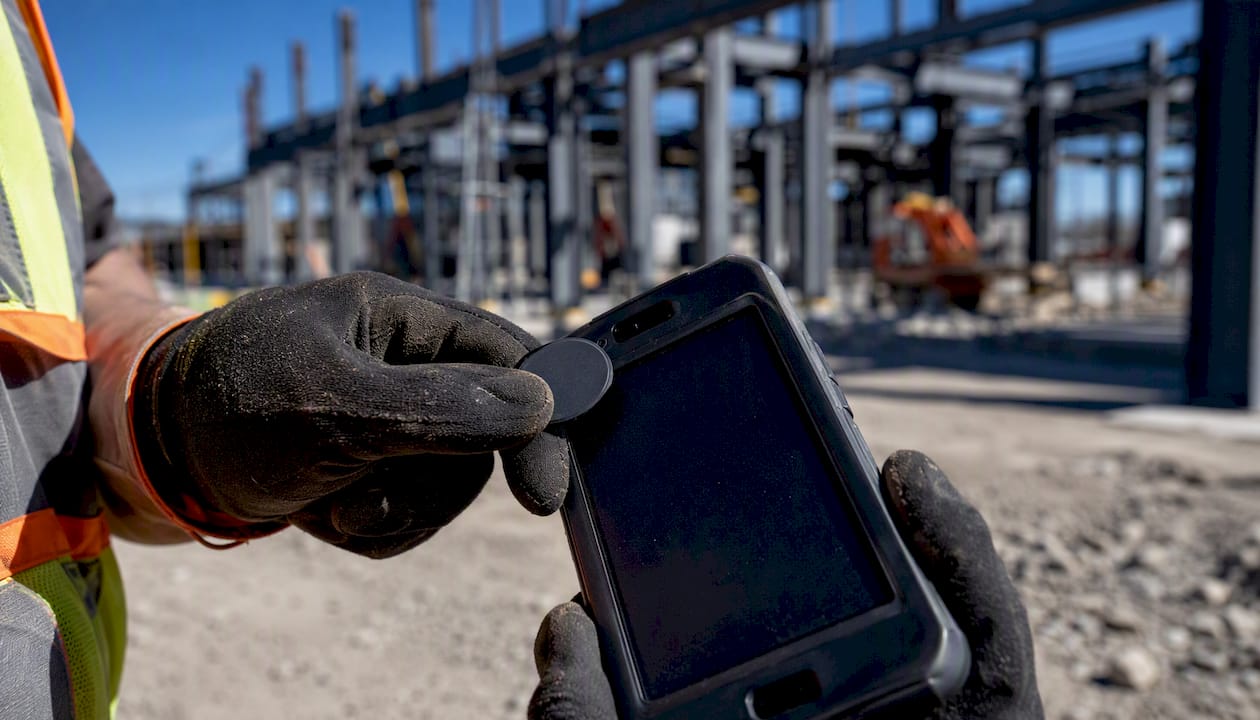
T&M ticket capture for inspectors. An inspector documents extra work on a change order: labor hours, equipment time, and materials. Offline time logging ties directly to the T&M ticket, giving the subcontractor a defensible record if the GC disputes the hours. That record is only as good as its timestamp integrity.
Equipment operators logging shift hours. An operator running a crane or excavator logs start and stop times against the equipment ID and project phase. Offline capture means the log exists even when the operator is in a remote area of a large site.

Multi-trade crews sharing a single device. On smaller projects, one foreman device handles clock-ins for electricians, plumbers, and framers across different cost codes. Offline batch clocking with project assignment handles this cleanly; a cloud-dependent app cannot.
Fulcrum’s mobile data collection platform illustrates how teams capture photos, GPS coordinates, and custom form data offline for later sync, which complements time tracking when richer job records (inspection photos, equipment condition notes) need to attach to the same timestamp. For subcontractors tracking labor hours on job sites, combining time data with field documentation creates a much stronger project record.
Data storage, privacy, and payroll compliance for U.S. teams
Preserve timestamp integrity and a verifiable audit trail. That is the non-negotiable baseline for both payroll accuracy and dispute resolution under U.S. labor law.
What to log locally
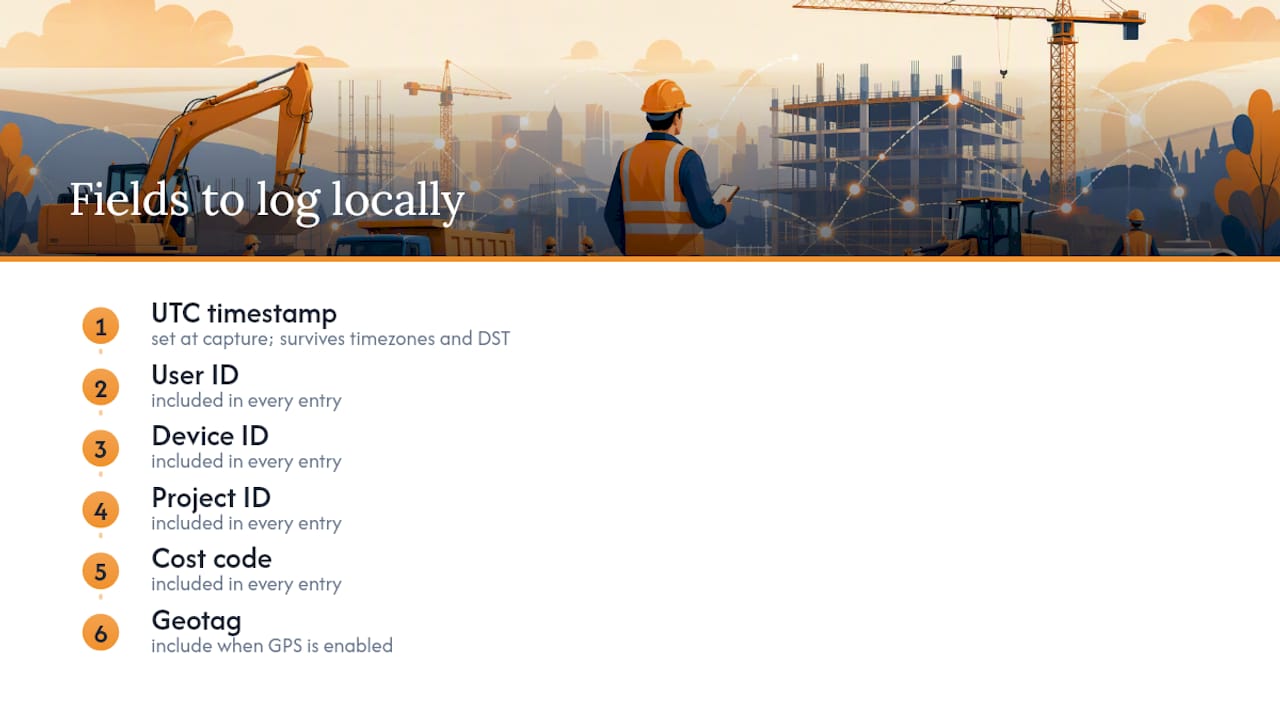
Every entry should carry: UTC timestamp (set at capture, not sync), user ID, device ID, project ID, cost code, and geotag when GPS is enabled. Do not rely on display-formatted local time as the source of record; UTC is the only timestamp that survives timezone changes and daylight saving transitions without ambiguity.
Retention and export
Keep raw entries for a minimum of three years to align with the Fair Labor Standards Act’s recordkeeping requirements. Export formats should include both a human-readable summary (for payroll review) and a raw CSV or JSON file (for audit). The raw file must show individual punch events, not just daily totals.
Privacy controls to require
- Encryption at rest on the device (AES-256 or equivalent).
- Limited telemetry: the app should not transmit location data continuously, only at clock events when GPS tagging is enabled.
- Admin controls for data export and deletion, so a departing employee’s device can be wiped without losing the project record.
- Local-first storage for air-gapped sites. Some tools, including desktop-focused options, offer fully local operation with no outbound network calls and CSV export for payroll, which suits compliance-restricted environments.
Pro Tip: Before each pay period, pull a raw CSV export and run a three-column check: (1) every worker on the crew roster appears at least once, (2) no entry has a sync timestamp earlier than its capture timestamp (a red flag for clock manipulation), and (3) total hours per worker match the foreman’s paper backup within 15 minutes. That check takes under 10 minutes and catches the errors that cause payroll disputes.
For deeper guidance on building timecard records that hold up to scrutiny, the Won2Build post on subcontractor time cards covers export formats and audit prep in detail.
This section is general operational guidance, not legal advice. Consult a qualified employment attorney or HR professional for compliance requirements specific to your state and workforce.
Why Won2Build Time Budge fits offline field tracking
Time Budge is built for foreman-led crew workflows with local capture and automatic field-to-office sync, which makes it a practical fit for subcontractors rather than a general-purpose tool adapted to construction.
Product snapshot:
- Local-first capture that queues entries on the device and syncs when connectivity returns.
- Foreman crew recording: one foreman clocks an entire crew in or out from a single device.
- Mobile and tablet support for both iOS and Android.
- Payroll-ready exports that map to standard payroll formats.
- Per-project labor tracking with cost code assignment available offline.
- Single sign-on integration with Won2Build Hub, so time entries flow directly into CO Hub for change order and T&M workflows, and labor actuals inform Bid Track estimates for future projects.
Won2Build implementation checklist:
- Provision devices and install Time Budge before crews leave the yard.
- Activate SSO so foremen access Time Budge, CO Hub, and other modules with one login.
- Set up each active project with cost codes and crew rosters in the system before going offline.
- Train foremen on crew clock-in, cost code assignment, and the end-of-shift sync ritual.
- Run a 2–4 week pilot and track the five metrics from the implementation section above.
Won2Build subcontractors who have piloted Time Budge on bounded projects report that the foreman workflow and automatic sync are the features that drive adoption. The office reconciliation step, which previously consumed hours per pay period, compresses significantly when entries arrive with intact timestamps and project assignments already attached. For a broader look at the business case, the Won2Build post on subcontractor time tracking benefits covers cost reduction in more depth.
This section reflects Won2Build’s product positioning. Evaluate Time Budge against your specific workflow requirements during a free trial.
The lesson most teams learn too late about offline deployment
The biggest deployment mistake is not a technical one. It is treating offline time tracking as a device problem when it is actually a workflow problem.
Most subcontractors spend weeks evaluating sync reliability and storage limits, which matter, but they underinvest in the foreman workflow. If the foreman finds the clock-in process awkward or slow, the crew reverts to paper within two weeks regardless of how good the software is. The technology only works if the person running it on-site has a reason to trust it.
The practical lesson: design the deployment around the foreman’s morning routine, not the office manager’s reporting needs. A 30-second crew clock-in that the foreman can do with gloves on, in the dark, with no signal, is worth more than a feature-rich dashboard the office loves but the foreman ignores. Make the sync mandatory but invisible: end-of-shift, one tap, done. The office gets clean data; the foreman gets no extra work.
The second pitfall is giving every worker a device. Single-device foreman workflows outperform multi-device individual tracking on most construction sites, because they reduce the number of conflict events, simplify training, and cut device management overhead. Save individual worker apps for office staff and project managers who actually need them.
Try Won2Build Time Budge on your next project
Construction subcontractors who want to stop reconstructing hours from memory at the end of the week have a direct path forward: a bounded pilot with one foreman, one project, and two to four weeks of real field data.

Start a free trial of Time Budge and bring three things to your demo: your device inventory (what phones or tablets your foremen carry), your current payroll export format, and a list of the cost codes for your next active project. The Won2Build team will configure a pilot scope around that specific project so you see real results, not a generic demo.
Time Budge is part of Won2Build Hub, which means a single login also gives you access to CO Hub for change order and T&M ticket management, Bid Track for estimating, and Takeoff for digital plan quantification. No separate logins. No re-entering data between modules. The suggested pilot scope for construction teams: one to two sites, one to three foremen, two to four weeks.
Sources
- ArcGIS Field Maps overview
- Felt field data collection app: GPS precision, offline mapping, surveys, and easy form builder
- Mobile Data Collection App | Fulcrum
- The 5 best time tracking apps in 2026
This article is general information, not a substitute for advice from a qualified lawyer. Consult a qualified legal professional about your own circumstances before acting on anything here.
Recommended
One login for estimating, bid tracking, change orders, and labor.
The Hub is free. Pay only for the apps you turn on.
Create your free Hub account- 7 Concrete Takeoff Steps Estimators Use to Avoid Ordering ShortfallsFollow seven concrete takeoff steps to calculate cubic yards, size rebar and formwork, convert volumes to supplier units, and verify quantities before bid...
- Are E-Signature Change Orders Legal and Worth the Switch?E-signature change orders streamline your workflow, ensuring faster approvals, fewer disputes, and quicker invoicing—discover the benefits now!
- How to Link Takeoff to Estimate for Accurate BidsLink your takeoff quantities to your estimate for accurate bids. Discover the seamless integration method that reduces errors and saves time.