
Cut 5.5 Hours Weekly: Single Entry Playbook for Subcontractors
A subcontractor-first playbook to stop duplicate entry: one day audit, a one project pilot, governance rules, and practical single entry steps that save...

Subcontractors eliminate double entry by moving estimating, time tracking, change orders, and takeoff into one synced system instead of four disconnected ones. A single-entry workflow means field data gets captured once and flows automatically into every module that needs it. The payoff shows up fast: fewer billing mistakes and faster pay apps. There are software options built for exactly this purpose, and some are available to try.
TL;DR:
- Focusing on time tracking to payroll integrations offers the quickest initial wins due to structured data and obvious pain points.
- Running a 30 to 60-day pilot on a mid-size project helps identify setup issues and quantifies time saved and duplicate entries avoided.
- Strong governance, including appointing a data steward and standardizing naming conventions, is more critical for success than the specific technology chosen.
- Overcoming common rollout obstacles involves prioritizing native integrations, ensuring offline functionality, and enforcing one authoritative data entry point.
- Measuring operational savings through reduced re-entry hours and faster pay applications confirms tangible financial benefits.
Table of Contents
- Five Moves That Start Cutting Duplicate Entry This Week
- What a Single-Entry Workflow Actually Looks Like
- A Five-Step Plan to Roll Out Single-Entry Workflows
- Why Rollouts Stall (and How to Keep Yours From Reverting)
- What to Measure and What Payback Looks Like
- Why Governance Beats the Tool Every Time
- Try an Integrated Suite Built for This Exact Problem
- Sources
- FAQ
Five Moves That Start Cutting Duplicate Entry This Week
You don’t need a six-month rollout to see results. A few focused actions, run in the right order, will show you where the bleeding is and stop the worst of it.
- Run a one-day entry audit. Track every place a foreman, PM, or office admin retypes information that already exists somewhere else. Note the source, the destination, and how often it happens.
- Pick one workflow to fix first. Time tracking and change orders tend to have the highest re-entry rates on active jobs, so start there instead of trying to fix everything at once.
- Set up a one-project pilot. Choose a mid-size job, not your biggest or messiest one, and assign a single owner who’s accountable for making it work.
- Track two numbers during the pilot. Hours saved per week and the raw count of entries avoided are enough to prove the case without drowning anyone in spreadsheets.
- Review after two weeks, not two months. Early friction is normal; catching it fast is what keeps the pilot from quietly dying.
Pro Tip: Assign the pilot owner before you pick the software. A clear owner with no tool beats a great tool with no owner.
What a Single-Entry Workflow Actually Looks Like
A single-entry workflow means field data gets captured once, at the source, and then pushed automatically to every module that needs it. A foreman logs hours on a tablet. That entry updates payroll, job costing, and the change order log at the same time, without anyone touching a keyboard twice.
Three technical pieces make this possible:
- A shared data environment (or CDE) acts as the single source of truth every module reads from and writes to, instead of each app keeping its own private copy of the truth. Research on centralized shared data environments shows this structure directly reduces duplicate handling and cuts down on rework and RFIs.
- Single sign-on and API-level sync let modules talk to each other in real time instead of relying on someone exporting a CSV and importing it somewhere else.
- Mobile field sync captures data on-site, even offline, and pushes it to the office record the moment a connection is available.
Here’s a concrete chain: a takeoff line for drywall square footage feeds directly into the estimate, the estimate sets the labor budget, field hours get logged against that budget, and a change order updates all three automatically when the scope shifts. No one retypes the square footage four times.
Construction teams spend real time hunting for information that should already be in front of them. One industry report found workers lose about 5.5 hours a week just searching for project data. That’s the time single-entry systems give back.
A Five-Step Plan to Roll Out Single-Entry Workflows
Skipping steps is how most rollouts stall halfway and quietly revert to spreadsheets. Follow this order and each step sets up the next one.
- Audit for one full day. Document who re-enters what data, where, and how often. Be specific: “PM retypes hours from paper time cards into QuickBooks every Friday” is useful; “we have some double entry issues” is not.
- Choose your first integration path. Map exactly which fields move between which systems. Time tracking to payroll is usually the fastest win because the data is structured and the pain is obvious to everyone.
- Configure a one-project pilot. Train the field and office staff who’ll actually touch the system daily, and set simple rules: one entry point per data type, no side spreadsheets.
- Run the pilot for 30 to 60 days. Capture baseline numbers before you start and compare them at the end. Don’t extend it past 60 days. If it’s not working by then, the problem is the setup, not the timeline.
- Iterate, then scale. Fix what broke in the pilot before rolling out to more projects.
Lock in governance early, not as an afterthought:
- Assign one data steward per project who owns accuracy and flags conflicts.
- Standardize naming conventions so a “CO-14” means the same thing in every module.
- Set version control rules so nobody’s working off an outdated estimate.
Case analyses on interoperability and duplicate data entry consistently point to the same conclusion: the technology matters less than whether governance actually gets enforced. Won2Build’s own guide to construction collaboration recommends phased pilots over big-bang rollouts for exactly this reason. Partial adoption during a messy transition is often worse than the double entry you began with.
Why Rollouts Stall (and How to Keep Yours From Reverting)
Every integration effort hits the same handful of walls. Knowing them ahead of time is half the fix.
- File-format mismatches. If your takeoff tool can’t talk to your estimating software without a manual CSV export, you haven’t eliminated double entry, you’ve just relocated it. Prioritize native syncs and APIs over export-import routines.
- Old habits win under deadline pressure. Field crews revert to the spreadsheet they trust when they’re rushed. Fix this by enforcing one authoritative entry point and offering a quick, visible incentive for using it correctly during the pilot.
- Spotty jobsite connectivity. Offline capture that syncs automatically once a signal returns solves this without asking crews to change how they work.
- No one owns the data. Without a lightweight data-steward role and basic naming rules, even a well-integrated system fragments within a few months.
Pro Tip: If your pilot team is still keeping a “backup” spreadsheet after 30 days, that’s not a training gap, it’s a trust gap. Find out why they don’t trust the system before you push harder on adoption.
If adoption stalls hard, pause and re-evaluate the setup rather than forcing compliance. A forced rollout that nobody trusts creates worse habits than the double entry it replaced.
What to Measure and What Payback Looks Like
Two categories of numbers matter, and you don’t need more than a handful of each.
Operational metrics:
- Hours saved per week across office and field staff
- Number of duplicate entries prevented during the pilot window
- Time to produce a completed pay application
Financial metrics:
- Labor cost avoided from reduced re-entry hours
- Fewer billing corrections and disputed invoices
- Faster cash flow from quicker, cleaner pay apps
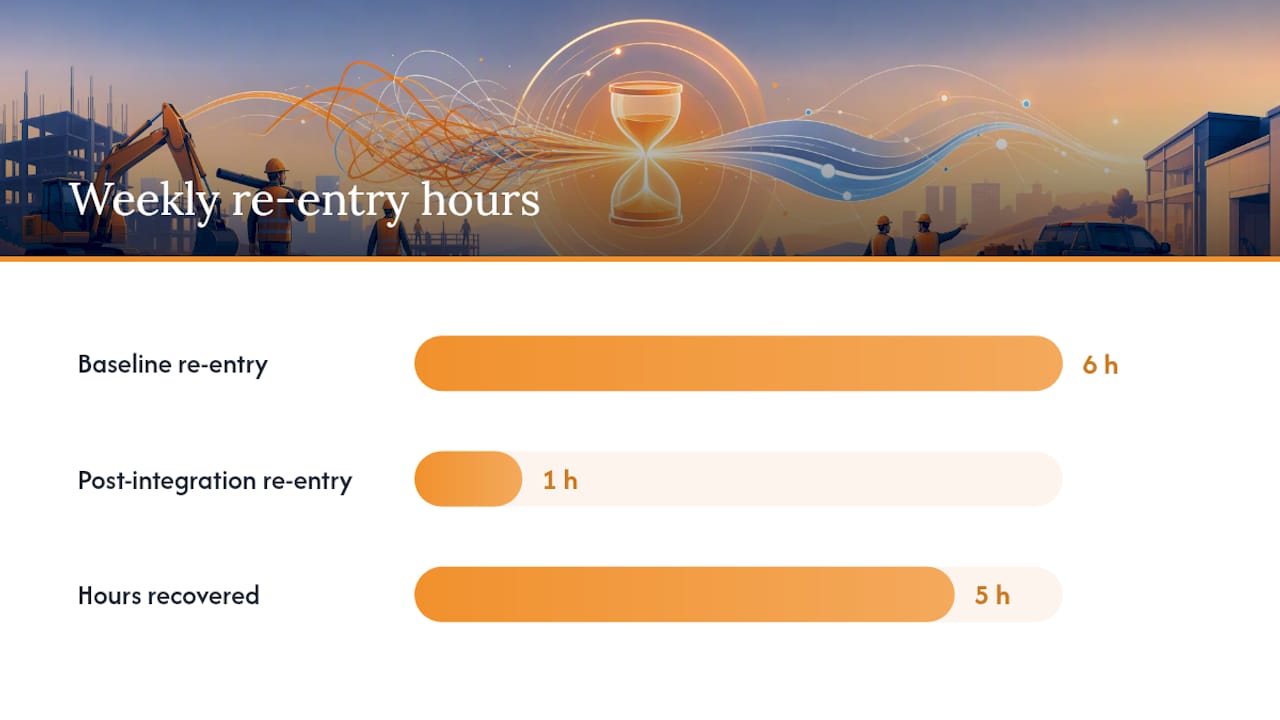
Before/after math is straightforward once you have a baseline. If your office spends 6 hours a week re-entering time card data across systems, and integration cuts that to 1 hour, you’ve recovered 5 hours weekly, which is real payroll cost at whatever your admin rate happens to be. Collect baseline numbers during your audit week, before the pilot starts, so the comparison isn’t guesswork later.
Broader research on digital integration in construction project management backs the operational case: teams using integrated digital workflows see measurably better schedule predictability and faster project completion, not just fewer typos.
Why Governance Beats the Tool Every Time
The software matters less than most subcontractors think. I’ve seen well-designed systems fail because nobody trained the second shift, and I’ve seen a basic setup work because one PM refused to let anyone keep a shadow spreadsheet.
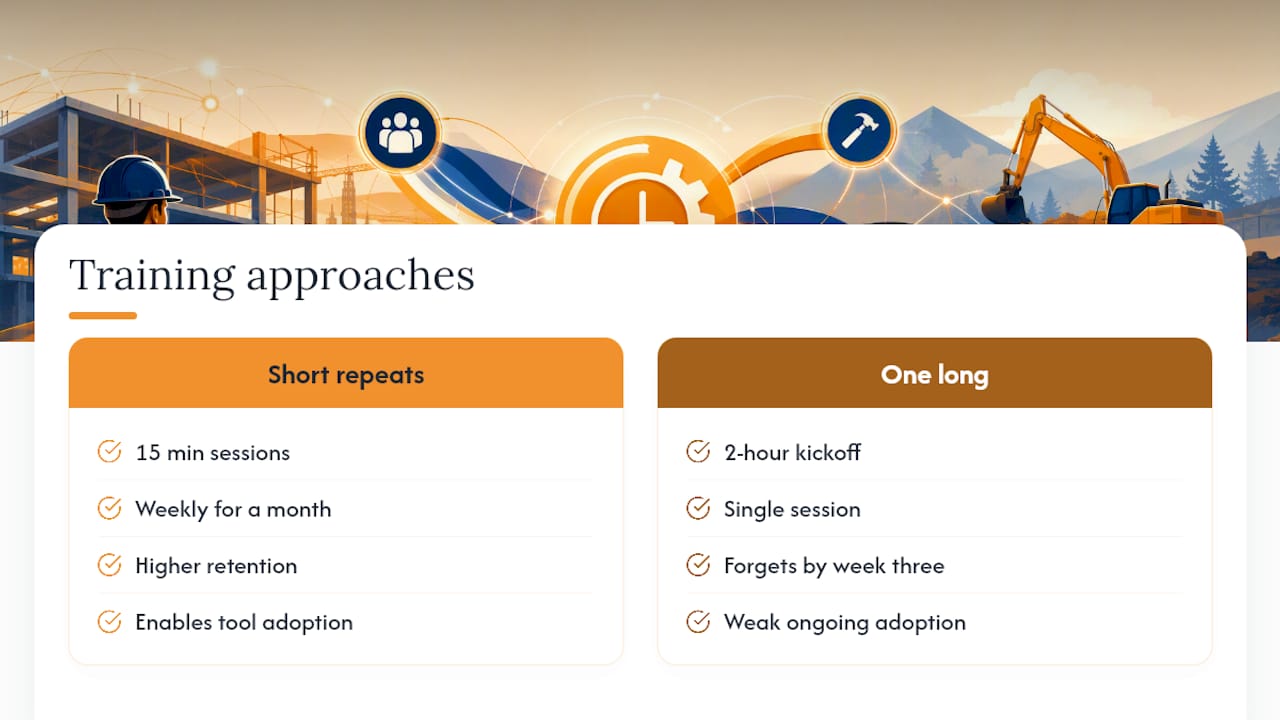
The pattern that actually moves the needle: short, repeated training sessions beat one long onboarding session every time. Fifteen minutes every Friday for a month sticks better than a two-hour kickoff nobody remembers by week three. On one pilot rollout, a crew that logged hours through a synced mobile app instead of paper time cards cut Friday payroll processing from most of a morning down to about 20 minutes, simply because nobody was re-typing anything.
Technology creates the opportunity. Governance and training are what make people actually use it. Skip either one and you’re back to spreadsheets within a quarter, no matter how good the software is.
— Jen Reese
Try an Integrated Suite Built for This Exact Problem
There are integrated software suites for subcontractors that bundle time tracking, change order management, estimating, and digital takeoff under one login, with real-time sync between field and office so a number entered once shows up correctly everywhere it needs to.

If change orders are your biggest re-entry headache right now, CO Hub handles that piece directly and syncs with the rest of the suite. If takeoff-to-estimate accuracy is where you’re losing time and margin, start with the Takeoff module and see how a quantity pulled once flows straight into your bid. Either way, a pilot project is the fastest way to find out whether single-entry workflows fix your specific bottleneck. Start with one project, measure the two weeks that follow, and decide from there.
Sources
- The role of digital technologies in enhancing construction project management | Scientific Reports
- Interdisciplinary digital design (excerpt) — benefits of single shared models and cloud-based platforms
- Case analyses on platform roles in reducing duplication and improving traceability (MDPI)
- ITcon report on CDEs and productivity (2024)
FAQ
What Does “Eliminate Double Entry” Mean for Subcontractors?
It means capturing project or labor data once, in one system, and letting synced modules like time tracking, estimating, change orders, and takeoff share that data automatically instead of retyping it in each tool.
How Long Should a Single-Entry Pilot Run?
Thirty to 60 days is enough to see real before/after numbers without dragging the process out; if it’s not working by day 60, the setup needs fixing, not more time.
What’s the Fastest Workflow to Integrate First?
Time tracking to payroll is usually the quickest win because the data is structured and the pain of re-entry is obvious to everyone on the team.
Can Won2Build Hub Replace Separate Estimating and Time Tracking Tools?
Yes. Won2Build Hub combines Time Budge, CO Hub, Bid Track, and Takeoff under one login with field-to-office sync, so data entered in one module updates the others automatically.
What Happens if Field Crews Keep Using Spreadsheets After Rollout?
That’s usually a sign of a trust gap, not a training gap; find out why the crew doesn’t trust the new system before enforcing stricter compliance rules.
Recommended
One login for estimating, bid tracking, change orders, and labor.
The Hub is free. Pay only for the apps you turn on.
Create your free Hub account- Managers: Make Mobile Field Workflows Resilient for 72 Hour OutagesPlaybook for field managers: offline first mobile workflows, resilient sync and conflict handling, compliance first AI guardrails, and practical pilot steps.
- Daily Signed Records: Force Account Tracking for Managers & InspectorsField checklist for project managers and inspectors to keep force account tracking audit-ready: use daily signed records for labor, equipment, and...
- Stop Timecard to Report Drift: Labor Cost Codes for SubcontractorsFix the timecard to report chain with labor cost codes that tie crews to budgets. Includes a 6 code starter and a burdened rate example.