
Stop Cost Drift Daily: Real Time Labor Reports for Subcontractors
Practical subcontractor playbook for real time labor reports: daily capture, enforced cost codes, and committed costs to catch overruns early and protect...

Real-time labor reports pull crew hours, per-project labor costs, and productivity straight from the field into the office within hours, not weeks. For subcontractors, that speed is the entire point: labor typically runs 20 to 35 percent of total project cost, and catching an overrun on day three beats catching it on day twenty. Tools like Won2Build Hub’s Time Budge exist to make that daily visibility routine instead of a scramble.
TL;DR:
- Real-time labor reports should track fully burdened labor costs daily to accurately assess project profitability and prevent margin erosion.
- Consistent cost coding, daily data capture, and dedicated ownership are essential for reports to remain current and reliable over the project lifecycle.
- Integrating field data with payroll, job costing, and estimating systems reduces manual entry errors and provides immediate insights for pay and billing accuracy.
- Setting clear escalation rules and focusing on cumulative trends helps catch drift early, preventing minor issues from becoming large overruns.
- Starting with a pilot project to standardize processes and train teams ensures successful adoption and improves data quality over time.
Table of Contents
- What Does a Real-Time Labor Report Actually Show?
- Which Metrics and Red Flags Should You Watch?
- How Do You Implement Real-Time Labor Reporting?
- How Do Real-Time Reports Support Certified Payroll Audits?
- What Integrations Turn Labor Data Into Action?
- Why Does “Real-Time” So Often Revert to “Two Weeks Late”?
- How Should Labor Reports Tie Into Contracts and Payment?
- Can Real-Time Labor Data Support Change Order Negotiations?
- How Do You Train Teams to Act on Real-Time Data?
- What Privacy and Compliance Rules Apply to Field Data?
- What Adopting Daily Reports Actually Changes
- Getting Time Budge Running on Your Next Project
- Sources
- FAQ
What Does a Real-Time Labor Report Actually Show?
A real-time labor report is only useful if it captures the right fields at the right granularity. Most subcontractors need four layers of information, and skipping any one of them creates blind spots that surface only after the budget is already blown.
The base layer is raw field data: timestamps, worker name, trade classification, cost code, and a split between straight time and overtime hours. Where the work is unit-based (linear feet of duct, square feet of drywall, cubic yards of concrete), you also need a work-unit count tied to that cost code.
On top of that sits the money. A usable report shows wages, employer burden (payroll taxes, insurance, benefits), and the fully burdened labor rate, then rolls those into per-project labor dollars. That burdened rate matters more than raw wages because it’s the number that actually erodes margin.
- Core fields: timestamp, worker, classification, cost code, straight/OT hours, work units
- Cost layer: wages, burden, fully burdened rate, cumulative labor dollars by project
- Productivity layer: hours per unit, percent of budget consumed vs. percent complete
- Committed costs: open POs and signed subcontract values shown next to live actuals
Fully burdened labor cost, tracked daily, is the single number that tells you whether a job is actually making money or just staying busy. Labor’s share of total cost makes it the fastest lever to erode, or protect, your margin, according to Gyde Analytics.
Committed costs deserve their own mention. Recording a purchase order or signed subcontract as committed budget the moment it’s issued means your budget view reflects real obligations before a single invoice lands, which is exactly the gap that turns “we’re on budget” into “we were on budget, six weeks ago.”
Which Metrics and Red Flags Should You Watch?
Five metrics do most of the work, and each one has a natural owner. Splitting ownership matters because a foreman and an estimator will notice different things in the same data.
- Hours vs. estimate, by cost code. If framing labor is running 15% over budgeted hours at 60% complete, that’s a trend, not noise. The foreman should catch this daily.
- Fully burdened labor cost vs. estimate. Hours can look fine while burden creep (overtime, shift differentials) quietly inflates the dollar figure. The PM owns this weekly.
- Overtime share of total hours. Overtime above 10 to 15% of total hours on a steady-state crew usually signals understaffing or a schedule problem, not a one-off push.
- Productivity: hours per unit. Compare this week’s hours-per-unit against the estimate’s assumed rate. A widening gap over two consecutive weeks is worth an estimator’s review.
- Percent budget consumed vs. percent complete. If you’ve spent 70% of labor budget at 50% complete, escalate immediately.
Short-term dips (one bad weather day, one crew short a member) are normal. What you’re watching for is cumulative drift across two or three reporting periods in the same direction. A single rough day means nothing; three weeks of the same trend means something.
Pro Tip: Set a hard escalation rule, like “any cost code over 10% above budgeted hours at less than 80% complete gets a same-week PM review.” Vague thresholds get ignored; specific ones get acted on.
How Do You Implement Real-Time Labor Reporting?
Getting to genuinely real-time reporting is a rollout, not a software toggle. Subcontractors with lean back offices tend to succeed by sequencing the work instead of trying to fix everything on the first project.
- Standardize cost codes before you capture anything. If three foremen are coding the same task three different ways, no report downstream will mean anything. Lock the taxonomy first.
- Capture time at the point of work, daily. Mobile clock-in, photo timesheet extraction, or a simple daily check-in all work, as long as the data leaves the field the same day it’s earned. Digital time capture cuts payroll processing time by up to 25% compared to paper.
- Enforce cost-code selection at entry, not after the fact. A dropdown that forces a choice beats a blank field someone fills in from memory two weeks later.
- Log committed costs the moment a PO or subcontract is signed, so budget-vs-actual reflects obligations, not just paid invoices.
- Build a simple dashboard with traffic-light status and set thresholds for automatic flags, reviewed mid-week rather than only at month-end.
- Assign daily and weekly owners. Foremen check daily entries; PMs reconcile weekly; someone is accountable for both, by name.
- Pilot on one project first. Prove the workflow on a single job before rolling it across your whole portfolio.
- Standardize taxonomy before rollout
- Capture daily, not weekly
- Enforce codes at entry
- Track committed costs alongside actuals
- Assign named owners for daily and weekly checks
Field workflows like mobile timesheet capture or offline time tracking solve the “how” once the sequence above is set.
How Do Real-Time Reports Support Certified Payroll Audits?
Daily labor capture does double duty: it feeds job costing and it builds the audit trail certified payroll under Davis-Bacon actually requires. Every certified payroll filing needs hours, classification, and gross earnings tied to a specific worker on a specific day, and reconstructing that from memory two weeks after the fact is where compliance problems start.
Photographing daily timesheets with AI extraction creates a timestamped source image alongside the extracted data, so you have both the raw evidence and the usable numbers if a wage-and-hour dispute or DOL audit surfaces months later.
- Store the source photo, not just the transcribed data
- Export extracted fields directly to your certified payroll format
- Verify entries the same day, while a foreman can still confirm a discrepancy from memory
Pro Tip: Same-day verification is cheap. Verification six weeks later, when the foreman has moved to another job and can’t remember a Tuesday, is expensive and sometimes impossible.
What Integrations Turn Labor Data Into Action?
A labor report that lives in isolation from payroll and job cost is a report nobody trusts. The integrations that matter most connect field capture to payroll, your accounting or job-cost ledger, estimating, and PO systems, so a number entered once in the field never gets re-typed by hand in the office.
- Payroll integration turns verified field hours directly into pay runs, cutting the re-keying that causes most manual timesheet errors.
- Job-cost ledger integration shows committed PO and subcontract values next to live actuals, so budget-vs-actual updates before invoices even arrive.
- Estimating integration lets you compare today’s productivity against the rate the bid was built on, not a generic industry average.
The practical friction usually shows up in cost-code mapping between systems and in field crews working offline part of the day. Build for both from the start rather than discovering the gap during your first real audit.
Why Does “Real-Time” So Often Revert to “Two Weeks Late”?
Most reporting programs don’t fail because of bad software. They fail because of four predictable habits that creep back in within a month of launch.
- Inconsistent cost coding. Fix it with a locked taxonomy and dropdown-only entry, never free text.
- Batch or late entry. If foremen fill out timesheets on Friday for the whole week, you have a weekly report wearing a real-time label. Require same-day capture and keep it fast.
- Manual re-keying. Every hand transcription step is a chance for error and delay. Photo extraction or direct mobile capture removes it.
- Low adoption. Pilot on one crew, train the foreman first, and measure how fresh the data actually is during the first month, not just whether people are technically using the app.
Pro Tip: Track “data age” as its own metric during rollout, meaning the gap between when work happened and when it hit the report. If that gap creeps past 24 hours, you’ve quietly reverted to batch reporting no matter what the software is called.
How Should Labor Reports Tie Into Contracts and Payment?
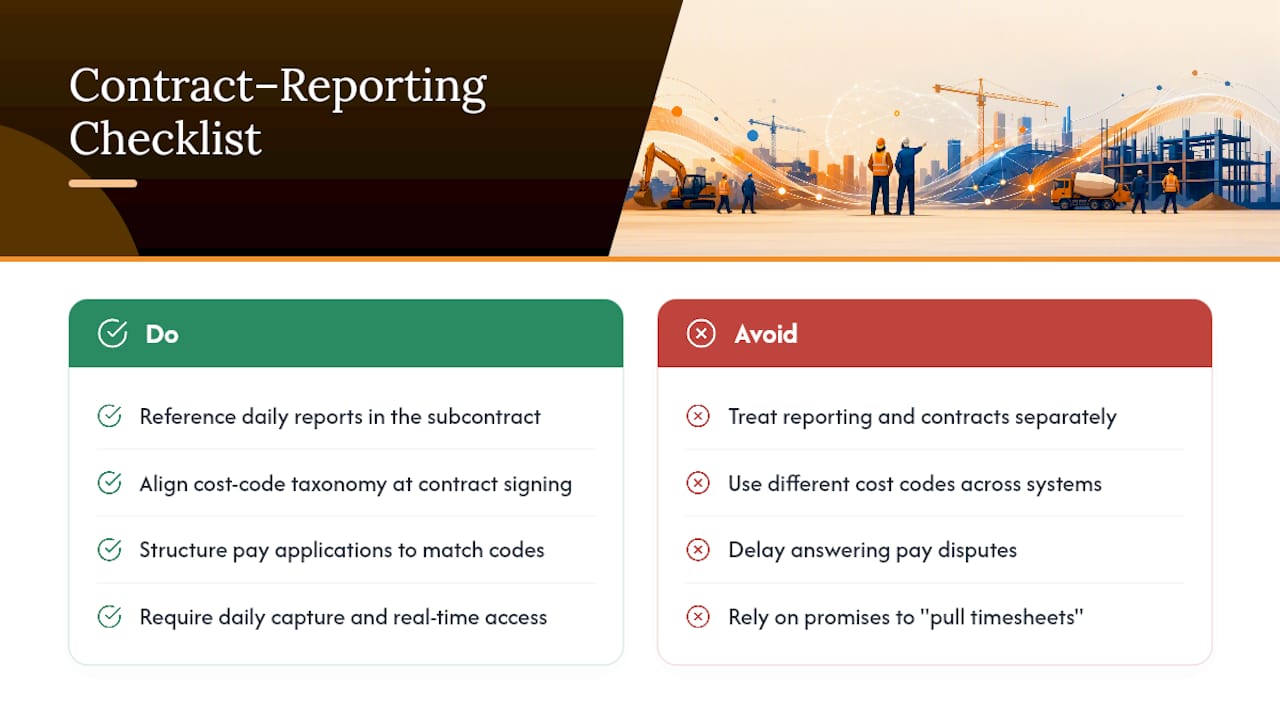
Labor reporting and the contract that governs payment work best when they’re built to reference each other, not treated as separate systems that happen to describe the same job. Most subcontractor agreements already require some form of daily reporting or timekeeping as a condition of payment, particularly on prevailing wage or bonded work, so the report you’re already generating should be the document that satisfies that clause.
Structure payment applications around the same cost codes your labor reports use. When a pay application references “framing, labor” and your job cost ledger uses a different code for the same work, reconciling the two eats hours every billing cycle. Aligning the taxonomy once at contract signing removes that friction for the life of the project.
Retainage and payment timing disputes also get shorter when labor data is current. A general contractor questioning a pay application line item gets a same-day answer, backed by daily entries and timestamped photos, instead of a promise to “pull the timesheets and get back to you.” That speed matters more than it sounds, because payment disputes tend to escalate the longer they sit unresolved.
Build labor reporting requirements directly into subcontract language where you can, specifying daily capture, cost-code alignment with your billing schedule, and access to real-time data for both parties. It turns a reporting habit into a contractual expectation, which protects you if a dispute ever reaches arbitration or litigation.
Can Real-Time Labor Data Support Change Order Negotiations?
Change orders and claims live or die on documentation, and labor reports with daily timestamps make a far stronger case than a reconstructed estimate built weeks after the fact.
Consider a scenario common on commercial retrofit work: a general contractor issues a scope change mid-project, but the paperwork lags two weeks behind the actual field impact. A subcontractor running daily labor capture already has hours, cost codes, and productivity data showing exactly when the crew’s hours-per-unit rate shifted, tied to the date the scope actually changed on site. That timeline, backed by timestamped entries rather than memory, is the difference between a change order that gets approved in a week and one that drags through three rounds of “can you document that.”
The same logic applies to delay claims. If a GC’s late material delivery stalled a crew for four days, a real-time labor report shows the exact hours logged against that cost code during the delay window, alongside the productivity drop once work resumed. That’s a far stronger negotiating position than an after-the-fact narrative.
The pattern holds across both cases: the value isn’t the software, it’s having contemporaneous, cost-coded, timestamped data ready before the negotiation starts rather than assembled defensively after the GC pushes back. Subcontractors who treat daily labor capture as claims insurance, not just job costing, tend to win change order negotiations faster and for closer to their actual cost impact.
How Do You Train Teams to Act on Real-Time Data?
A dashboard nobody understands is just a prettier version of the paper timesheet stack it replaced. Training has to happen at two levels, because foremen and office staff need to interpret the same data differently.
Field supervisors need to learn what to log and when, not how to analyze trends. Keep their training practical: which cost code applies to which task, why same-day entry matters, and what “verified” looks like on a photo timesheet. A foreman who understands that a missed cost code creates a blind spot for the PM two weeks later will take coding seriously in a way that a generic “please be accurate” memo never achieves.
Office staff and PMs need the opposite training: how to read the dashboard for drift, not just snapshots. Teach them to compare this week’s hours-per-unit against the estimate’s assumed rate, not just against last week, since week-over-week comparisons alone can mask a slow, cumulative overrun. Walk new PMs through one real example of a caught overrun and one missed one, so they understand what the escalation threshold actually looks like in practice.
The rollout period is the best training ground you’ll get. Run a 30 to 60 day pilot on one project, have the PM and foreman review the same report together weekly, and use real discrepancies from that job as the training material. Nobody retains a policy document. Everyone retains the week a coding error hid a $4,000 overrun for ten days.
What Privacy and Compliance Rules Apply to Field Data?
Capturing daily labor data, especially photos and location-tagged timestamps, means handling personal information, and subcontractors need a basic compliance posture even without a dedicated legal team.
Photo timesheets and mobile check-ins often include a worker’s name, image, and sometimes GPS location at clock-in. That data needs a defined retention policy: how long you keep it, who can access it, and why you’re storing it (certified payroll compliance is a legitimate, defensible reason; indefinite retention with no purpose is not).
State laws vary on biometric data specifically, so if your capture method uses fingerprint or facial recognition for clock-in verification rather than a simple photo, check your state’s biometric privacy requirements before rollout rather than after a worker complaint. Union agreements and prevailing wage contracts sometimes add their own notification requirements about how labor data gets recorded and reported, so read the governing agreement before assuming your standard workflow complies.
Practically, three habits cover most of the exposure: tell workers in writing what data you’re capturing and why, restrict dashboard access to people who actually need it for job costing or payroll, and set a retention schedule instead of keeping everything forever by default. None of this is complicated, but skipping it is the kind of gap that only becomes visible during a dispute or an audit, which is the worst possible time to discover it.
What Adopting Daily Reports Actually Changes
The subcontractors who get real value from real-time labor reports aren’t the ones with the fanciest dashboard. They’re the ones who treat daily capture like a job-site discipline, the same way you’d treat a safety walkthrough: nonnegotiable, boring, and done every single day regardless of who’s watching.
Move that same crew to daily capture, and the drift shows up by day four, while there’s still schedule left to fix it.
Over a 30 to 60 day pilot, expect the biggest early win to be faster detection, not perfect numbers. Cost-code discipline takes a cycle or two to stick. [Author bio: Jen Reese, industry experience placeholder.]
— Jen Reese
Getting Time Budge Running on Your Next Project
Won2Build Hub is the alternative to bolting together a spreadsheet, a paper timesheet stack, and a payroll export nobody trusts. Time Budge, the labor module inside the Hub, covers the operational checklist directly: mobile field capture, enforced cost-code dropdowns, committed-cost visibility next to live actuals, and exports built for certified payroll formats. Because it shares a single login with CO Hub, Bid Track, and Takeoff, labor data doesn’t get re-keyed into a separate change order or estimating tool, it just flows.

Pricing is flat per company at $199 per month for Time Budge, plus a $2 per month active field worker fee, so a growing crew doesn’t blow up your software cost the way per-seat pricing does. Start with a single pilot project, confirm your cost-code taxonomy in the app, and check the full Time Budge product page or the pricing page for current plan details before you scale it across your portfolio.
Sources
For deeper dives on the concepts covered here: Real-Time Job Costing for Construction explains committed-cost tracking in detail, Gyde Analytics breaks down profitability monitoring, and CCR-Mag’s analysis covers the industry-wide cost of paper timesheets. For field workflow specifics, see manual timesheet error prevention and, for a logistics-adjacent example of site-level data capture, site access measurement practices.
- How to Track Project Profitability in Real Time for Contractors
- Real-Time Job Costing for Construction | CentSight
- Why Construction Labor Cost Tracking Fails When Projects Scale
- Ccr-mag
FAQ
How Fast Do Real-Time Labor Reports Actually Update?
Most systems update within a day of field entry, with some mobile capture tools syncing within hours once a worker clocks in or a timesheet photo is processed. The speed depends on whether crews capture time at the point of work or batch it at the end of the week, which is the habit that determines whether “real-time” is accurate or aspirational.
What Fields Does Certified Payroll Require From a Labor Report?
Certified payroll under Davis-Bacon needs worker name, classification, straight and overtime hours, gross earnings, and fringe benefit detail, tied to a specific date and project. Timestamped photo capture with AI extraction gives you both the source evidence and the exportable data those filings require.
Should I Use Photo Timesheets or a Mobile App for Capture?
Photo timesheet extraction lets crews keep familiar paper habits while still feeding a digital report same-day, which reduces field resistance during rollout. A mobile app like Time Budge captures data more directly at clock-in and skips the extraction step entirely, so the right choice depends on how ready your crews are to change habits.
Where Should a Subcontractor Start Implementing This?
Start by standardizing cost codes across every active project, then pilot daily capture on a single job before rolling it out company-wide. Tools like Time Budge are built to enforce that code discipline at entry, which is the step most rollouts skip and later regret.
How Much Does Real-Time Labor Tracking Software Cost?
Time Budge runs $199 per month per company, plus a $2 per month fee per active field worker, with unlimited team members otherwise included. Current pricing for the full Won2Build Hub bundle, including Bid Track and CO Hub, is listed on the pricing page.
Recommended
One login for estimating, bid tracking, change orders, and labor.
The Hub is free. Pay only for the apps you turn on.
Create your free Hub account- Managers: Make Mobile Field Workflows Resilient for 72 Hour OutagesPlaybook for field managers: offline first mobile workflows, resilient sync and conflict handling, compliance first AI guardrails, and practical pilot steps.
- Daily Signed Records: Force Account Tracking for Managers & InspectorsField checklist for project managers and inspectors to keep force account tracking audit-ready: use daily signed records for labor, equipment, and...
- Stop Timecard to Report Drift: Labor Cost Codes for SubcontractorsFix the timecard to report chain with labor cost codes that tie crews to budgets. Includes a 6 code starter and a burdened rate example.